For detail if you are adding a prober, refer to the information for your prober in Model 4200A-SCS
Prober and External Instrument Control:
• “Suss MicroTec PA-200 Prober”
• “Micromanipulator 8860 Prober”
• “Using a Manual or Fake Prober”
• “Cascade Summit-12000 Prober”
• “Signatone CM500 Prober”
• “Using an MPI Probe Station”
Step 1. Exit Clarius and open KCon
To exit Clarius and open KCon:
1. Exit Clarius.
2. On the Windows desktop, select the KCon icon.
Step 2. Add the equipment
To add equipment to the system configuration:
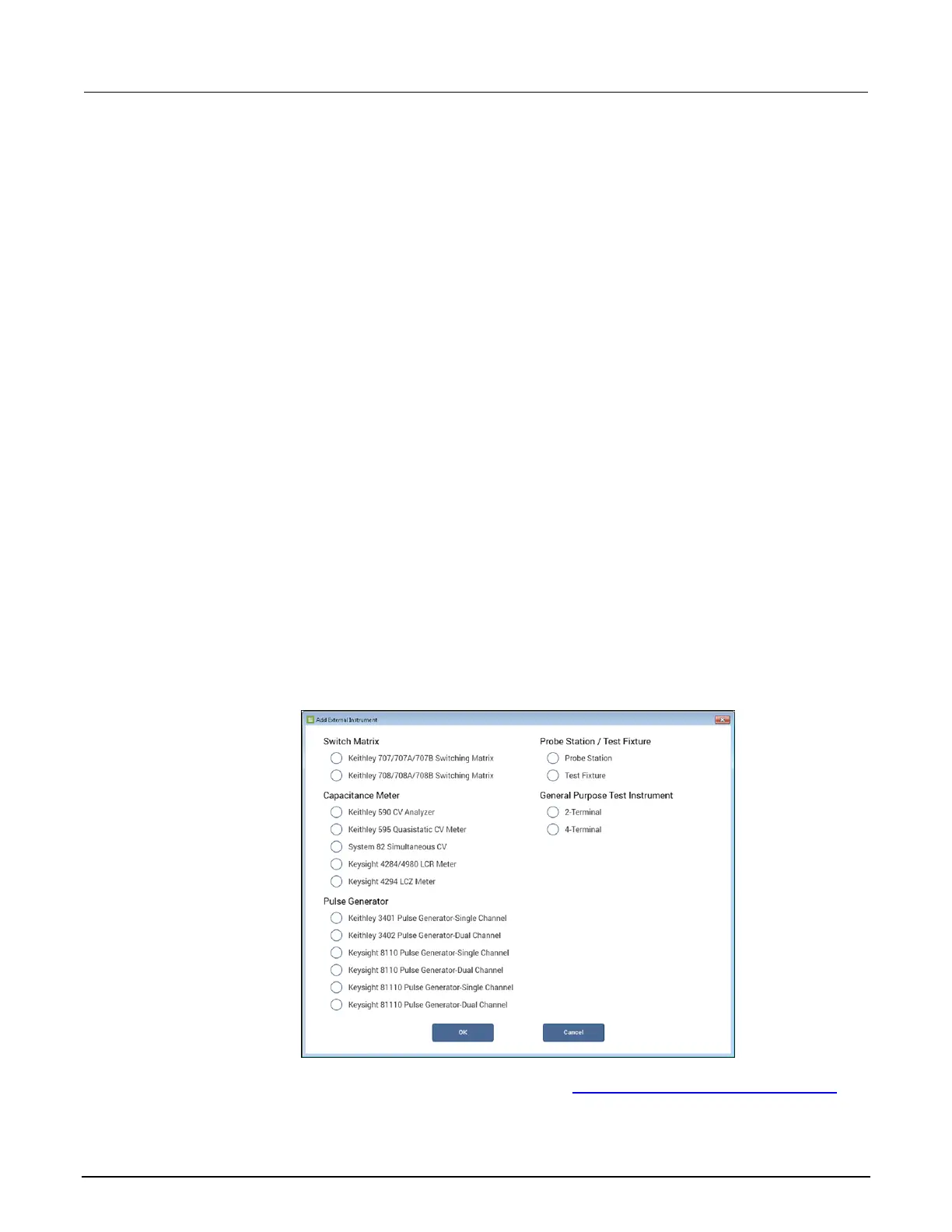
1. At the bottom left of KCon, select Add External Instrument.
2. Select the specific instrument.
3. Select OK to add the instrument to the System Configuration list.
Figure 17: Add external instrument
For descriptions of the options for your equipment, refer to Instrument properties and connections (on
page 3-14).


 To Next Page
 Loading...