Operating Instructions Model 300E Carbon Monoxide Analyzer
Instruction Manual
110 P/N 04288 REV: A
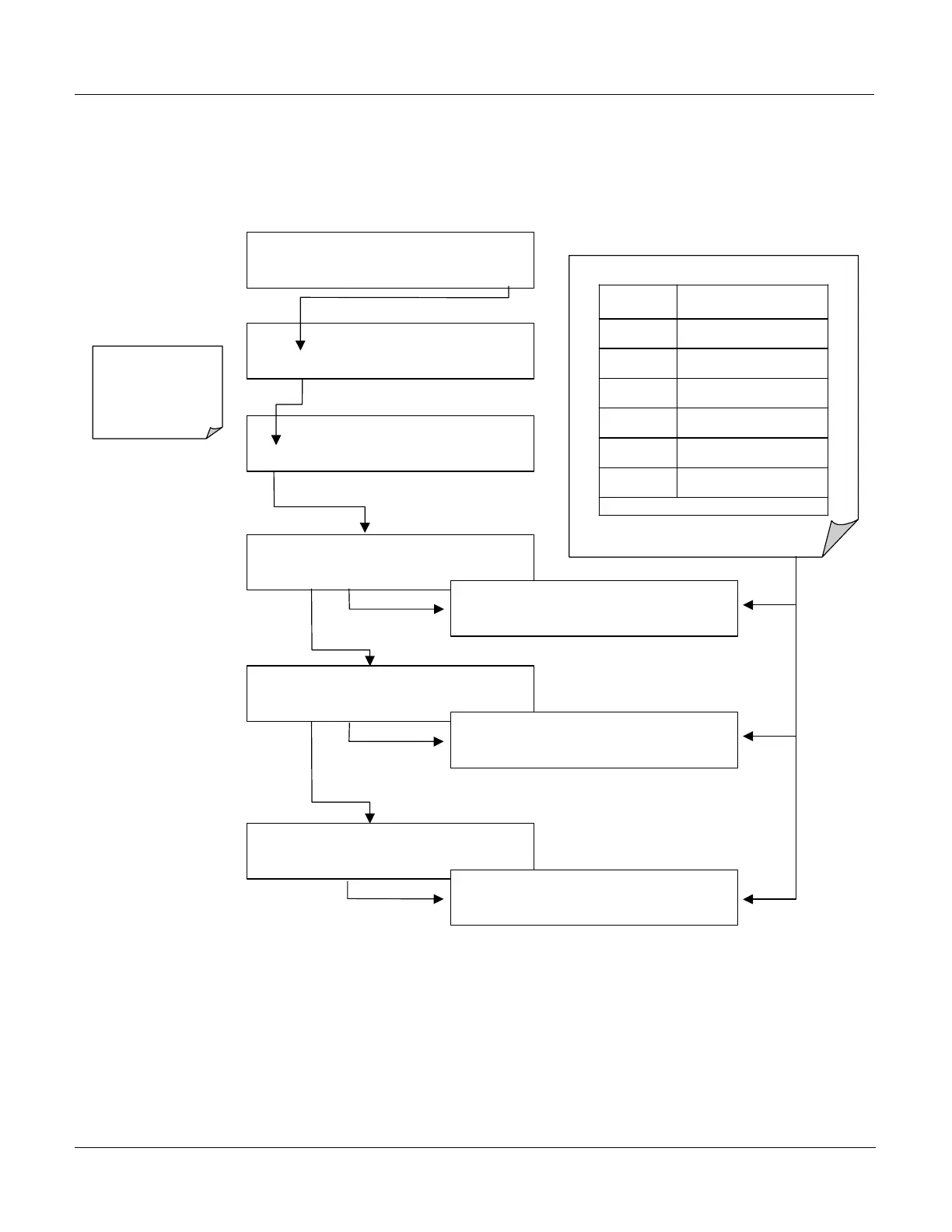
6.10.5. Viewing Existing Data Channels
The data in the default Data Channels can be viewed through the following
keystroke sequence:
SAMPLE RANGE = 50.0 MGM CO =
< TST TST > CAL
SETUP
SETUP C.3
CONC
: DATA AVAILABLE
NEXT
VIEW
EXIT
SETUP C.3
PNUMTC
: DATA AVAILABLE
PREV
NEXT
VIEW
EXIT
SETUP C.3
CALDAT
: DATA AVAILABLE
PREV
VIEW
EXIT
SETUP C.3
00:00:00 SLOPE1=0.000
PV10 PREV
<PRM
PRM>
EXIT
SETUP C.3
00:00:00 CONC1=0.0 PPM
PV10 PREV
NEXT NX10 EXIT
SETUP C.3
00:00:00 SMPFLW=000.0 cc / m
<PRM PRM>
EXIT
SETUP C.3 DATA ACQUISITION
VIEW
EDIT
EXIT
SETUP C.3
CFG
DAS
RNGE PASS CLK MORE EXIT
VIEW KEYPAD FUNCTIONS
KEY FUNCTION
<PRM Moves to the next Data
Parameter
PRM>
Moves to the previous Data
Parameter
NX10
Moves to view pointer forward
10 data points/channels
NEXT Moves to the next data
point/channel
PREV
Moves to the previous data
point/channel
PV10
Moves to the backward 10
data points/channels
NOTE: Keys only appear as needed
EXIT
will go back to
previous menu
returning to the main
SAMPLE
Display.






 To Next Page