Operating Instructions Model 300E Carbon Monoxide Analyzer
Instruction Manual
112 P/N 04288 REV: A
When viewing the Data Channels from the Data Channel Edit Menu, the top line of
the display gives the user a glimpse of the configuration of that Channel as follows:
CHANNEL NO.) NAME: TRIGGER, NUMBER OF PARAMETERS CHOSEN, NUMBER OF
EVENTS
EXAMPLE:
The display line:
0) CONC : ATIMER, 3, 900
means:
Channel No.: 0
NAME: CONC
TRIGGER EVENT: ATIMER
PARAMETERS: Three parameters are included in this Channel
EVENT: This Channel is set up to record 900 events
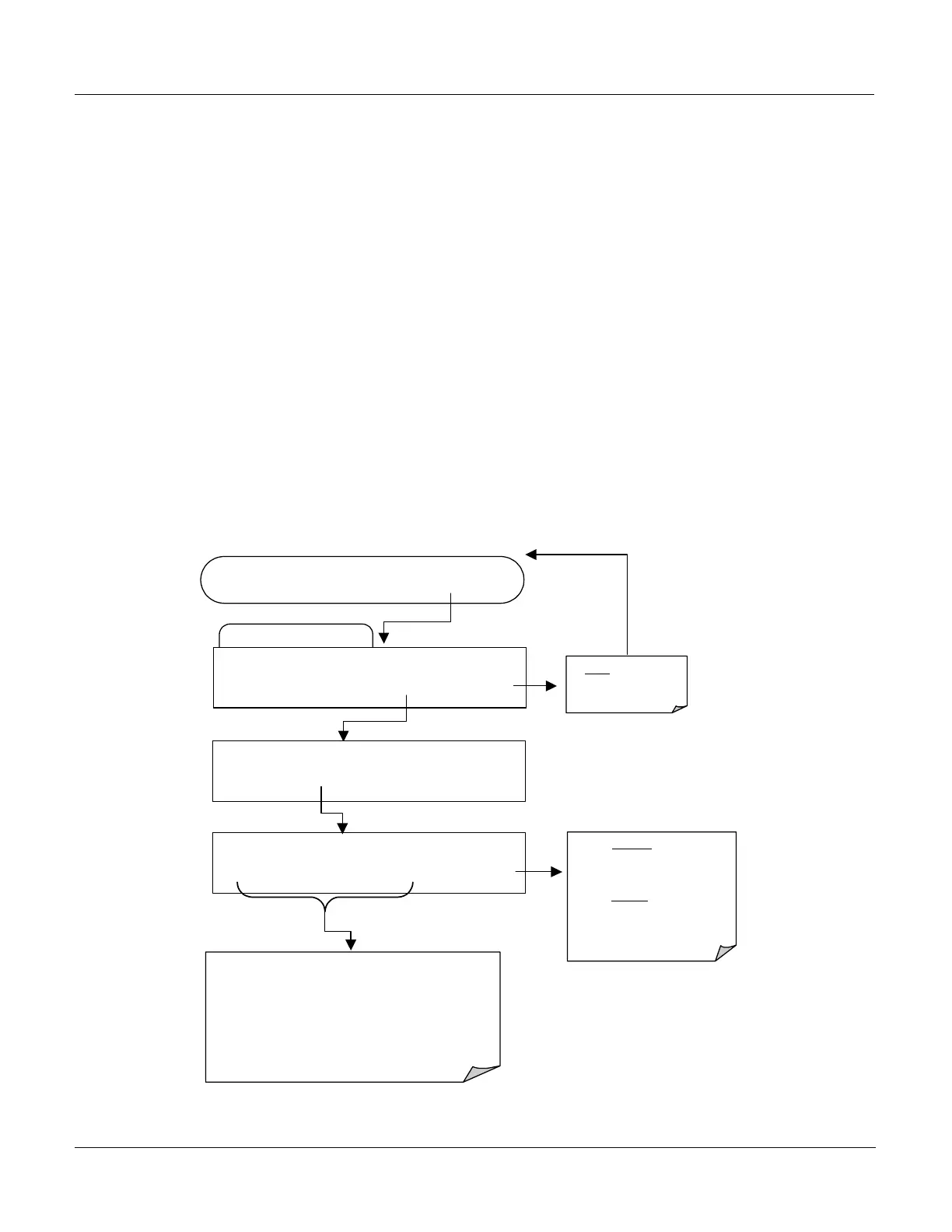
6.11.2. Editing the Data Channel Name
To edit the name of a specific Data Channel, press:
Edit Data Channel Menu
SETUP C.3 0) CONC: ATIMER, 2, 900
PREV NEXT INS DEL EDIT PRNT EXIT
FROM THE DATA CHANNEL PASSWORD MENU
Exits to the Main
Data Acquisition
Menu
SETUP C.3 NAME:CONC
C O N C - - ENTR EXIT
ENTR accepts the new string
and returns to the previous
menu.
EXIT ignores
the new string
and returns to the previous
menu.
Press each
Key repeatedly to cycle through the entire
available character set:
A-Z
0-9
space ’ ~ ! Ó # $ % ^ & * ( ) - _ = +[ ] { } < >\ | ;
: , . / ?
SETUP C.3 NAME:CONC
<SET SET>
EDIT
PRINT EXIT






 To Next Page