D Series Syringe Pumps
Section 3 Basic Programming and Operation
3-21
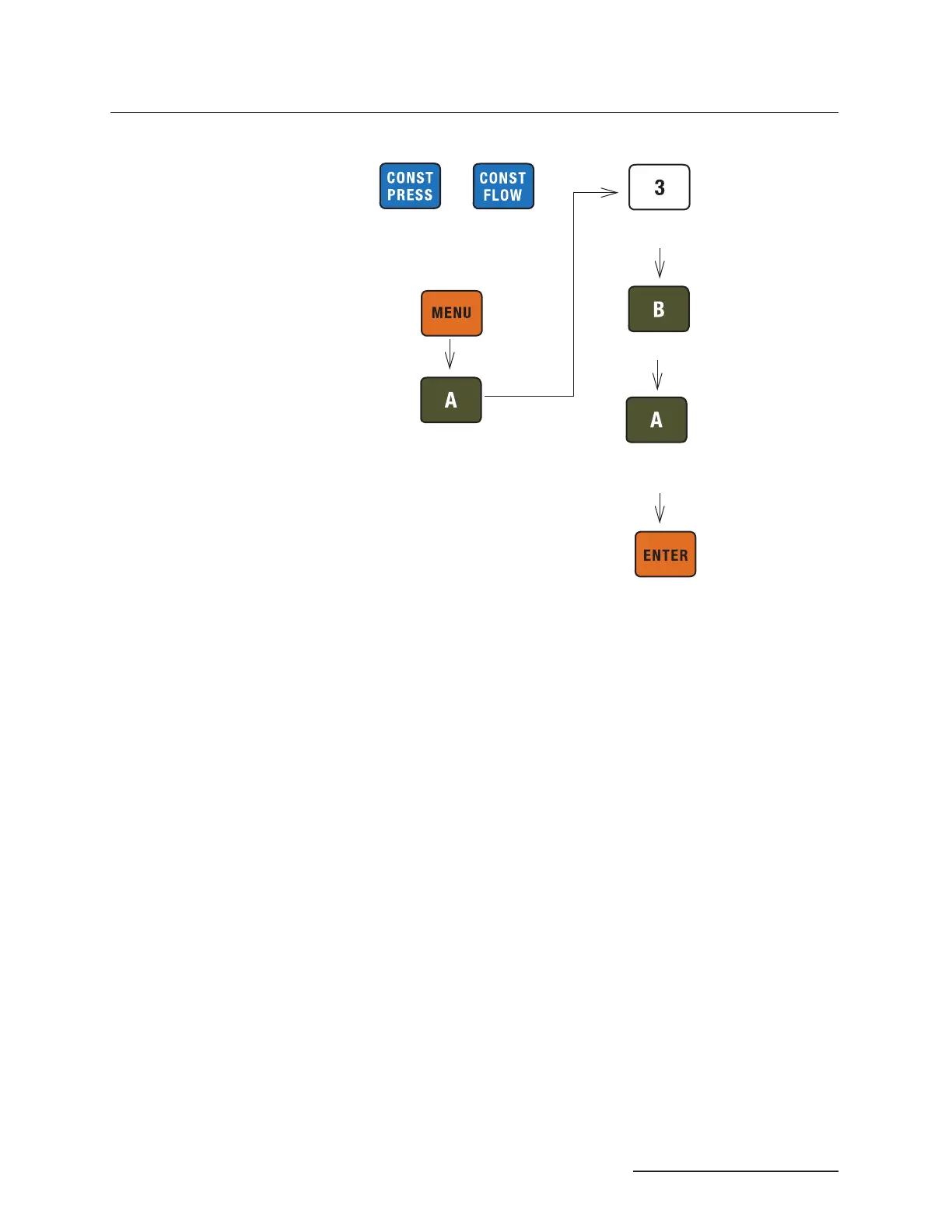
Figure 3-13 Button sequence for external control setup
3.13 Remote RUN/STOP The D series syringe pump RUN/ST OP function can be exter-
nally controlled by a switch contact closure or TTL input. The
input voltage is 5 volts and is internally pulled high (RUN). The
input is level sensitive (must remain high for RUN or low for
STOP) and must be high for normal operation of serial (RS-232)
control.
To enable the remote RUN/STOP feature, press MENU >MORE>
(A) > EXTERNAL >(3)>DIGITAL (A) ON. Then press RUN or force
the RUN/STOP pin low to enable the pump. Thereafter, the
RUN/STOP pin will control operation.
first press RUN or force the RUN/STOP pin low to enable the
pump. Thereafter, the RUN/ST OP pin will control operation.
Pressing STOP on the front panel will override the RUN/STOP
pin.
3.13.1 Wire Connections Two wires are required for external RUN/ST OP control. The
digital common or ground wire should be connected to one of the
four DIGITAL GROUND terminals of the ACCESSORY con-
nector on the controller rear panel. The control wire should be
connected to terminal 1, under DIGITAL INPUT. If an electri-
cally isolated relay is used, one relay terminal should be con-
nected to digital ground and the other to terminal 1, under
DIGITAL INPUT.
or
(
CP or CF and selected
pump are displayed)
(MORE)
(EXTERNAL)
(On/Off)
(
SET RANGE)
Enter Vmax value



 To Next Page