62 SUPPLEMENTS - СА62 Alarm Control Panel
SUPPLEMENT В
EXAMPLES FOR SECURITY APPLICATION WITH CA62
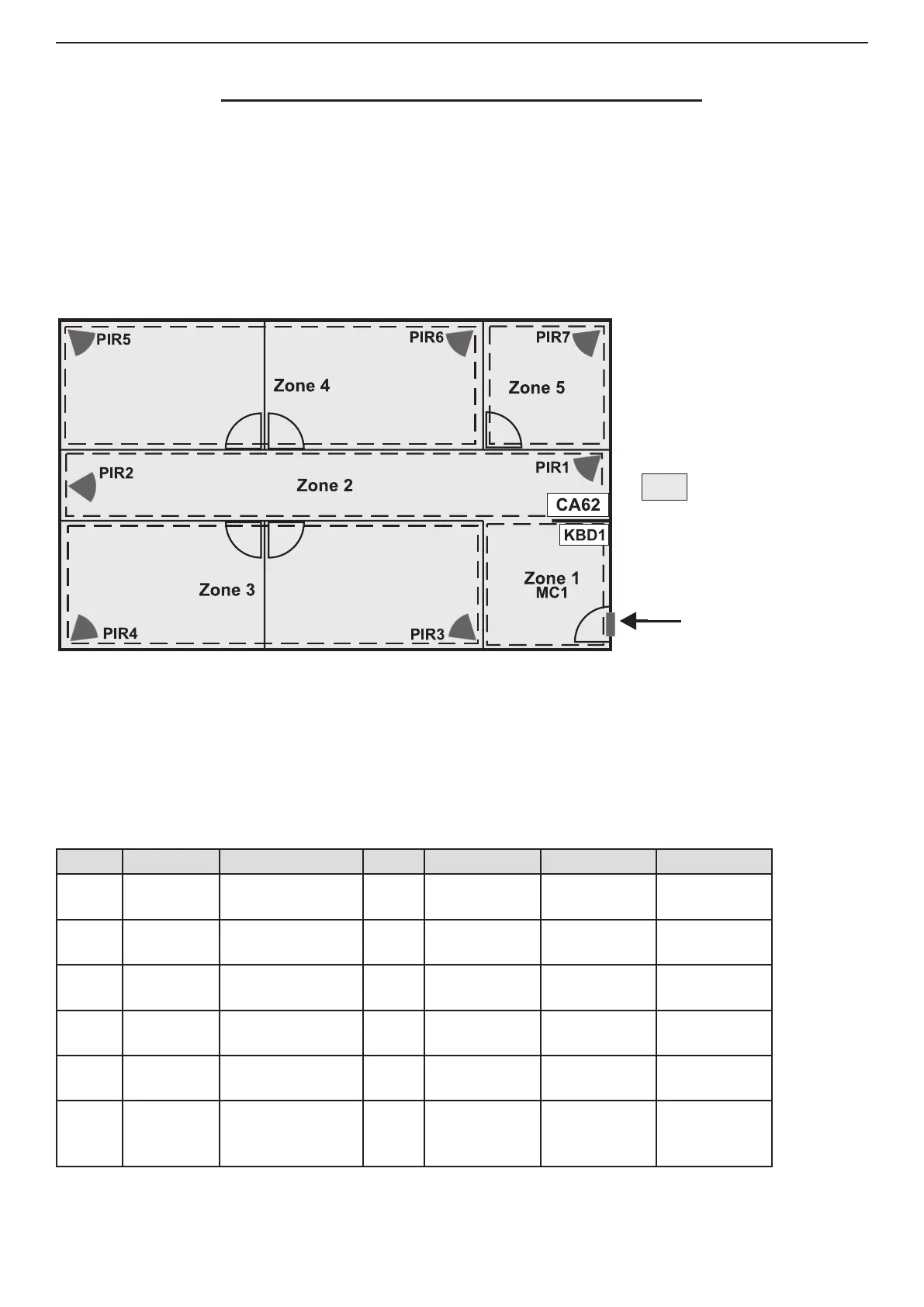
For illustration of the default factory congurations here are shown some examples for organizing the security
system.
The symbols used in the examples below have the following meaning:
MC - Magnetic contact;
PIR - Motion PIR detector;
KBD - Control keyboard;
СА62 - Control panel;
Zone n - Zone number.
DEFAULT CONFIGURATION 1
General information for DEFAULT CONFIGURATION 1:
• Zones - 6
• 1 partition - А
• 1 keyboard (suitable models LED61, LED62, LCD62, LCD62B, LCD63)
Short programming table for DEFAULT CONFIGURATION 1:
Zone Type Attributes Part Detectors Room Control
1 Entry/Exit
Bypass
Disarm Enable
A MC1
Central
Entrance
KBD1
2 Follow
Bypass, Stay
Disarm Enable
A PIR1, PIR2 Corridor KBD1
3 Instant
Bypass, Stay
Disarm Enable
А PIR3, PIR4
Ofce 1
Ofce 2
KBD1
4 Instant
Bypass, Stay
Disarm Enable
А PIR5, PIR6
Ofce 3
Ofce 4
KBD1
5 Panic
Bypass, Stay
Disarm Enable
А PIR7
Book-
keeping
KBD1
6 Tamper Disarm Enable А
TAMPER
from all of the
detectors
All rooms KBD1
Central
Entrance
Corridor
Ofce 1
Ofce 2
Ofce 3
Ofce 4
Book-
Keeping
Default codes:
• User 1 - 1111
• Manager - 0000
• Engineer - 7777
Partitions in the system:
- PART А
PART A
ENTRANCE PART A



 To Next Page