100
Sidekick
®
Plus Test Set
The Line Failure page shows the event counters and
updates continuously. The counters can be reset to zero
by pressing the F1 Reset Counters key.
Display Description
FEC Number of forward error corrections
CRC Number of cyclical redundancy check
errors
ES Number of error seconds
UAS Number of unavailable seconds
LOS Number of times there was a loss of signal
LOF Number of times there was a loss of frame
Press up (2) to advance to Band Status (VDSL) or Hlog.
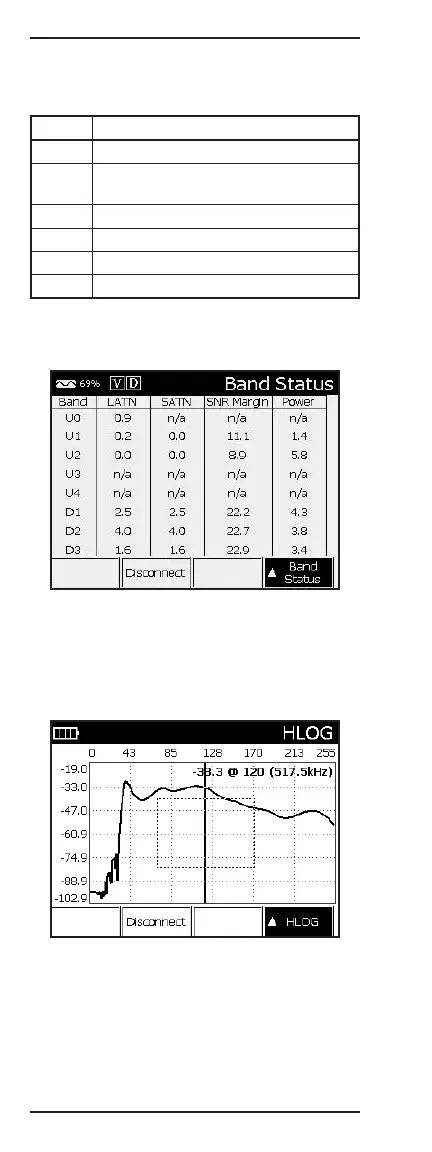
Band Status (VDSL only)
The Band Status screen displays the Line Attenuation
(LATN), Signal Attenuation (SATN), Signal-to-Noise
Margin (SNR Margin), and the Power (Power) of each
upstream and downstream band in the VDSL spectrum.
HLOG
The HLOG graph shows the attenuation per channel
(frequency) between the DSLAM and the modem. The
information is obtained when the modem and the
DSLAM train up and can show issues with attenuation
or bridge taps. The horizontal axis is the bin index, and
the vertical axis is the attenuation value in dB.
Press up (2) to advance to the Bits graph.



 To Next Page