Controls and Operating
3-14
Menu Screen and Buttons
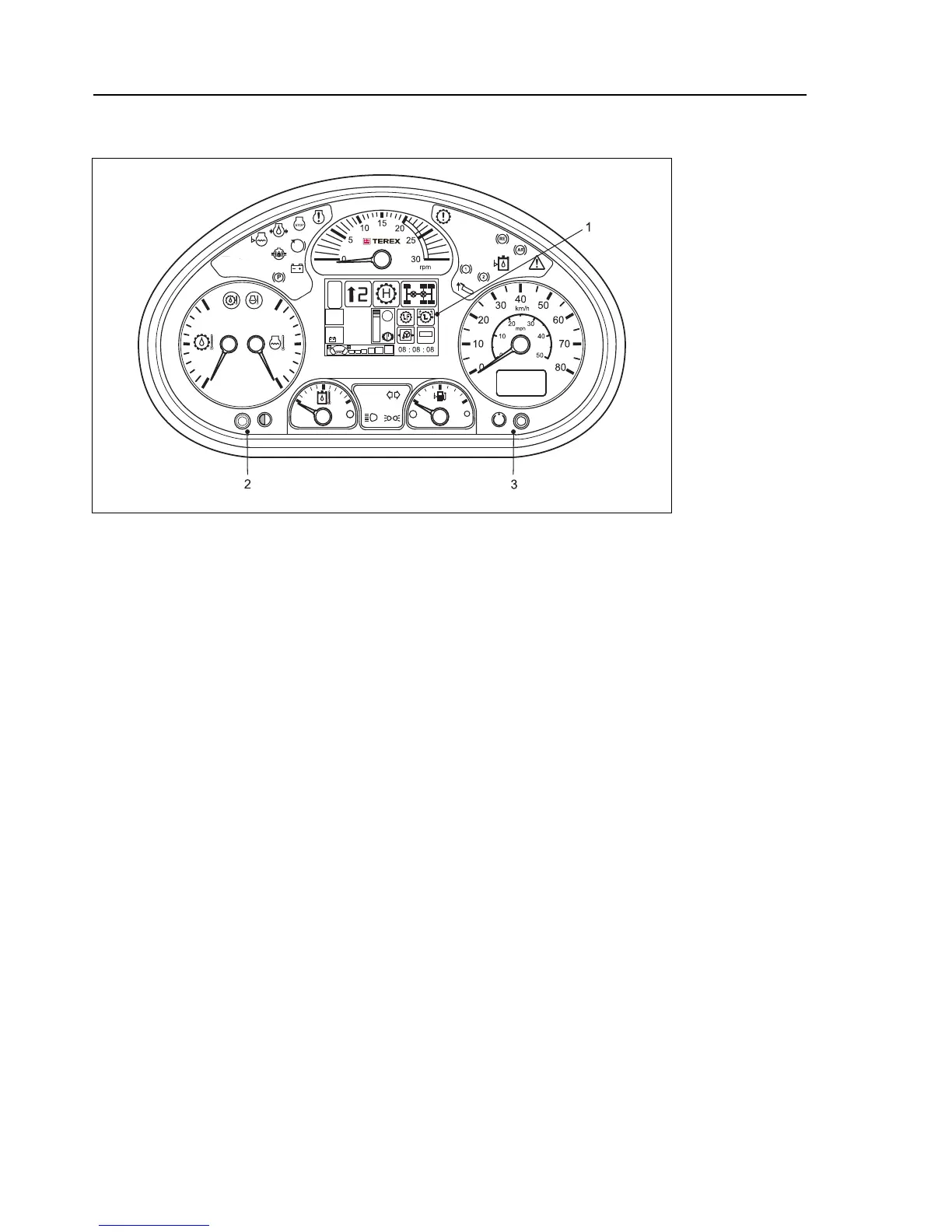
1. Menu Screen - The following illustrations show the sequential display
in its five possible screens. On initial starting of the vehicle, the display
shows the Power Up Screen (1) and then automatically scrolls to the
Main Screen.
2. Left Menu Control Button - The "Display-Menu O.K. Switch", also
called the "Left Menu Control Button" is used to change values
(brightness setup, setting date/time, etc.) or to be used as ‘ENTER /
OK’ button in particular situations.
The Dashboard display screen provides a 320 x 240 pixel color
display, used as a flexible operator information device.There are
several different screens displayed during power up, normal operation,
body lift, brightness and date/time setup and engine and transmission
diagnostics.
3. Right Menu Control Button - Switching between the different
screens is performed automatically, depending on the current active
function. Alternatively a screen can be chosen manually by using the
"Display-Menu (+)(-) Switch" (refer to ‘Switches’ - 4) on the Dashboard
or by using the Dashboard display's "Right Menu Control Button".


 To Next Page