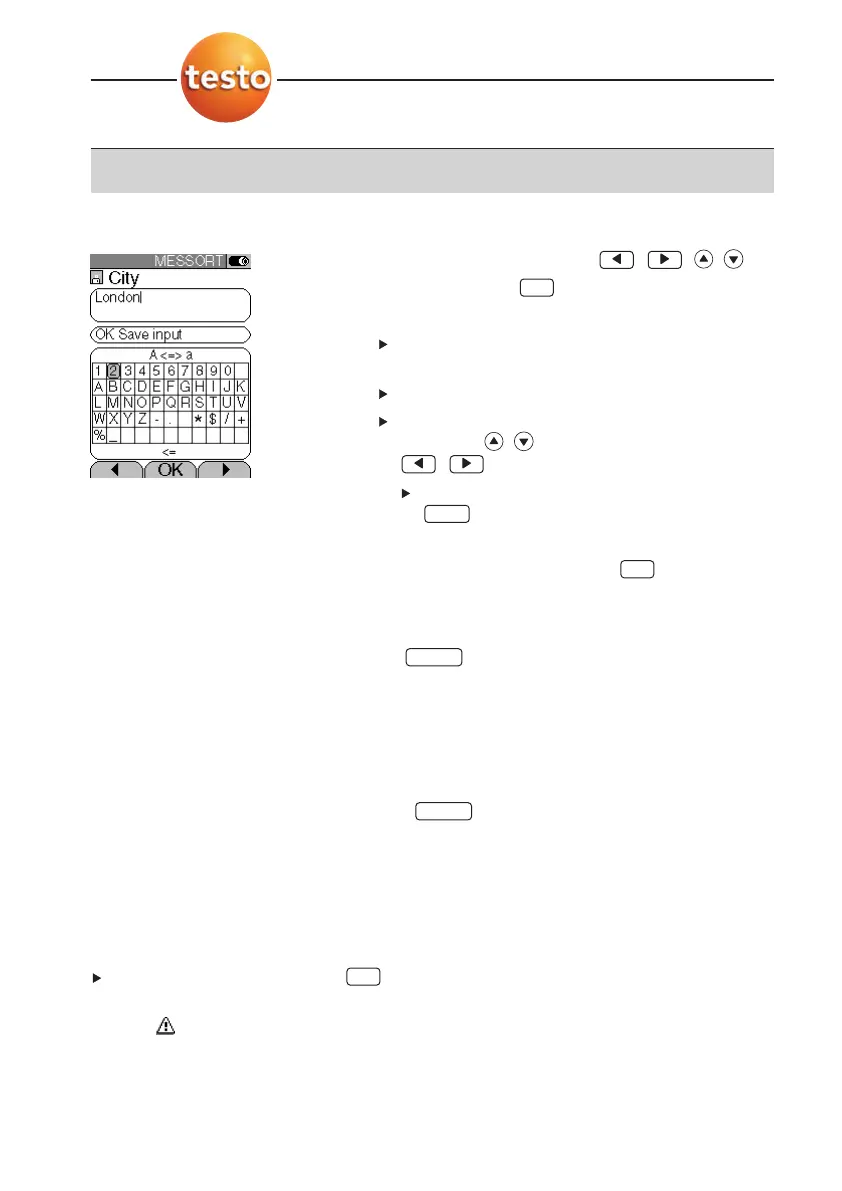
Input editor
1
Select the value (character): , , , .
2
Accept the value: .
Options:
To switch between upper-case/lower-case let-
ters:
A <=> a (not always available).
To delete characters:
<=.
To position the cursor in the text: Select the text
input field: , and position the cursor:
,.
To delete characters in front of the cursor:
.
3
Repeat steps
1
and
2
as required.
4
Save the input: OK Save input .
E.4.4 Printing data
Data are printed out via the function key . The function is only available if a print-
out is possible.
If data are to be transferred to a protocol printer via the infrared interface, the printer that
is to be used must be activated, see
Printer
, p. 28.
E.4.5 Saving data
Data are saved either via the function key or the function field OK Save input. The
functions are only available if saving is possible.
See also
Memory/Location
, p. 23.
E.4.6 Confirming an error message
If an error occurs, an error message is shown in the display.
To confirm an error message: .
Errors which have occurred and have not yet been rectified are shown by a warning
symbol ( ) in the header.
Error messages which have not yet been removed can be viewed in the
Inst’ diagnosis
menu, see
Instrument diagnosis
, p. 25.
OK
Save
Print
OK
Del.
OK
E. Operation
E.4 Basic operating steps
22



 To Next Page