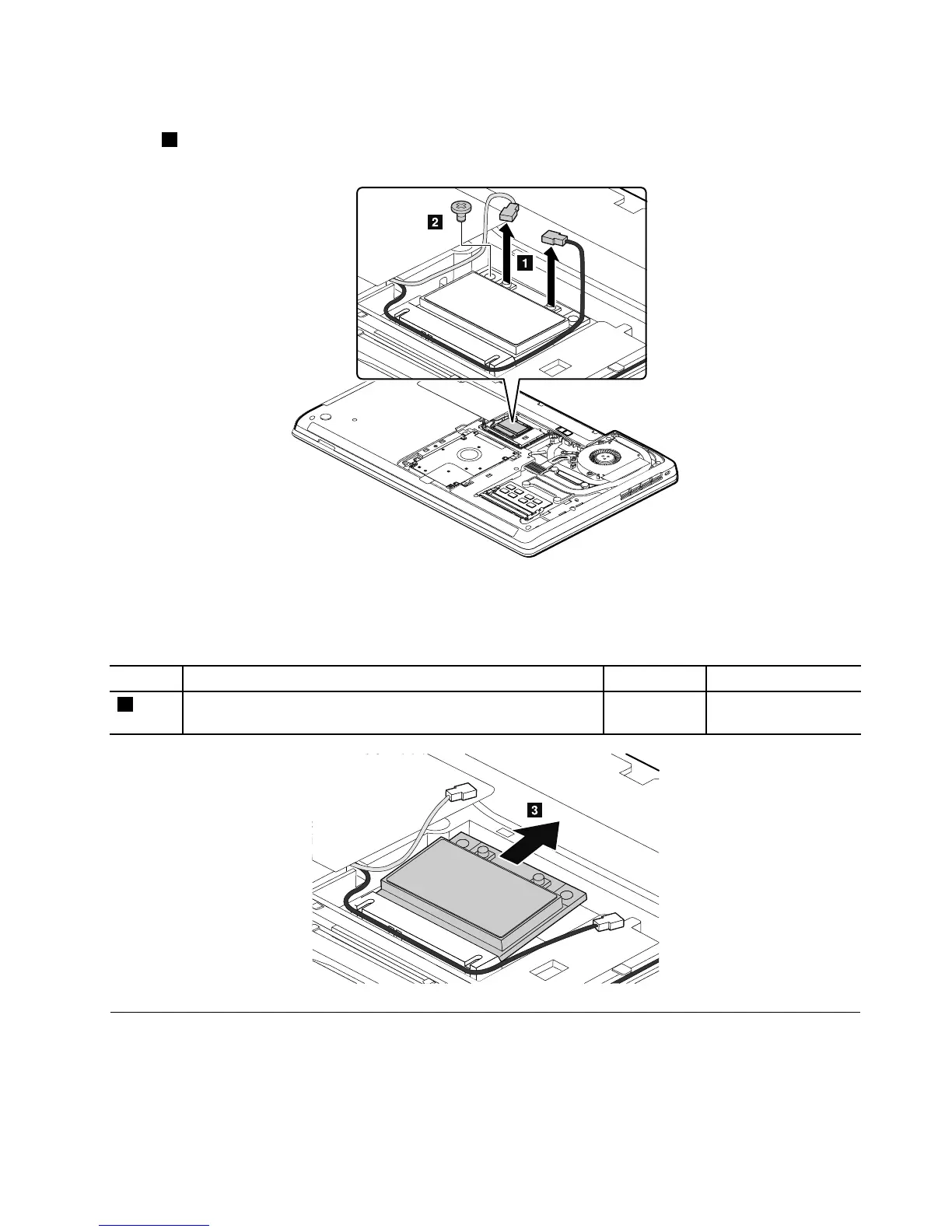
RemovalstepsofPCIExpressMiniCardforwirelessLAN
Instep1,unplugtheconnectorsbyusingtheantennaRFconnectorremovaltoolorpicktheconnectors
withyourngersandgentlyunplugtheminthedirectionofthearrows.
Note:Yourmodelmightlookslightlydifferentfromtheillustrationabove.
Wheninstalling:PlugthegraycableintothejackmarkedMAINorM,andtheblackcableintothejack
markedAUXorAonthecard.
StepScrew(quantity)Color
Torque
2
M2×3mm,wafer-head,nylon-coated(1)
Black0.181Nm
(1.85kgf-cm)
1080PCIExpressMiniCardforwirelessWANormSATAsolidstatedrive
Foraccess,removetheseFRUsinorder:
•“1010Batterypack”onpage62
•“1030Smallbottomcover”onpage64
Chapter9.RemovingorreplacingaFRU69



 To Next Page