Chapter6.Specialkeys
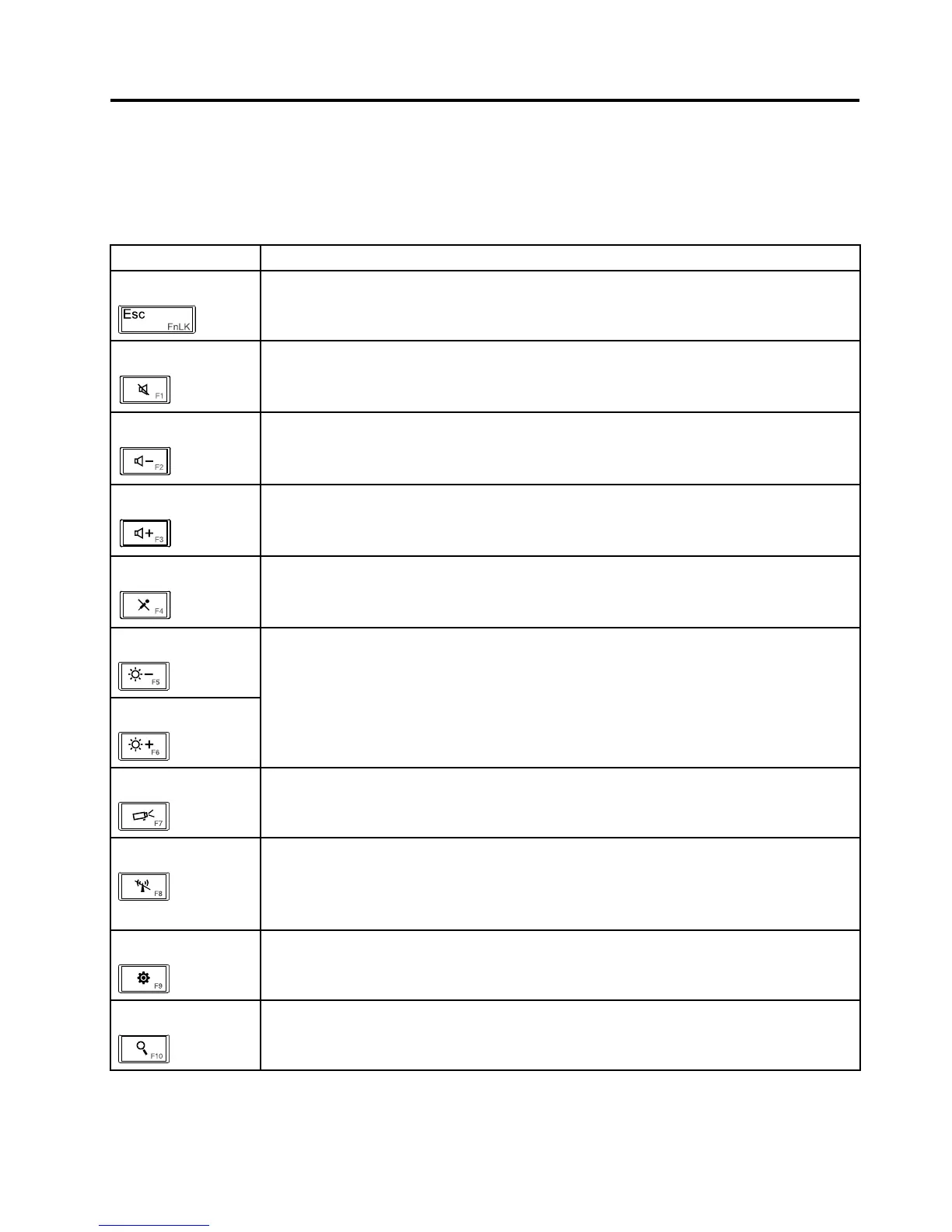
Thefollowingtabledescribesthefunctionsofthespecialkeysonthecomputerkeyboard.
Table8.Specialkeys
Specialkey
Description
EscPressthiskeytoopentheThinkPadKeyboardPropertieswindowwhereyoucantogglethe
F1-F12keyfunctionality.
F1Pressthiskeytomuteorunmutethespeakers.
Note:Ifyoumutethesoundandturnoffyourcomputer,thesoundwillremainmutedwhen
youturnonyourcomputeragain.Toturnonthesound,pressF2orF3.
F2Pressthiskeytodecreasethespeakervolume.
F3Pressthiskeytoincreasethespeakervolume.
F4
Pressthiskeytomuteorunmutealloftherecordingdevices.
F5
F6
Youcantemporarilychangethecomputerdisplaybrightnessbypressingthesetwokeys.
Tochangethedefaultbrightnesslevel,right-clickthebatterystatusiconintheWindows
noticationarea,thenclickAdjustscreenbrightnessandmakechangesasdesired.
F7Pressthiskeytoswitchthedisplayoutputlocationbetweenthecomputerdisplayandan
externalmonitor.
F8PressthiskeytoenableordisabletheAirplanemode.
TheAirplanemodedisablesthewirelessfeaturesofyourcomputertocomplywithairline
regulations.Whenyoupressthiskey,alistofwirelessconnectionsisdisplayed.Youcan
quicklyturnonorturnoffallthewirelessnetworkconnections.
F9
PressthiskeytoopentheSettingscharm.
F10
PressthiskeytoopentheSearchcharm.
©CopyrightLenovo2012,2013
45



 To Next Page