Wheninstalling:Plugtheorangecableintothemainconnector,andthebluecableintotheauxiliary
connector.
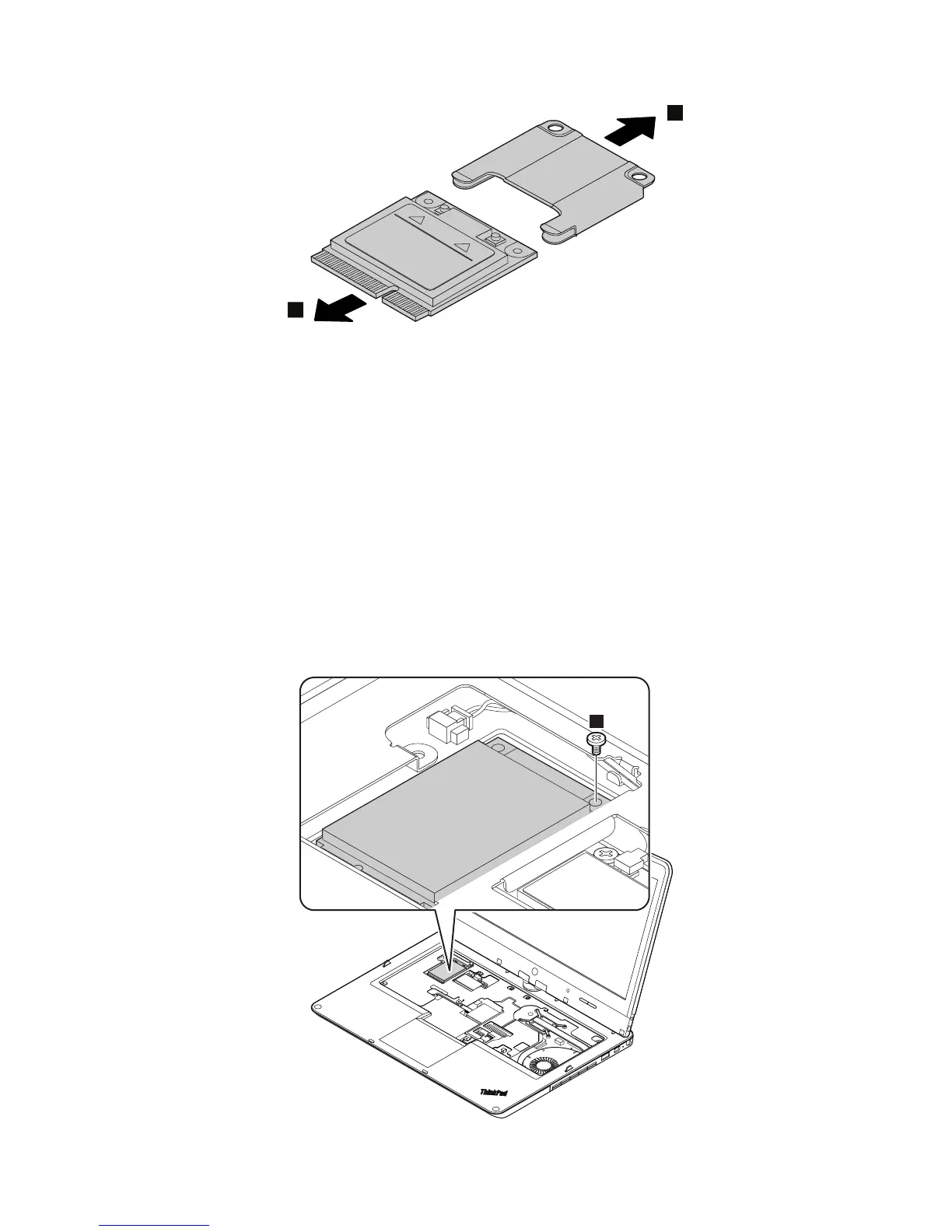
RemovalstepsofmSATAsolid-statedrive
ThecomputercomeswitheitheraPCIExpressMiniCardforwirelessWANoranmSATAsolid-statedrive.If
thecomputerisequippedwithanmSATAsolid-statedrive,itisinstalledinthewirelessWANcardslot.
Attention:
•Donotdropthedriveorapplyanyphysicalshocktoit.Thedriveissensitivetophysicalshock.Improper
handlingcancausedamageandpermanentlossofdata.
•Beforeremovingthedrive,havetheusermakeabackupcopyofalltheinformationonitifpossible.
•Neverremovethedrivewhilethecomputerisoperatingorinsuspendmode.
•EnsurethatyoupartitionthemSATAsolid-statedriveafterinstallingitonthecomputeryouareservicing.
Otherwise,themSATAsolid-statedrivewillnotfunctioncorrectly.Forinstructionsononhowtopartition
anmSATAsolid-statedrive,gotohttp://www.lenovo.com/support/msata-fru.



 To Next Page