Using recording features
30
3.10 Playing the videos
You can play and watch recorded videos on your product. Follow the instructions to play the videos.
1
On the Live view screen, tap the Home menu ( ) button
>
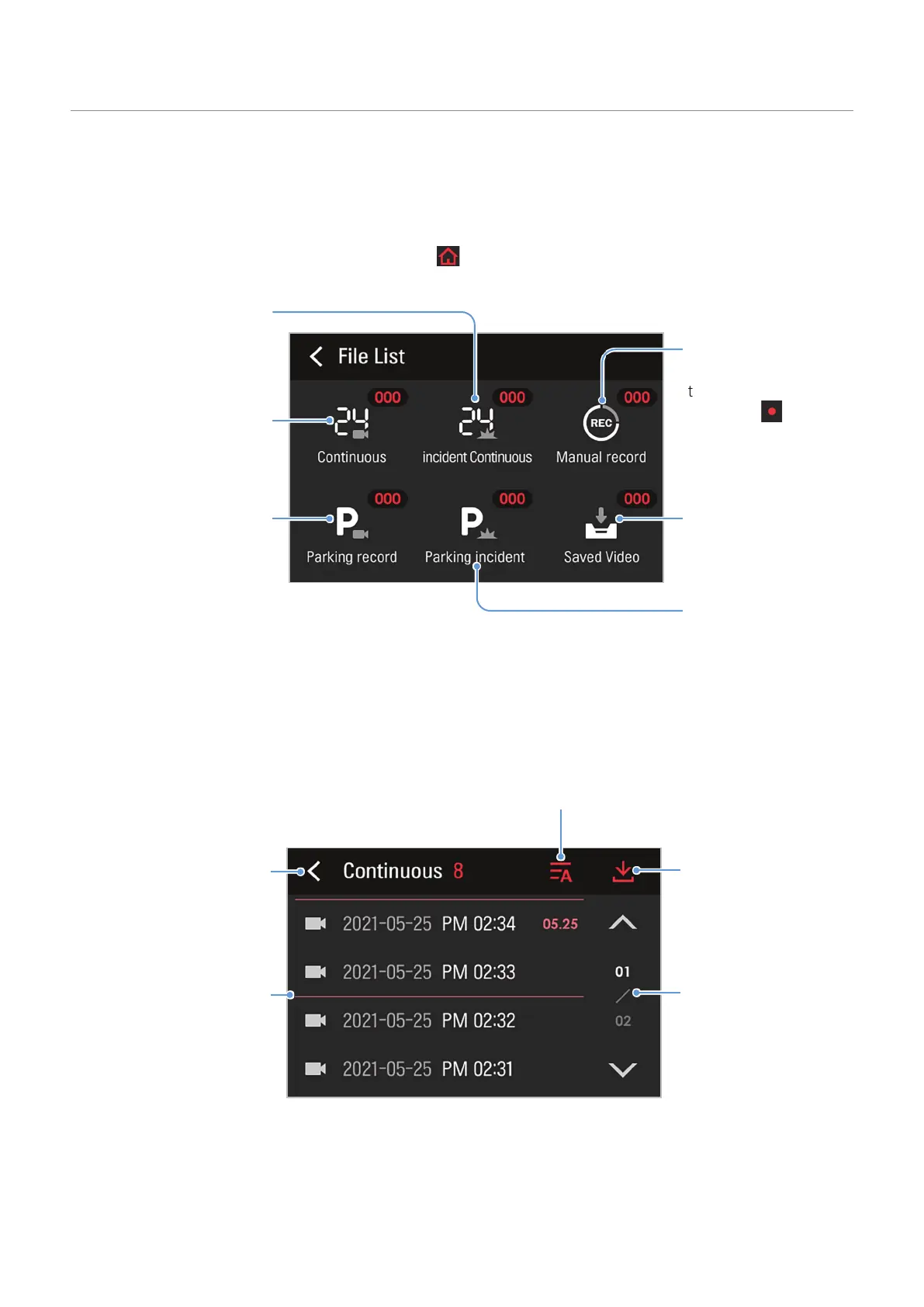
File List. The number of videos categorized
by the recording mode will be displayed.
Video files that are
manually selected and
kept by the user.
Videos that are
recorded when impacts
are detected during
parking incident.
Video files that are
manually recorded by
tapping the manual
recording (
) button
on the Live view screen.
1-minute long
continuous videos that
are recorded during
continuous recording.
Videos that are
recorded when impacts
are detected during
continuous recording.
Videos that are recorded
under recording
conditions other than
impact detection during a
parking incident recording
(motion detection and
timelapse videos).
2
When you select a category, the video file list will appear. Select the video you want to play.
Scroll through the list to
search for a video file.
Move to the File list
screen.
Displays a list of
recorded videos.
Move the video to the
Archive.
Filter video files by date, time,
and all in sequence when tapped.



 To Next Page