33
Other information
EN
Sockets
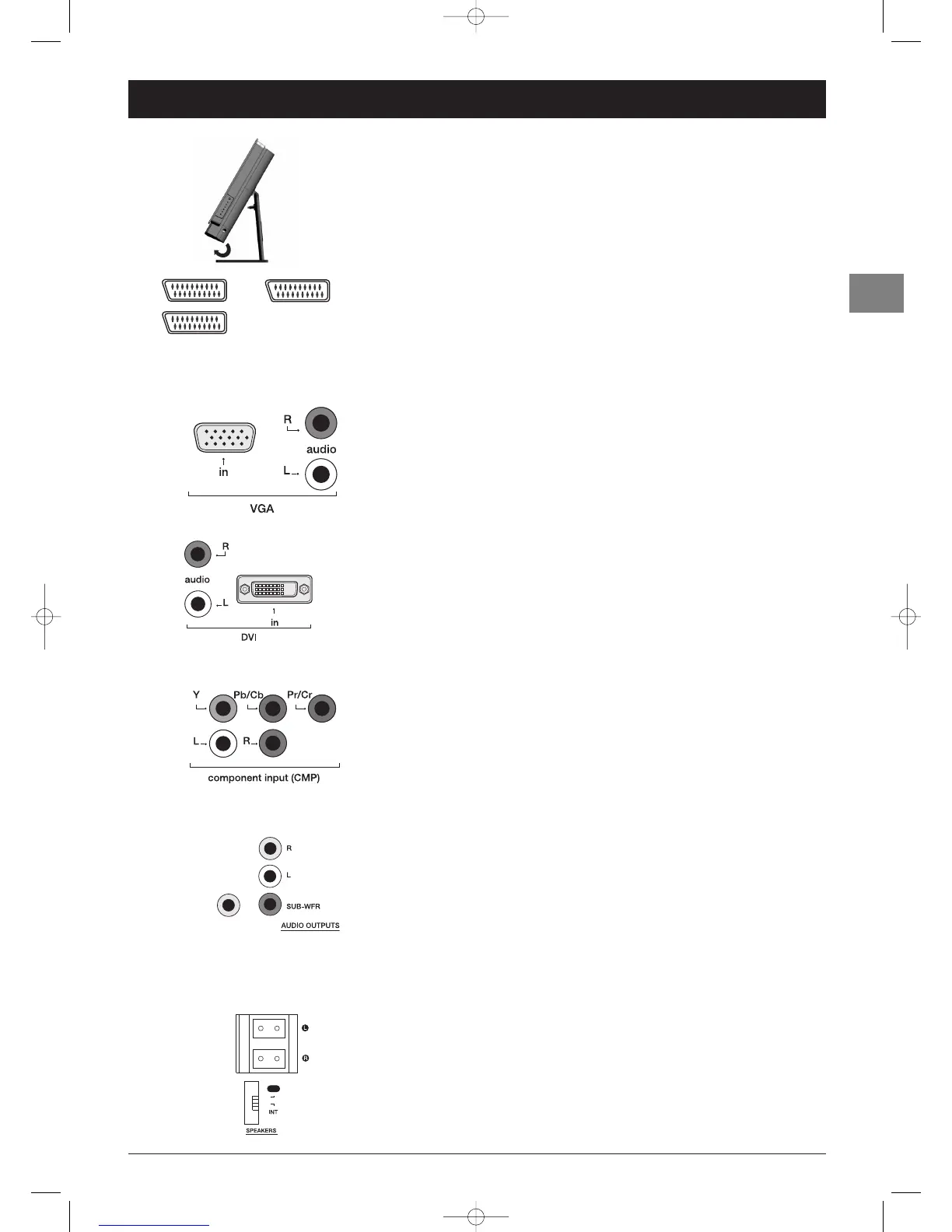
AV1 and AV2 SCART sockets (input-output) at the back
These sockets can be used to connect a range of equipment, including video recorders,
camcorders (VHS, S-VHS, 8 mm or Hi 8), decoders, satellite receivers, DVD players, games
consoles or devices producing an RGB signal.
OAV3 SCART socket (input) at the back
This socket can be used to connect equipment, such as video recorders or camcorders
(VHS, S-VHS, 8 mm or Hi 8).
OAV3 RCA audio + video sockets (input) on the side
These can be mainly used to connect camcorders (VHS or 8 mm format).
OAV3 RCA audio + S sockets (input) on the side
These can be mainly used to connect camcorders (S-VHS or Hi 8 format).
VGA + RCA audio sockets (VGA) (input) at the back
These can be used to connect a computer.
DVI + RCA audio sockets (input) (DVI) at the back
These sockets can be used to connect a PC with a compatible graphics card, certain DVD
players or a compatible high-definition digital satellite decoder.The DVI socket automatically
detects whether a signal is received when you select the DVI programme.
Notes:
- To ensure a high display quality, use a cable of less than 5 metres in length and of the quality
required by the DVI standard.
- Do not connect devices supplying analogue RGB signals to this connector.
CMP + RCA audio sockets (CMP) (input) at the back
These can be used to connect a DVD player.The component sockets automatically detect
the type of component signal received: interlaced component (YPrPb) or progressive
component (YCrCb).
To display images using the equipment connected, press the
AV button on the remote
control: once to select AV1, twice to select AV2, three time to select AV3 (depending on
model), and so on to select VGA,DVI and CMP. For some equipment (connected to the
SCART sockets), this selection is done automatically.
RCA audio + subwoofer sockets (output) on the left side
These can be used to connect a stereo amplifier, a hi-fi system or amplified speakers (see
below).
Coaxial digital audio output (DIGITAL)
This socket offers a higher level of sound quality compared to that provided using an
analogue audio connection. For 6-channel multichannel sound, connect the audio/video
amplifier or receiver to this socket using a coaxial cable (not supplied).
Connecting active speakers
The audio RCA sockets on the side of the television can be used to connect active
speakers (with a built-in amplifier) replacing the television’s built-in speakers.
Connect the left speaker to the RCA L socket and the right speaker to the RCA R socket.
Connect the subwoofer to the SUB-WFR socket.
Connecting speakers (on the side)
Connect the left speaker to the L socket and the right speaker to the R socket.
Set the switch to EXT.The TV set’s speakers are disabled.
If you disconnect the speakers from the TV set, remember to reset the switch to INT so
that the TV set’s speakers are enabled again.



 To Next Page