Getting started
4
EN
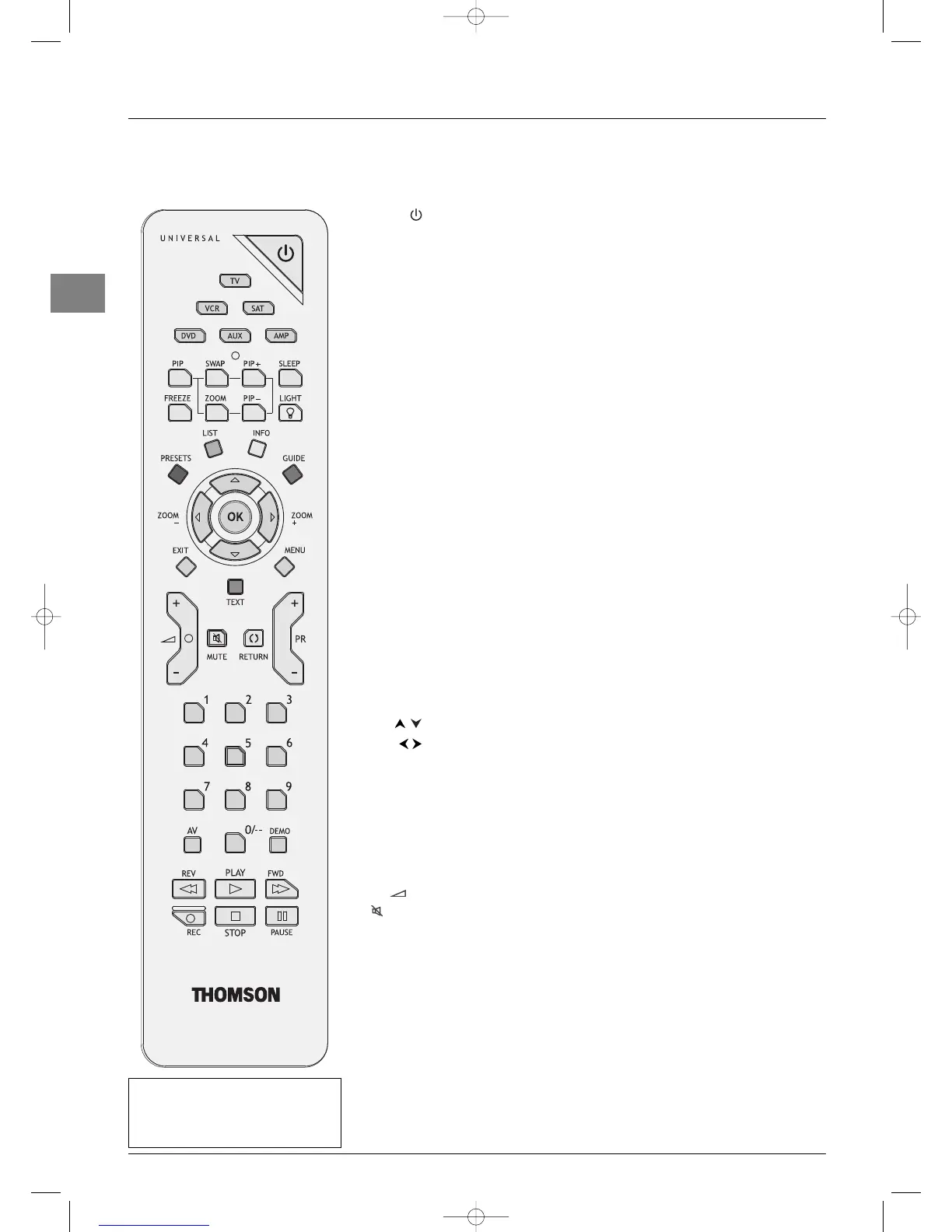
Remote control TV functions
Most of your television’s functions are available via the menus that appear on the screen.The remote control supplied with your set can
be used to navigate through the menus and to configure all the general settings.
Standby / quit standby.
TV To access TV mode. Press this button to control the television.
VCR To access VCR mode.
DVD To access DVD mode.
SAT To access SAT mode.
AUX To access AUX mode.
AMP To access AMP mode.
light To provide information:
- it lights up when you press a button,
- it indicates the status when the remote control is being programmed (see
page 6),
- if the batteries are run down, it flashes when you press a button.
PIP To enable the PIP function (see page 17).
SWAP To swap the main picture with the PIP picture (see page 17).
PIP+/PIP- To change programmes within the PIP function (see page 17).
ZOOM To change the size of the PIP picture (see page 17).
FREEZE To freeze the main picture (see pages 11 and 17).
SLEEP To access directly the
Sleep timer
option in the
Time
menu
(see page 15).
LIGHT Remote control light.
PRESETS (red button) sound and picture settings menu.
LIST (green button) list of programmes (see page 11).
INFO (yellow button) status information (see page 10).
GUIDE (blue button) programme guide (see page 22).
TEXT (purple button) Teletext (see page 21).
The coloured buttons can also be used for operating Teletext.
To select menu options.
To set functions, change values, enable and disable functions (checkbox) in
menus.
To select the picture format or zoom.
OK To confirm a selection, enable and disable functions (checkbox) in menus.
To freeze the main picture (see pages 11 and 17).
MENU To access the OVERVIEW menu.
EXIT To exit the menu structure.
In PIP mode: to disable the PIP function.
+/- To control the volume.
MUTE To switch the sound off and back on again.
RETURN To return to the previous channel/AV programme.
PR+/PR- To change channels.
0-9 To select a channel by its number. In the case of channel numbers with two
digits:
- press the tens digit for a few seconds to display it on the screen, then press
the units digit or
- press
0
to display “--”, then enter the channel number.
In PC mode, the
0
button is inactive and buttons 1-9 can be used to return
to TV mode and change channels.
AV To select an appliance connected to an AV socket.
O
DEMO To access demo mode.
Important: If the batteries in your
remote control are run down, you can
use the buttons on the set, as they
have the same functions as those on
the remote control.



 To Next Page