E-DOC-CTC-20090507-0002 v1.0
39
6 Thomson Gateway GUI
6 Thomson Gateway GUI
Introduction
The Thomson Gateway comes with an integrated configuration web interface, commonly referred to as the
Graphical User Interface (GUI).
It allows you to configure your Thomson Gateway simply by using a web browser from any local computer
connected to the Thomson Gateway.
Requirements
Before you can access the Thomson Gateway web pages:
Javascript must be enabled on your web browser. For more information, consult the help of your Internet
browser.
Your computer must be configured to obtain an IP address automatically. This is the default setting.
Components
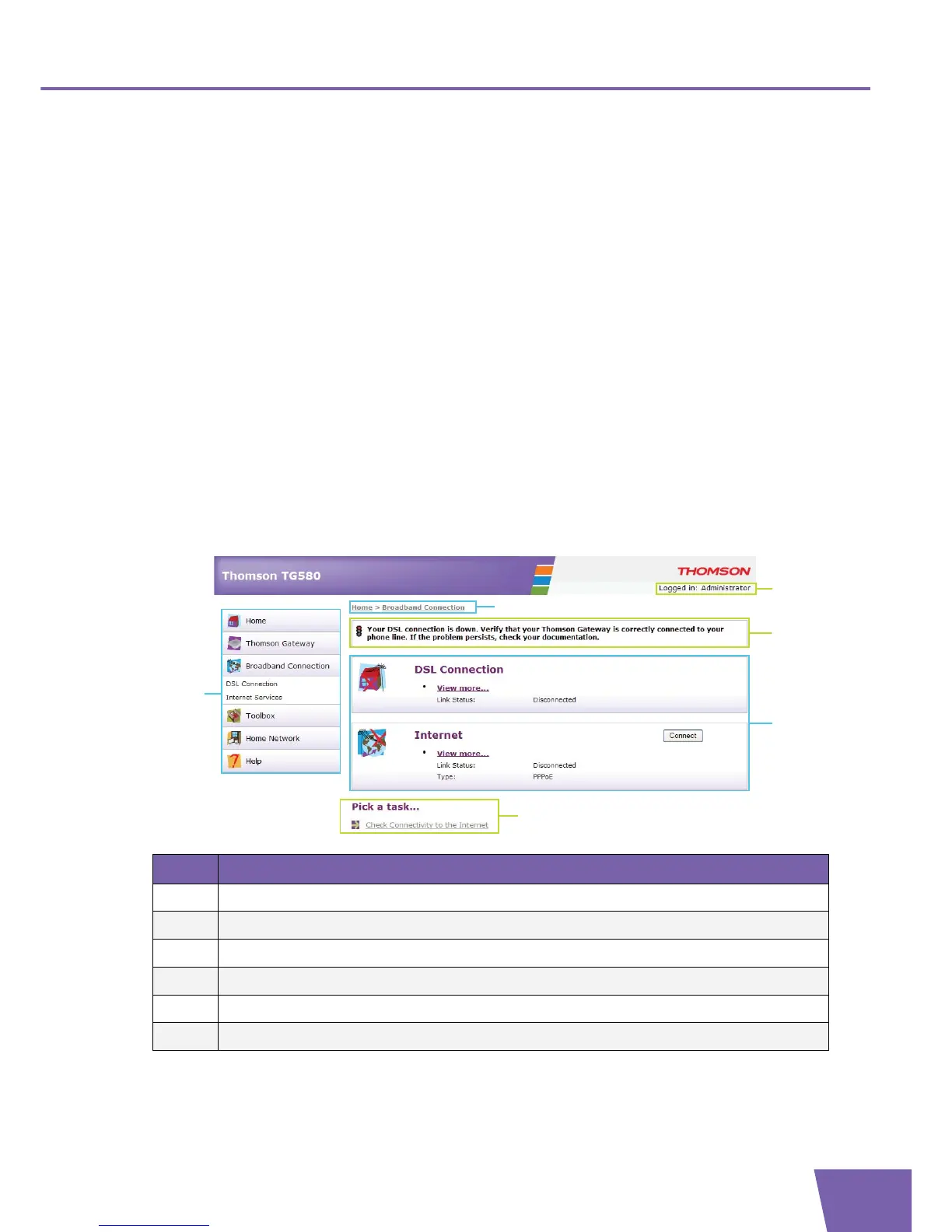
You can find the following components on the Thomson Gateway GUI:
Label Description
1 Menu
2 Location bar
3 Login section
4 Notification Area
5 Content pane
6 Tasks



 To Next Page