17
Standard Controller Menus
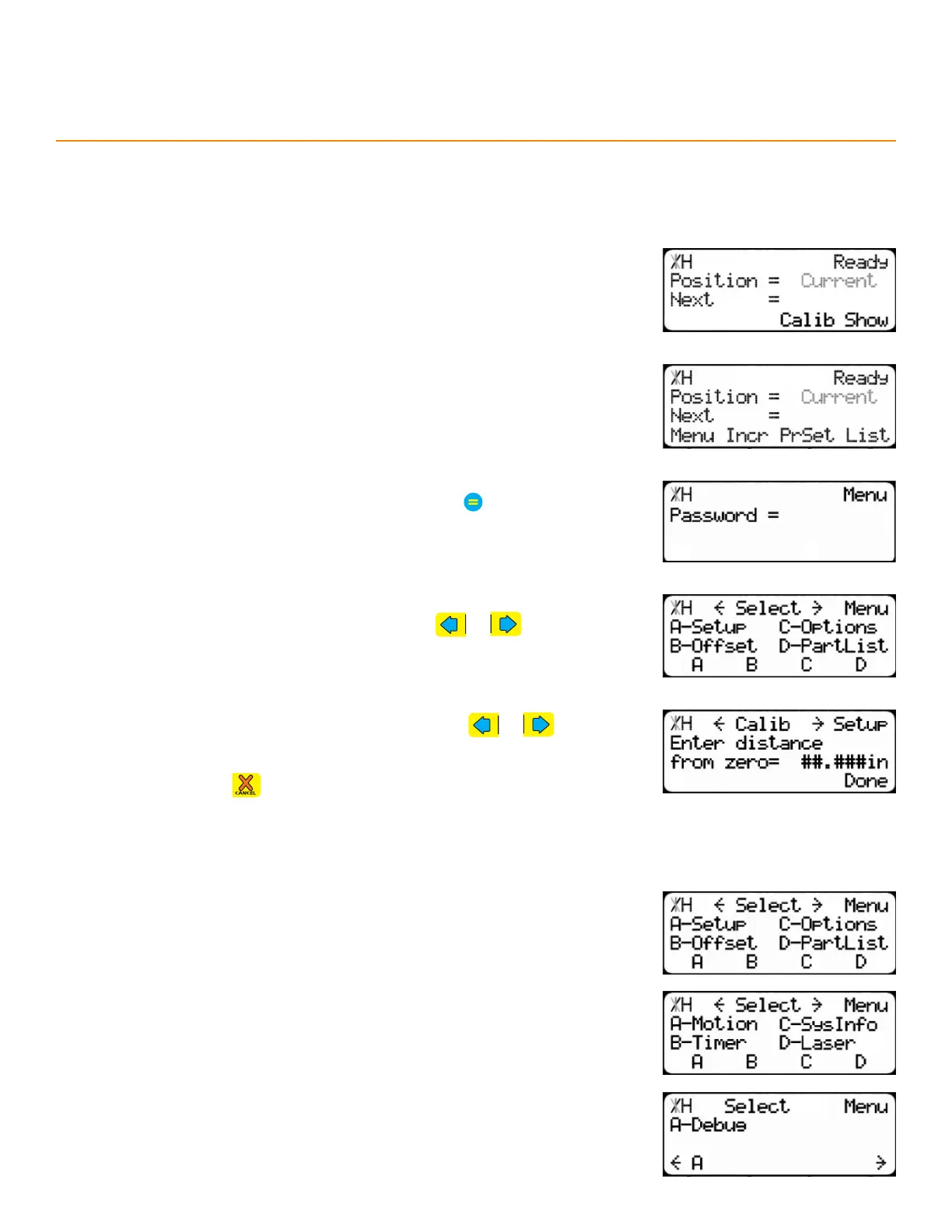
1. Start at the Ready Screen.
2. Press the [Show] soft key.
acceSSing & navigating tHe menuS
3. Press the [Menu] soft key.
4. Enter the TigerStop
®
’s password and then press
• By default, the TigerStop
®
’s password is the serial number.
Setup - Calibration and installation settings.
Oset - Set an oset.
Options - Display, print, and safety settings.
Part List - Part list operational settings.
Motion - Movement settings.
Timer - Clamp and Advanced Interconnect Kit settings.
System Info - Overall system information and settings.
Laser - Laser defecting settings.
Debug - Diagnostic tools.
menuS oveRview
The Standard Controller has 9 menus spanning 3 menu select screens.
5. Scroll through the menu options by pressing or Press the
corresponding soft key to open the menu.
6. Scroll through each menu’s contents by pressing or
7. Press the [Done] soft key (where available) to return to the Ready
Screen or press to go back to the menu selection screen.


 To Next Page