
 Need help?
Do you have a question about the TigerStop Standard Controller 5 and is the answer not in the manual?
Important safety precautions and responsibilities for operating TigerStop® products.
Guidelines and requirements for safe installation of TigerStop® products.
Safety considerations when integrating TigerStop® with other machinery.
Essential safety practices and hazards during TigerStop® operation.
Access manuals and videos via the TigerStop® website.
Contact TigerStop® support via email for assistance.
Reach TigerStop® customer service by phone for support.
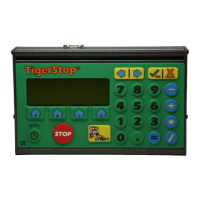
Explanation of the controller's buttons for operation and menu navigation.
Description of soft keys for varied functions and math keys for calculations.
Usage of numeric keys for inputting values into the controller.
Steps to perform the 'Home Routine' for initial TigerStop® setup.
Description of the Ready Screen interface, drive indicator, and position displays.
How to manually move the TigerStop® using distances.
Utilizing the controller's calculator function for math problems.
Manually moving the TigerStop® towards or away from the tool.
Using the increment function for stepped movements and push feeding.
A shortcut method for calibrating the TigerStop® system.
Setting up and utilizing 100 programmable hot keys for common lengths.
Procedure for removing saved presets from the system.
Overview of the four types of part lists for managing cutting operations.
Steps to program Pusher or Set Point lists for automated cutting.
Steps for programming Pattern or Pull lists for automated cutting.
Instructions for executing a Pusher list.
Instructions for executing a Set Point list.
Instructions for executing a Pattern or Pull list.
Procedures for modifying existing part list entries.
Cutting around defects to optimize material yield.
Step-by-step guide to enter and move through the controller menus.
Summary of the nine main menus and their functions.
Adjusting the system's calibration parameters for accuracy.
Performing the initial home routine for the TigerStop®.
Defining the saw blade's material loss (kerf) for precise cuts.
Automatically setting the minimum and maximum travel limits.
Tuning the TigerStop®'s accuracy through an automated setup process.
Setting the closest position limit to the tool.
Setting the farthest position limit from the tool.
Adjusting backlash compensation for improved movement accuracy.
Configuring the direction of movement for jogging operations.
Automatically detecting and setting up installed interconnect kits.
Fine-tuning the scale for accurate distance translation.
Programming and modifying offset values for position adjustment.
Quickly jumping to a specific, pre-programmed offset number.
Changing the display language of the TigerStop® controller.
Viewing or changing the system password.
Setting the idle time before the controller enters sleep mode.
Selecting the display units (inches or millimeters).
Adding/removing a soft key for switching between units.
Modifying conversion math for inches and millimeters.
Adjusting the display's text darkness level.
Specifying the type of printer installed with the TigerStop®.
Printing part length and quantity information on a label.
Defining the distance between the inkjet printer and the saw blade.
Setting a minimum safe distance for operator warnings.
Alerting the user when cut length exceeds outfeed clearance.
Preventing calibration changes without a password.
Defining the minimum safe distance for backing off from moving parts.
Setting the distance the TigerStop® retracts after positioning.
Determining when the TigerStop® retracts based on conditions.
Setting the length of the first trim cut in part lists.
Setting the length of the last trim cut in part lists.
Setting the distance material is pushed past the tool's zero point.
Adjusting the retract distance for easier material loading.
Setting the retract distance from the final position in a pull list.
Defining the longest acceptable stock length for set point lists.
Using excess material for head or tail cuts to reduce waste.
Configuring how presets behave in Set Point, Increment, or Pusher modes.
Running set point lists as pusher lists for drilling tools.
Permanently deleting all saved part lists from the system.
Setting the score threshold for accepting optimization solutions.
Setting the time threshold for accepting optimization solutions.
Penalizing multiple board optimized solutions for cutting longer parts first.
Defining the distance between the tool's zero point and the infeed clamp.
Defining the distance between the tool's zero point and the outfeed clamp.
Setting the retract point for the swing clamp to avoid collision.
Option to ignore part quantities when making a part list.
Determining behavior for downloading part lists from different sources.
Cutting very small trims to preserve material.
Setting a maximum cut length for working with warped stock.
Setting a second maximum cut length for warped stock.
Enabling or disabling the TigerMeasure sensor.
Setting the distance between the tool's zero point and the TigerMeasure sensor.
Enabling processing of part lists exclusively in metric units.
Determining how parts are counted in part lists (Standard, Pack, Panel).
Setting the TigerStop®'s top speed when moving towards the tool.
Setting the TigerStop®'s top speed when moving away from the tool.
Defining the TigerStop®'s acceleration when moving towards the tool.
Defining the TigerStop®'s acceleration when moving away from the tool.
Setting the TigerStop®'s deceleration when moving towards the tool.
Setting the TigerStop®'s deceleration when moving away from the tool.
Setting the wait time after receiving a command before moving.
Adjusting P, I, and D gain settings impacting TigerStop® movement.
Configuring a hidden setting that impacts TigerStop® movement.
Adjusting low (120V) and high (220V) voltage values for throttle equation.
Configuring hidden settings that impact TigerStop® movement.
Configuring hidden settings that impact TigerStop® movement.
Setting the delay for clamping after moving to position.
Setting the delay for tool cycling after clamp activation.
Setting the time for the DM sensor to come off after activation.
Setting the time for the tool to finish its cycle.
Setting the time for the tool to come off the Top Arbor sensor.
Setting the time for the DM sensor to return after TA sensor off.
Setting the delay for turning off clamps after DM sensor activation.
Setting the delay for movement after clamps turn off.
Setting the time for internal communications to complete.
Setting the wait time before moving after a Precision End Trim.
Allowing time for unclamping before initiating the outfeed move.
Setting the wait time after loading material before moving.
Displaying the TigerStop®'s serial number and enable code.
Showing the current software version of the TigerStop®.
Defining which end of the TigerStop® is the tool's zero point.
Setting the type of motor installed on the TigerStop®.
Configuring the installed interconnect kit and its operation mode.
Setting the speed for computer communication via the serial port.
Setting the communication speed for the I/O Panel via its serial port.
Determining the function of the brakes (Setpoint or Pusher).
Setting the duration the brake disengages for accuracy with heavy loads.
Controlling the laser defecting system's activation.
Enabling cutting of defects from material only.
Setting the minimum distance between defects for separate scans.
Specifying on which end of the TigerStop® the laser is mounted.
Setting the maximum range of the laser scanner.
Defining the distance from the laser to the paddle stop for end-of-stock signals.
Enabling or disabling the crayon marking system.
Distance between paddle foot and infrared length sensor.
Distance between ultraviolet and infrared length sensors.
Distance from tool's zero point where pusher foot begins lowering.
Defining how far from the crayon mark the saw cuts.
Measuring the difficulty of movement in the TigerStop®.
Checking inputs and outputs on the amplifier.
Reversing I/O Panel signals for DM sensors.
Revealing hidden settings for advanced diagnostics.
 General
| Model | Standard Controller 5 |
|---|---|
| Input Voltage | 100-240 VAC |
| Frequency | 50/60 Hz |
| Humidity | 10% to 90% non-condensing |
| Display | LCD |
| Operating Temperature | 32°F to 104°F (0°C to 40°C) |
| Storage Temperature | -4°F to 140°F (-20°C to 60°C) |
| Communication Ports | RS-232, Ethernet |

 To Next Page