3-49
Chapter 3
INSTALLATION AND SETTING PROCEDURES (HARDWARE)
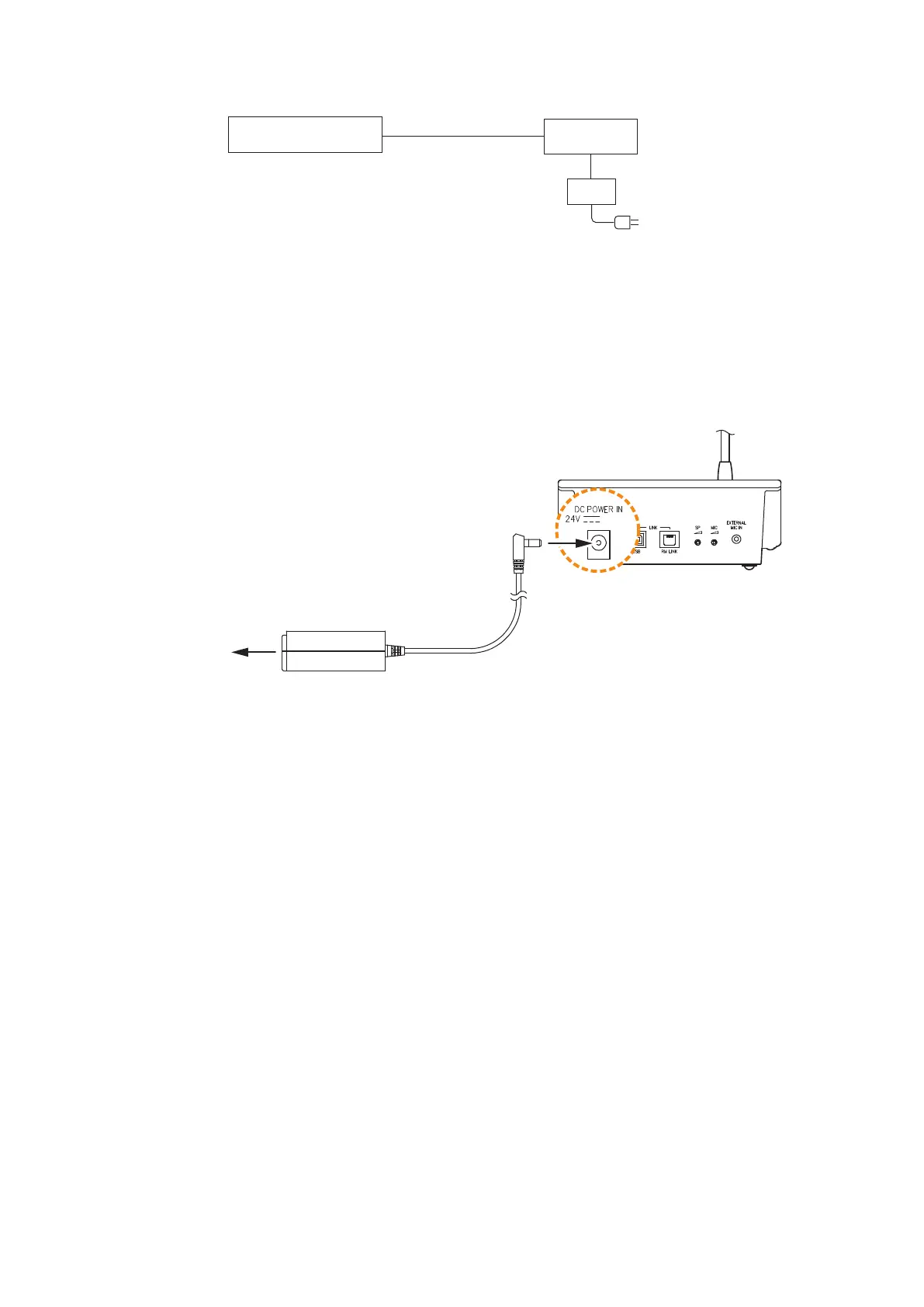
RM-300X rear
AC adapter AD-246 or
equivalent unit*
To AC power
Use when no backup power supply
is required.
[When power is supplied from the AC adapter]
* Usable AC adapter
24 V DC/over 200 mA (Operation range: 14 – 28 V DC)
Usable power output plug: Non-polarity type (Any polarity can be used.)
(5.5 mm outer diameter, 2.1 mm inner diameter, and 9.5 mm long)
Note
Plugging a DC plug into the RM-300X's power input terminal automatically switches the RM-300X's DC power
input to this terminal, disconnecting the unit's power supply from the RM link connector.
BesuretormlysecuretheDCplugbyxingthepowercableontotheRM-300X'sbottom-mountedcablehook.
If the DC plug is pulled out, the RM link connector takes over the unit's power supply and is connected to the
system power line. This may cause the voltage drop of power supply and increase the current consumption
from the VX-3000F, resulting in the system malfunction.
When supplying power to the RM-300X from the optional AD-246 AC Adapter using an STP category 5 straight
cable or over 4-pair shielded CPEV cable, the maximum length of connection cable (excluding power line) is
1200 m regardless of the type of cable and the number of remote microphone extension units.
Note
To power the remote microphones even during power failures, a battery backup is also needed for the AC
adapter.
Or supply power to the remote microphones from the VX-3000DS without using the AC adapter.
VX-3000F
RM-300X
AC adapter



 To Next Page