EasyManua.ls Logo

Tonghui TH9310 Series - 5.3 FUNCtion Subsystem Commands

Tonghui TH9310 Series
59 pages
Print Icon
To Next Page IconTo Next Page
To Previous Page IconTo Previous Page
Loading...
◇43
Query syntax: DISPlay:PAGE?
Return format: MEAS
5.3 FUNCtion Subsystem Commands
NOTE: the operating interface must be in Setup interface(DISPlay:PAGE MSETup)
5.3.1 FUNCtion subsystem commands--mainly used to set the test parameters of test
function
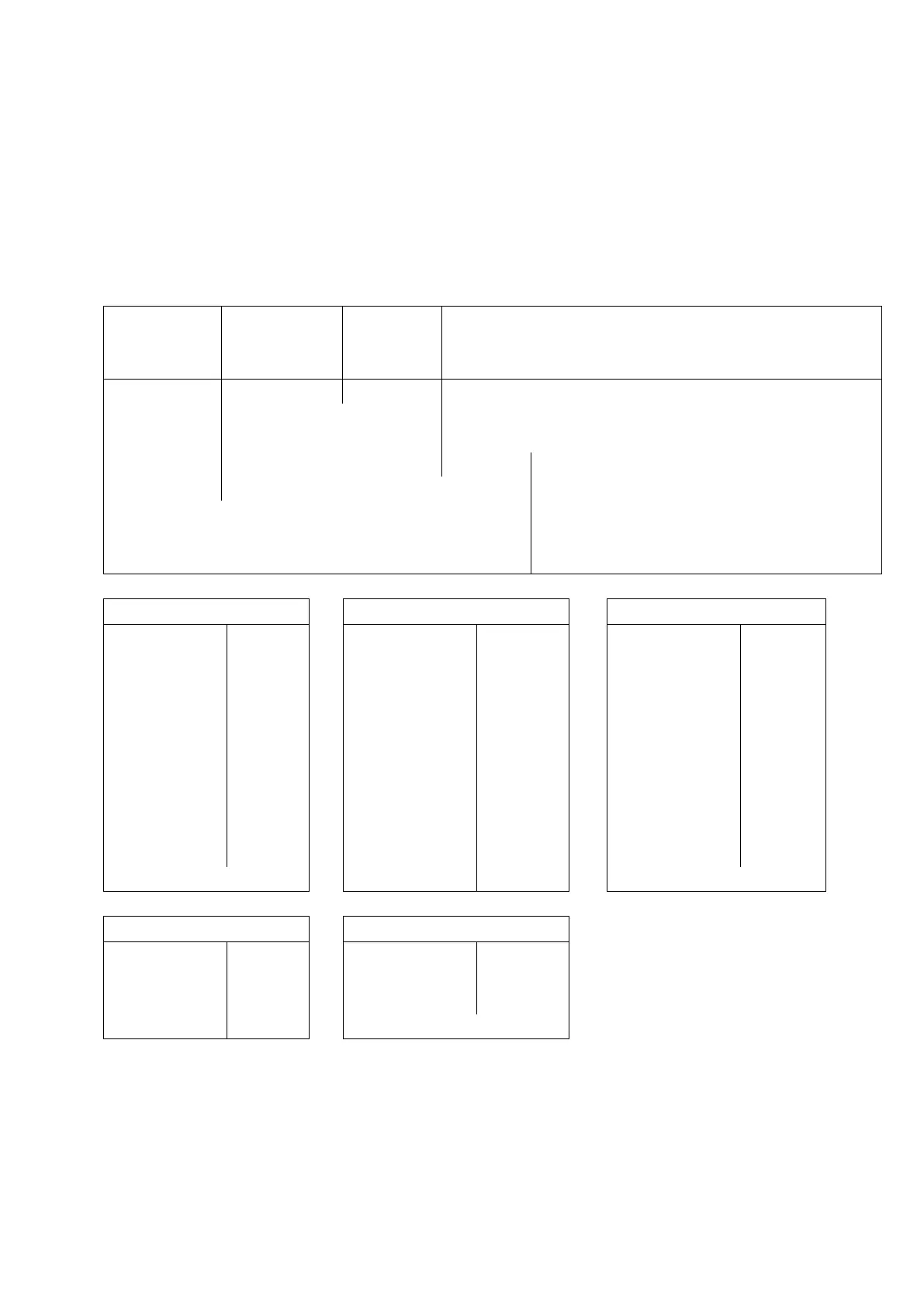
Command Tree:
Command
:
command
word
:
comman
d word
Value
:
command
word
FUNC
→
:SOUR
→
:STEP
→
NEW
Create a new test file
INS
Insert test step after current position
:STAR
DEL
Delete the test step of current position
< n >
→
:AC
STEP< n > Set as:AC Test (default)
:STOP
:DC
STEP < n > Set as:DC Test
:IR
STEP < n > Set as:IR Test
:OS
STEP < n > Set as:OS Test
:CK
STEP < n > Set as:CK Test
AC Test
:Param
DC Test
:Param
IR Test
:Param
:AC
→
:VOLT
:DC
→
:VOLT
:IR
→
:VOLT
:UPPC
:UPPC
:UPPC
:LOWC
:LOWC
:LOWC
:TTIM
:TTIM
:TTIM
:RTIM
:RTIM
:RTIM
:FTIM
:FTIM
:FTIM
:ARC
:WTIM
:ARC
:FREQ
:ARC
:RANG
:MODE
:RAMP
:MODE
:CH
:MODE
:CH
:CH
OS Test
:Param
CK Test
:Param
:OS
→
:OPEN
:CK
→
:VOLT
:SHOT
:UPPC
:GET
:CH
:CH
5.3.2 Commands for PROG Function
FUNC:STARt
Start the test while the instrument is in test interface.
FUNC:STOP
Stop the test while the instrument is in test interface.

Table of Contents