Shenzhen Topwisdom Technology Co., Ltd
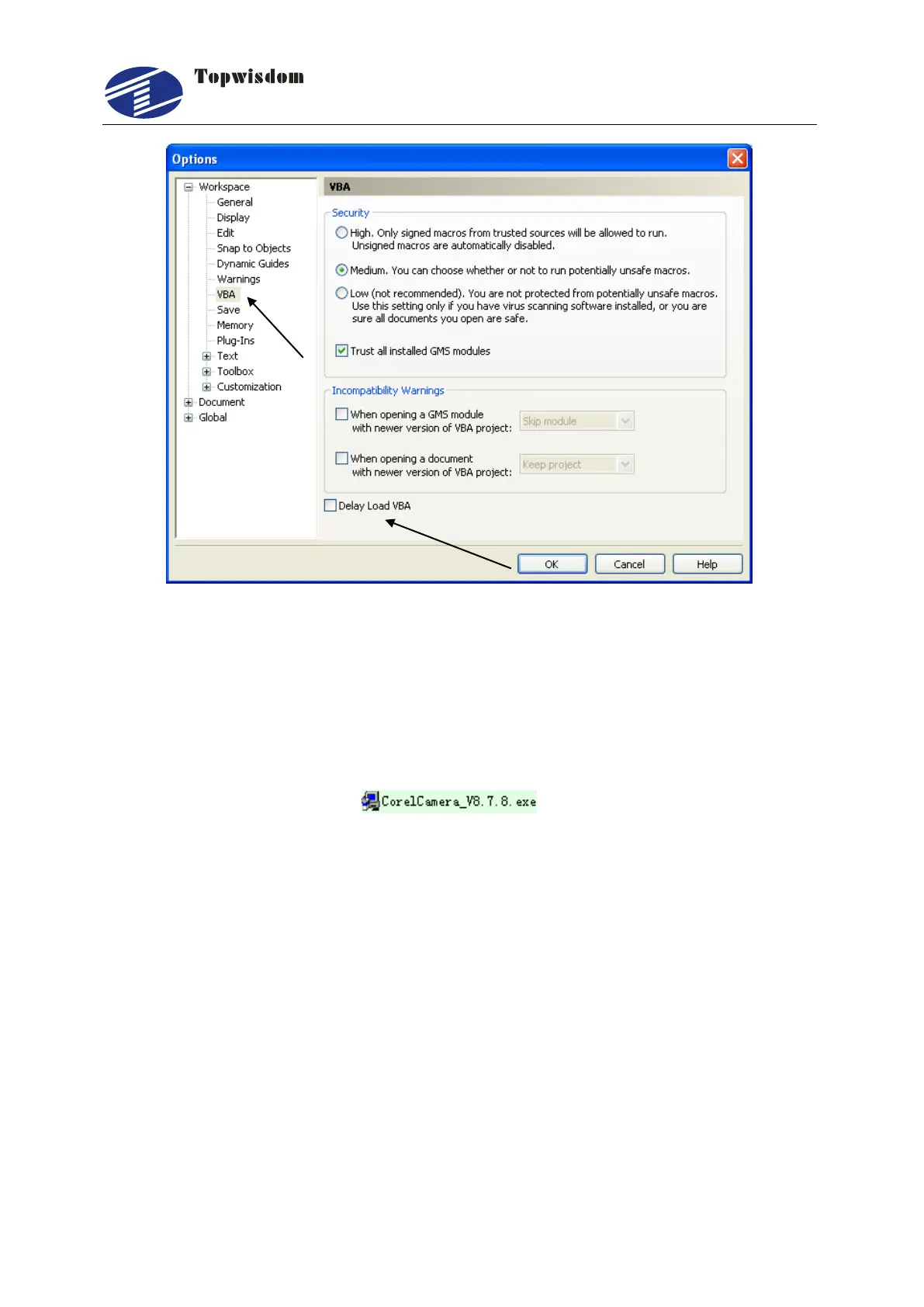
Fig. 3-7
In Fig. 3-7, first click on the ―VBA‖ as pointed out by the arrow in the left, then choose
the "Delay Load VBA" at the bottom, the installation is thoroughly completed.
3.2 Uninstalling CorelDRAW Direct Output
Double click on the icon of CorelDRAW Direct Output
installation software for uninstall, select ―Uninstall‖ and click the ―next‖ to uninstall the
software. The CarveNorNor folder in the root folder of CoreDRAW application and the
CORELSAVE_NOR folder in Draw folder can be manually deleted if it was needed.
3.3 Installing CAD Direct Output
Now there are two CAD Direct output software available.
CAD04-06_V8.3.1.exe
CAD07-09_V8.3.1.exe
CAD04-06_V8.3.1.exe is for installing on AutoCAD2004-2006, now the current
software version is V8.3.1—the version is according which program you installed. The
version is shown in the installing program name, as you can see in
CAD04-06_V8.3.1—the version is V8.3.1. CAD07-09_V8.3.1.exe is for installing on



 To Next Page