AccessingProtectedMenus
TheTRANSPORTSPEEDisadjustablewithinthe
SETTINGSMENUoftheInfoCenter.Thesesettingsare
intheProtectedMenu.
Note:ThefactorydefaultPINcodeforyoumachine
iseither0000or1234.
IfyouchangedthePINcodeandforgotthecode,
contactyourAuthorizedServiceDealerforassistance.
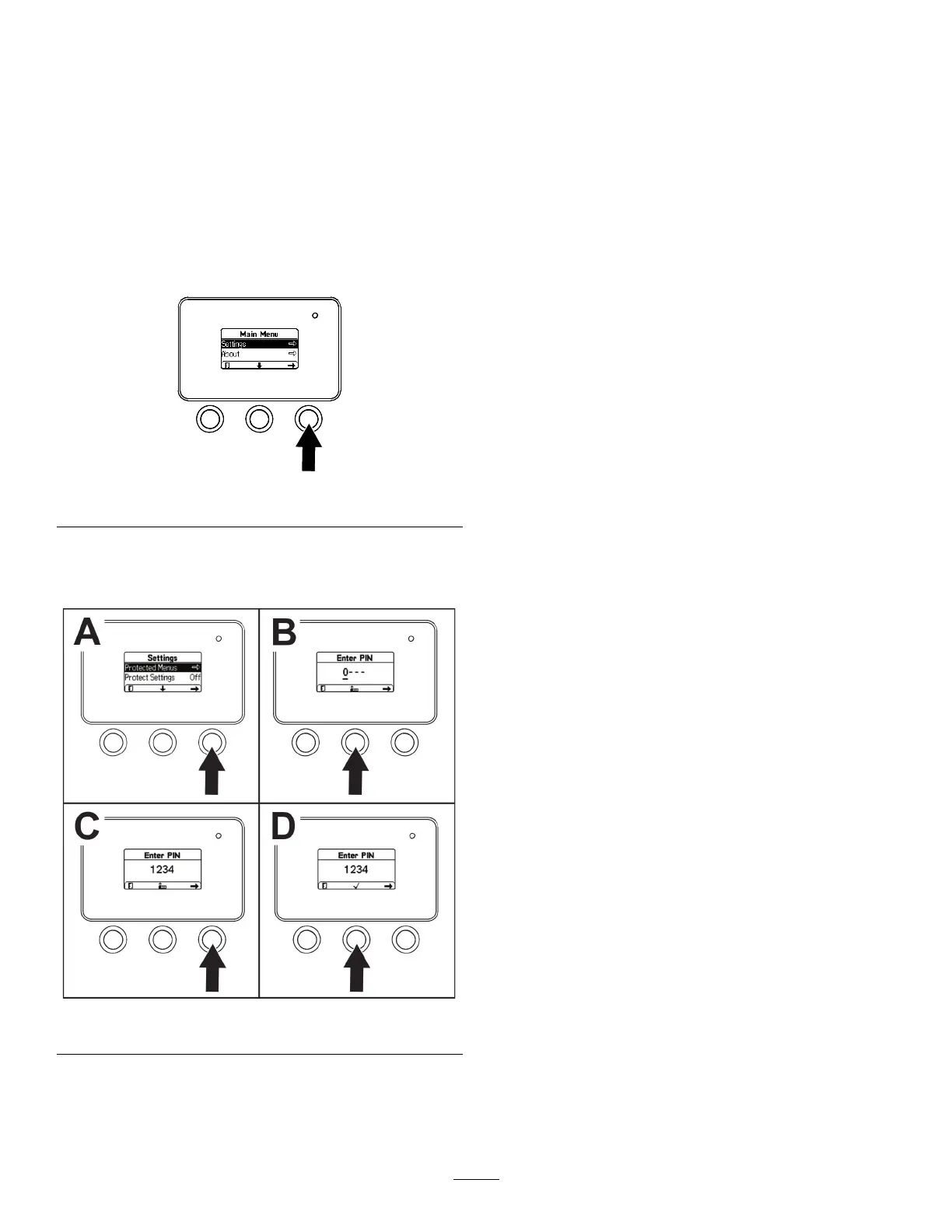
1.FromtheMAINMENU,usethecenterbuttonto
scrolldowntotheSETTINGSMENUandpressthe
rightbutton(Figure25).
g264775
Figure25
2.IntheSETTINGSMENU,usethecenterbuttonto
scrolldowntothePROTECTEDMENUandpress
therightbutton(Figure26A).
g264249
Figure26
3.ToenterthePINcode,pressthecenterbutton
untilthecorrectrstdigitappears,thenpress
therightbuttontomoveontothenextdigit
(Figure26BandFigure26C).Repeatthisstep
untilthelastdigitisenteredandpresstheright
buttononcemore.
4.PressthemiddlebuttontoenterthePINcode
(Figure26D).
Note:IftheInfoCenteracceptsthePINcode
andtheprotectedmenuisunlocked,theword
“PIN”displaysintheupperrightcornerofthe
screen.
Youcanviewandchangethesettingsinthe
PROTECTEDMENU.OnceyouaccessthePROTECTED
MENU,scrolldowntoPROTECTSETTINGSoption.
Usetherightbuttontochangethesetting.Setting
theProtectSettingstoOFFallowsyoutoviewand
changethesettingsinthePROTECTEDMENUwithout
enteringthePINcode.SettingtheProtectSettings
toONhidestheprotectedoptionsandrequiresyou
toenterthePINcodetochangethesettinginthe
PROTECTEDMENU.
SettingtheMaximumAllowedTransportSpeed
1.IntheSETTINGSMENU,scrolldowntoTRANSPORT
SPEEDandpresstherightbutton.
2.Usetherightbuttontoincreasethemaximum
transportspeed(30%to100%).
3.Usethecenterbuttontodecreasethemaximum
transportspeed(30%to100%).
4.Presstheleftbuttontoexit.
5.WhennishedwiththePROTECTEDMENU,press
theleftbuttontoexittotheMAINMENU,then
presstheleftbuttontoexittotheRUNMENU.
17



 To Next Page