Parameterization and configuration
TR-Electronic GmbH 2007, All Rights Reserved Printed in the Federal Republic of Germany
Page 58 of 68 TR - ECE - BA - DGB - 0065 - 03 03/11/2016
7.2.2 GET DATA CHECK - command
Instance 19, r/w
If the parameters are programmed via the "Parameter-Class", for taking over and test
the data, a Data-Check must be performed subsequently. The result (2 bytes) of the
SET DATA-CHECK can be read with GET DATA-CHECK. Are all bits of the returned
UINT value "0", no error is available. The possible errors are indicated in following
table:
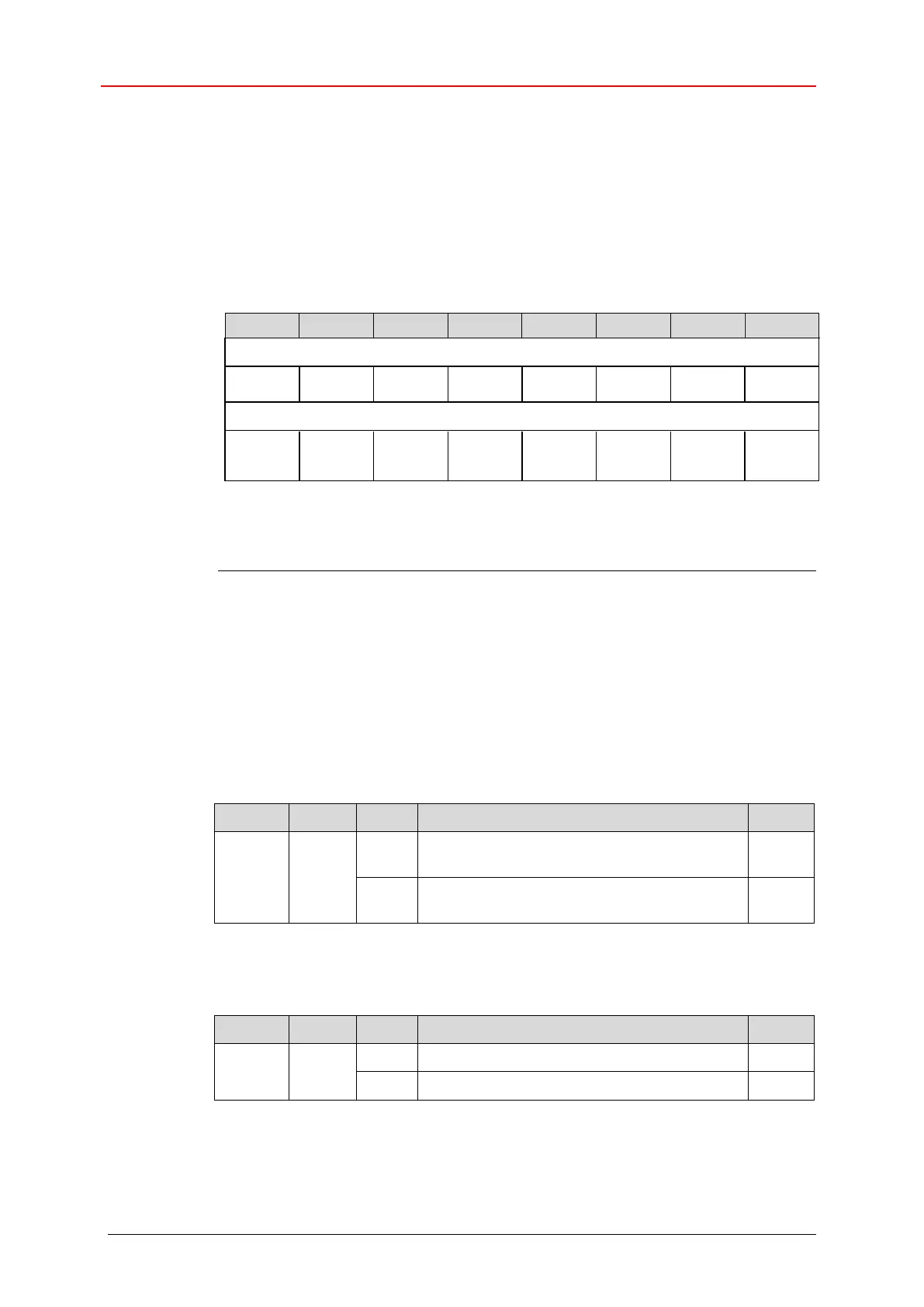
GET DATA-CHECK:
Low Byte Error Receive Buffer Master
High Byte Error Receive Buffer Master
An error bit can only then be reset when the data is corrected and a DATA-CHECK
command is executed.
1)
SL = Safety Limit
2)
OL = Operating Limit
3)
TNOS = Total Number of Steps
7.3 Parameters / Range of values
7.3.1 Direction
Position increasing clockwise
(view onto the shaft)
Position decreasing clockwise
(view onto the shaft)
7.3.2 Output Code










 To Next Page