Parameterization and configuration
TR-Electronic GmbH 2009, All Rights Reserved Printed in the Federal Republic of Germany
Page 88 of 92 TR - ELA - BA - DGB - 0015 - 13 04/23/2020
After installation of the device master file the device in the catalogue is at the following place:
PROFINET IO --> Additional Field Devices --> Encoders -->
TR Linear_Magnetostriction --> TR PROFINET Linear
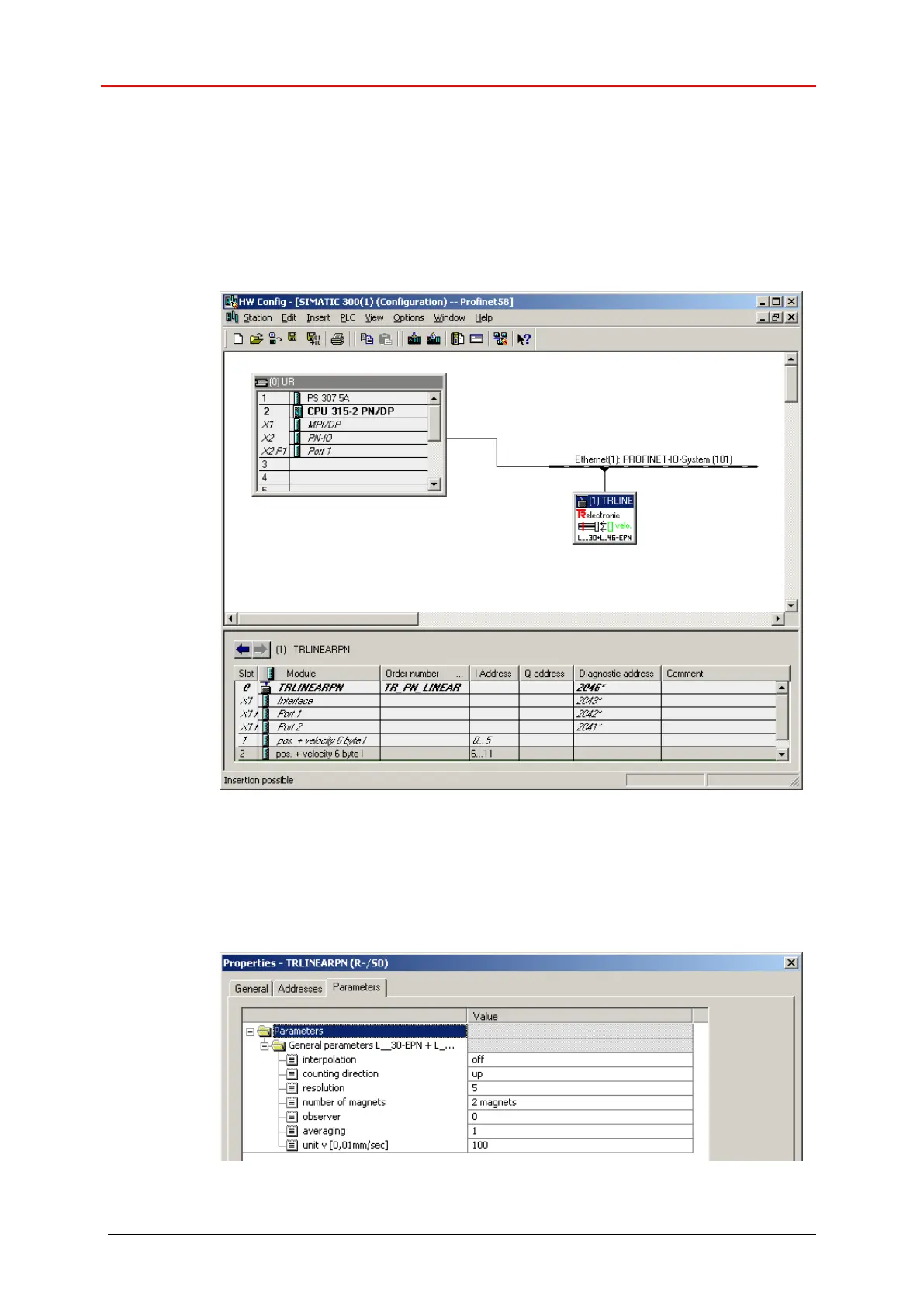
In the example, as PROFINET IO-Device a LA-46 with two magnets was connected to
the PROFINET network. Under the category "Module Slot 1" already one input module
"pos + velocity 6 byte I" is entered, which cannot be changed. The second input
module on slot 2 was entered manually:
Figure 11: Configuration example with “LA46”
Please recognize that the position data + velocity for the first magnet have the
addresses 0..5. The addresses 6..11 are reserved for the second magnet, see figure
above.
In the tab Properties --> Parameters the device parameters can be adjusted:
Figure 12: Parameter setting


 To Next Page
 Loading...