TEW-823DRU
16
© Copyright 2014 TRENDnet. All Rights Reserved.
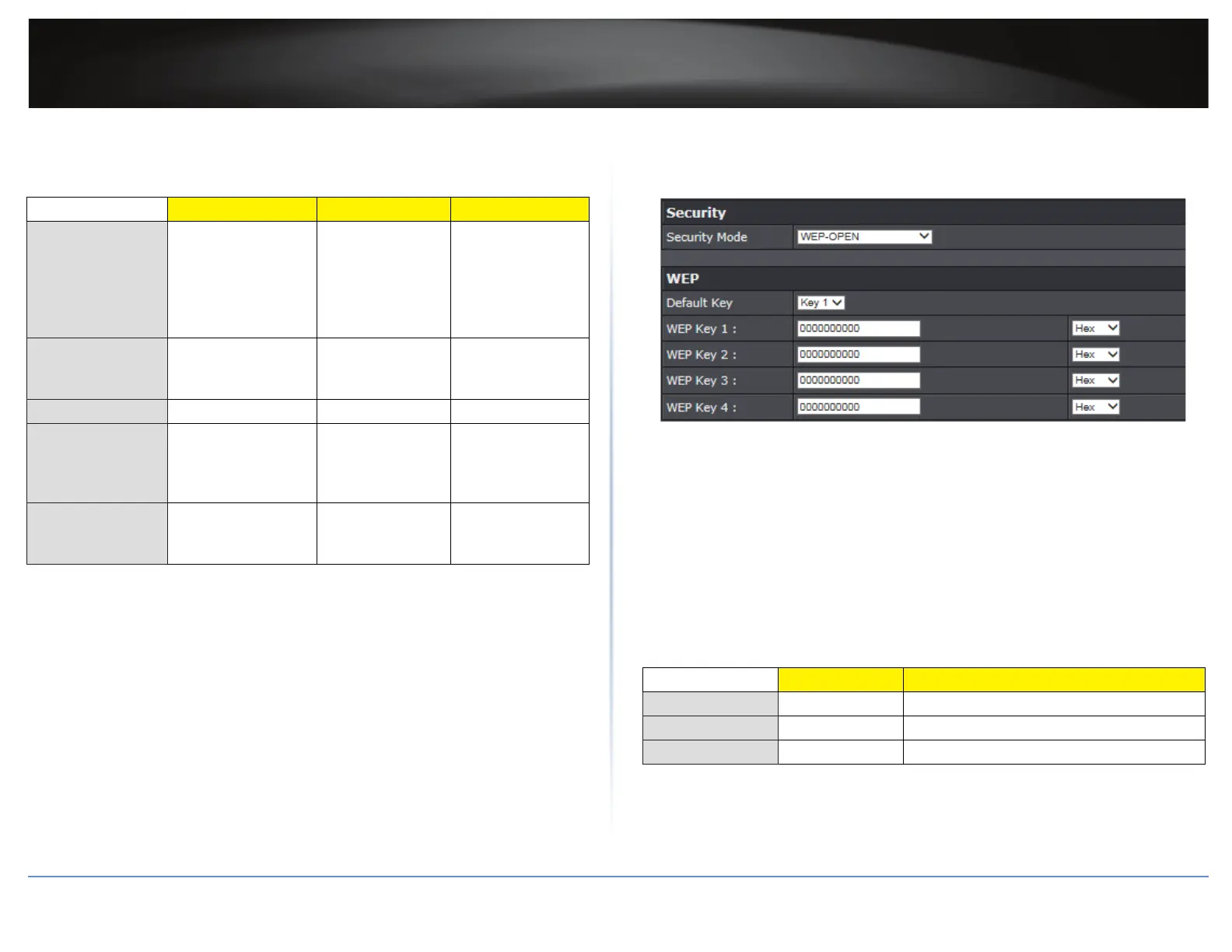
The following table is a brief comparison chart of the wireless security types and the
recommended conguraon depending on which type you choose for your wireless
network.
Security Standard WEP WPA WPA2
Compable
Wireless Standards
IEEE 802.11a/b/g
(802.11n devices will
operate at 802.11g
to connect using this
standard)
IEEE 802.11a/b/g
(802.11n devices
will operate
at 802.11g to
connect using this
standard)
IEEE 802.11a/b/
g/n/ac
Highest
Performance Under
This Seng
Up to 54Mbps Up to 54Mbps Up to 300Mbps
(11n) or 867Mbps
(11ac)
Encrypon Strength Low Medium High
Addional Opons Open System or
Shared Key,
HEX or ASCII,
Dierent key sizes
TKIP or AES,
Preshared Key or
RADIUS
TKIP or AES,
Preshared Key or
RADIUS
Recommended
Conguraon
Open System ASCII
13 characters
TKIP
Preshared Key
8-63 characters
AES
Preshared Key
8-63 characters
ÍNote: The compable wireless standard depends on the data rate supported by the
device:
• 802.11n: 150Mbps.
• 802.11ac: 433Mbps, 867Mbps.
Selecng WEP
If selecng WEP (Wired Equivalent Privacy), please review the WEP sengs to
congure and click Apply to save the changes.
Security Mode: Choose WEP-OPEN, WEP-SHARED, or WEP-AUTO.
ÍNote: It is recommended to use Open because it is known to be more secure than
Shared Key.
Default Key: Enter the WEP key. This is the password or key that is used to connect
your computer to this router wirelessly. You can enter 64-bit or 128-bit key. You can
enter up to four keys but only the one chosen as the Default Key will be used.
ÍNote: It is recommended to use 128-bit because it is more secure to use a key that
consists of more characters.
Hex/ASCII: Enter the WEP key format. Refer to the table below for the acceptable
characters and lengths for each format.
WEP Key Format HEX ASCII
Character set 0-9 & A-F, a-f only Alphanumeric (a,b,C,?,*, /,1,2, etc.)
64-bit key length 10 characters 5 characters
128-bit key length 26 characters 13 characters





 To Next Page