TEW-823DRU
17
© Copyright 2014 TRENDnet. All Rights Reserved.
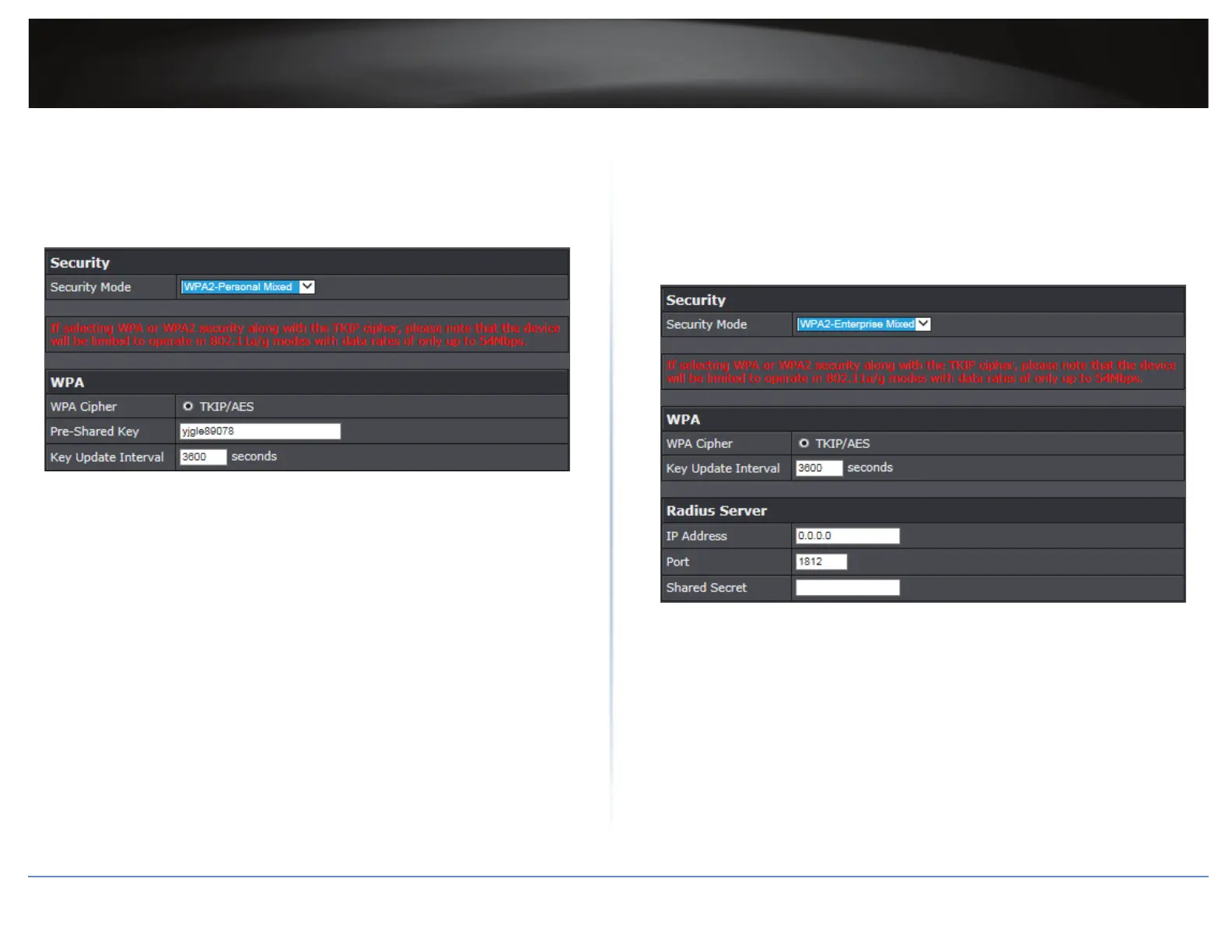
Selecng WPA-PSK / WPA2-PSK / WPA2-Personal Mixed
In the Security Mode drop-down list, select WPA-PSK, WPA2-PSK,or WPA2-Personal
Mixed. Please congure the sengs and click Apply to save the changes.
ÍNote: If selecng WPA or WPA2 security along with the TKIP cipher, the device will
be limited to operate in 802.11a/g modes with data rates up to 54Mbps.
The following secon outlines opons when selecng WPA-PSK, WPA2-PSK,or WPA2-
Personal Mixed,
WPA Cipher: The available Cipher Type for WPA-PSK is TKIP and for WPA2-Personal
Mixed is TKIP/AES. For WPA2-PSK the default Cipher Type is AES but if you need the
backward-compability (so it would accept WPA connecons), choose TKIP/AES
WPA Pre-Shared Key: Enter the passphrase.
ͳ This is the password or key that is used to connect your computer to this router
wirelessly.
Key Format: 8-63 alphanumeric characters (a,b,C,?,*, /,1,2, etc.).
Key Update Interval: Enter the me interval (seconds) of when the network
passphrase will rotate.
ÍNote: It is recommended to use the default interval me. Your passphrase will not
change, rotaon of the key is part of the WPA protocol and designed to increase
security.
Selecng WPA / WPA2 / WPA2-Enterprise Mixed
In the Security Mode drop-down list, select WPA, WPA2, or WPA2-Enterprise Mixed.
Please congure the sengs and click Apply to save the changes.
ÍNote:
ͳ If selecng WPA or WPA2 security along with the TKIP cipher, the device will be
limited to operate in 802.11a/g modes with data rates up to 54Mbps.
ͳ This security type requires an external RADIUS server.
The following secon outlines opons when selecng WPA, WPA2, or WPA2-Enterprise
Mixed,
WPA Cipher: The available Cipher Type for WPA is TKIP and for WPA2-Enterprise
Mixed is TKIP/AES. For WPA2 the default Cipher Type is AES but if you need the
backward-compability (so it would accept WPA connecons), choose TKIP/AES.
Key Update Interval: Enter the me interval (seconds) of when the network
passphrase will rotate.
ÍNote: It is recommended to use the default interval me. Your passphrase will not
change, rotaon of the key is part of the WPA protocol and designed to increase
security.
IP Address: Enter the IP address of the RADIUS server. For example, 192.168.10.250.





 To Next Page