Goblin – Operational Manual
TRINITY
[7]
Installation and Commissioning
The Goblin supports two installation modes – 3P4W and 3P3W. The installation
process of these modes is described below:
3P4W Mode Installation
Follow these steps to install / commission the unit.
1. Push the unit into the panel and mount using the clamps provided. Connect
the Auxiliary supply to the terminals marked P and N. The Auxiliary supply
range is 80 V AC to 270 V AC.
2. Connect the three phases with the phase sequence being R-Y-B to the
terminals marked U1, U2 and U3 respectively. Make sure that the three
phases coming to the unit come through control fuses of 1.0 Amp rating. This
will protect the electronics inside from damage due to severe overvoltage or
phase faults in the system.
3. Connect the neutral to the terminal marked U4.
4. Connect the two wires from the R-phase CT to terminals marked M1 & L1
such that S1 from CT goes to M1 on the unit. Connect the two wires from the
Y-phase CT to terminals marked M2 & L2 such that S1 from CT goes to M2
on the unit. Connect the two wires from the B-phase CT to terminals marked
M3 & L3 such that S1 from CT goes to M3 on the unit.
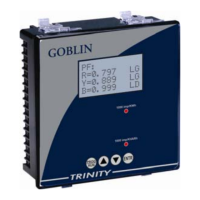
5. Switch on the three phase supply as well as Auxiliary supply. The unit will
come alive and display power information such as factory location for about
three seconds and then, it will display the first page of Run Mode.
6. If there is very little current or no current in the CT circuits, the unit may show
PFs as 0.999 or 1.000. This will go away as soon as the current builds up in
the CTs, above 0.4 % of rated CT.


 To Next Page