A-8 Model 3321 Aerodynamic Particle Sizer
Spectrometer
1. Switch the power off using the switch on the back of the cabinet and
unplug the power cord from the APS™ spectrometer.
2. Remove the knurled retaining ring from the outer inlet nozzle.
3. Loosen the six screws on both sides of the cabinet (two turns is
sufficient) and remove the cover straight upward.
4. Remove the two screws securing the digital printed circuit board.
5. Tilt the printed circuit board all the way back so that the pumps are
visible and the board rests against the top edge of the back of the
instrument.
6. The APS™ spectrometer uses two EPROM chips. They should be
labeled with seven digit part numbers. It is important that they go in
the correct sockets.
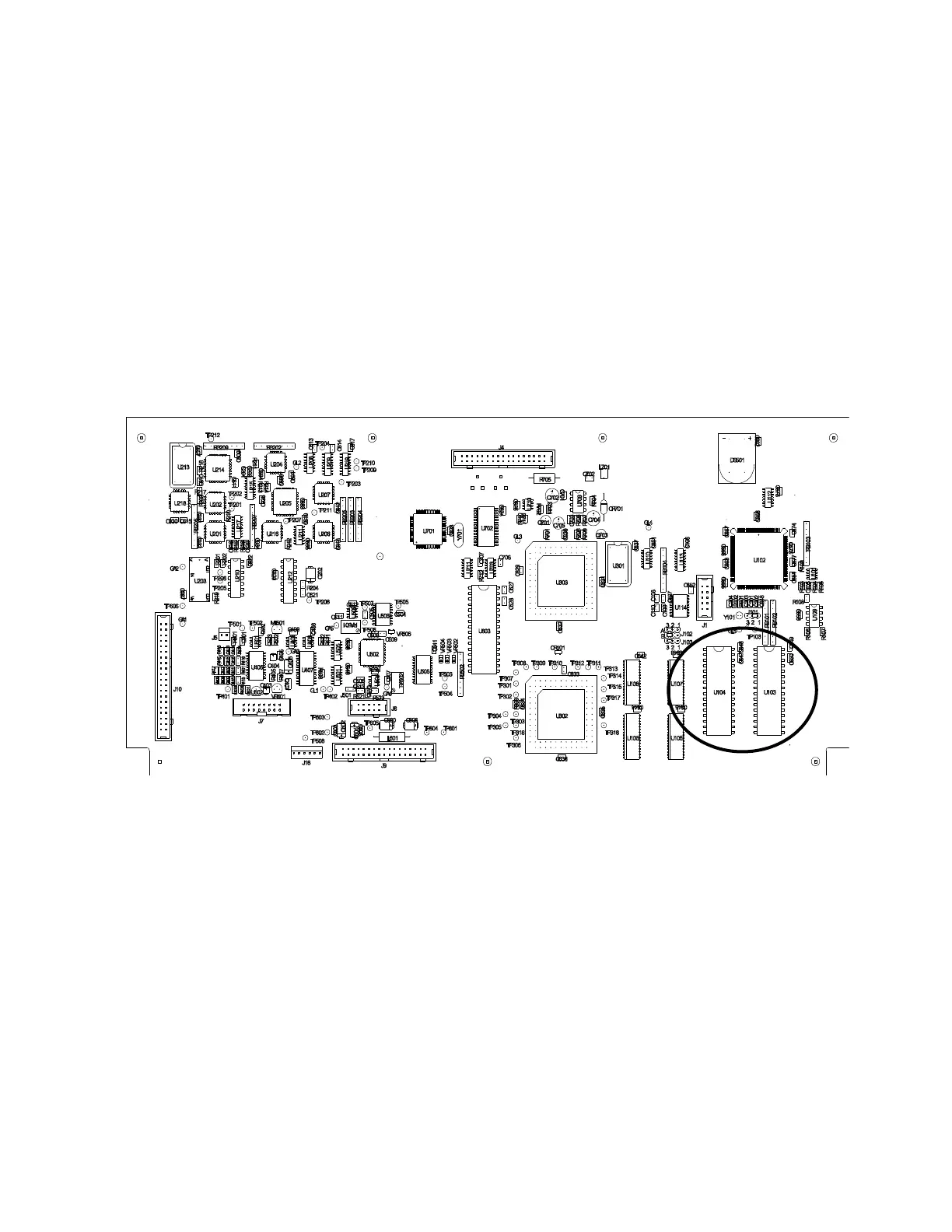
7. Locate the EPROM sockets from Figure A-1.
Figure A-1
Location of EPROM Chips on APS™ Spectrometer Digital PC-Board
8. Use the EPROM removal tool provided with the new EPROM chips to
remove one of the old chips.
9. Remove the new EPROM with the same seven-digit part number
from its static protection bag
10. Install the new chip into the vacant socket by aligning the notch on
the top center of the chip with the notch shown on the silkscreen.
11. Then, while supporting the printed circuit board with one hand behind
it, slightly insert one row of pins and then the other.
12. Once both rows of pins are slightly inserted, press the EPROM firmly
the rest of the way into the socket.














 To Next Page