UT25CL User Manual
12
Short press to turn on/off the backlight; long press to turn on/off the mute mode.
Short press to turn on/off the flashlight.
NCV button:
1). Cable tracking mode is the default mode after boot-up. Short press this button to switch to NCV mode.
2). In NCV mode, short press to switch to AUTO mode (in cable tracking mode).
The buzzer is designed in here.
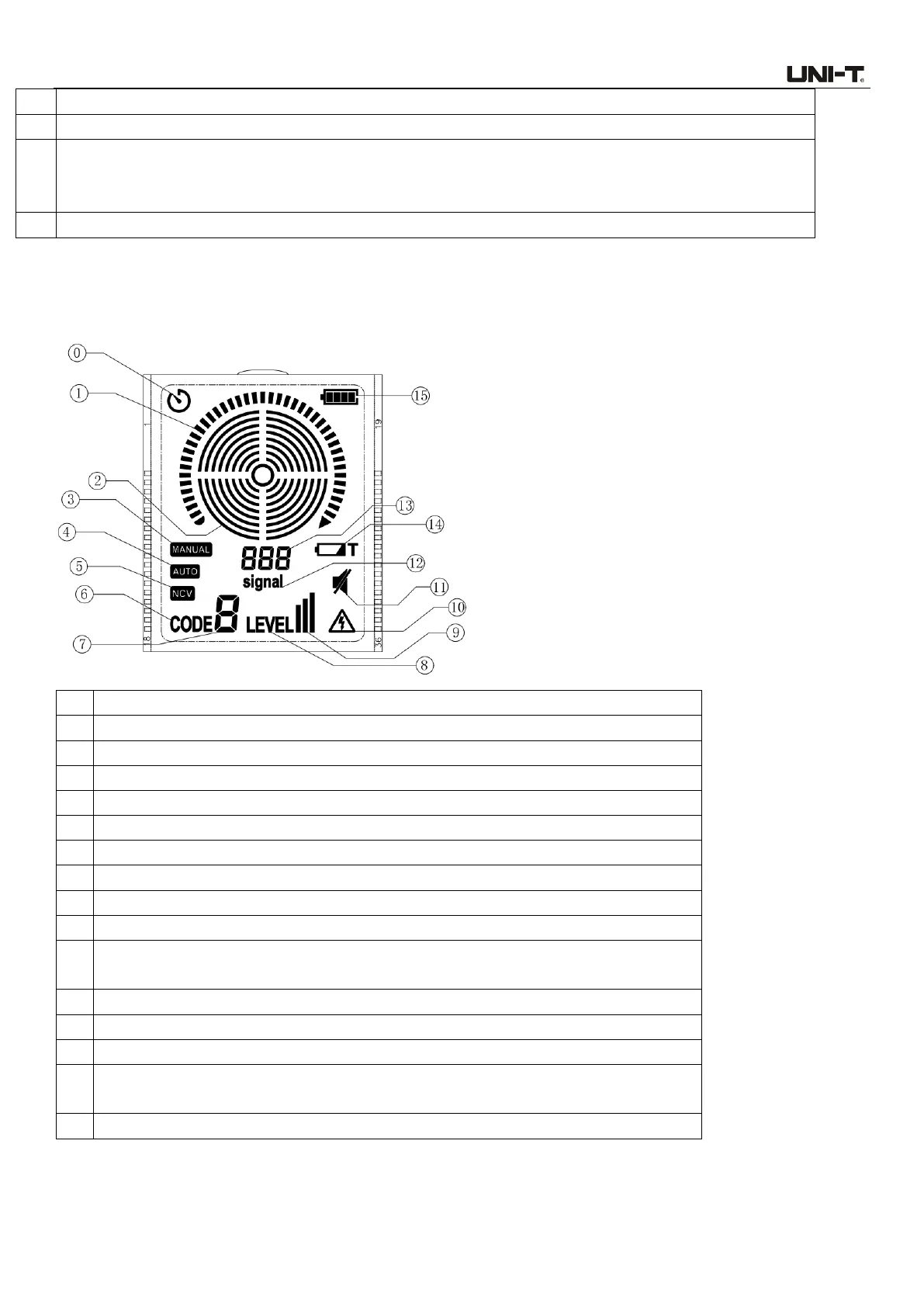
5.3 Description of Display
MANUAL mode (in cable tracking mode)
AUTO mode (in cable tracking mode)
NCV mode
CODE symbol (Displayed in cable tracking mode)
Transmitter code (0~7). This code is displayed in cable tracking mode.
LEVEL symbol (Displayed in cable tracking mode)
Transmitter power level (Displayed in cable tracking mode)
This symbol means non-contact voltage (NCV) is sensed. (NCV signal is sensed in
cable tracking mode or in NCV mode)
This symbol appears when the buttons are set in mute mode.
A signal symbol (Displayed in cable tracking mode)
Relative signal amplitude (Displayed in cable tracking mode)
The symbol means the transmitter is in low battery state. (Displayed in cable
tracking mode)
Battery power level (including 4 levels)



 To Next Page