UT25CL User Manual
31
8.7 Track Low-Voltage Wire and Data Cable
UT25CL can track data cable, video cable, and thermostat cable (For information about tracking
shielded data cable, please see “8.5 Track Shielded Cable”). Track data cable, video cable, and
thermostat cable:
1. Connect the transmitter by using independent grounding (See Section 7.1)
2. Set the receiver to automatic or manual scanning mode to track the cable.
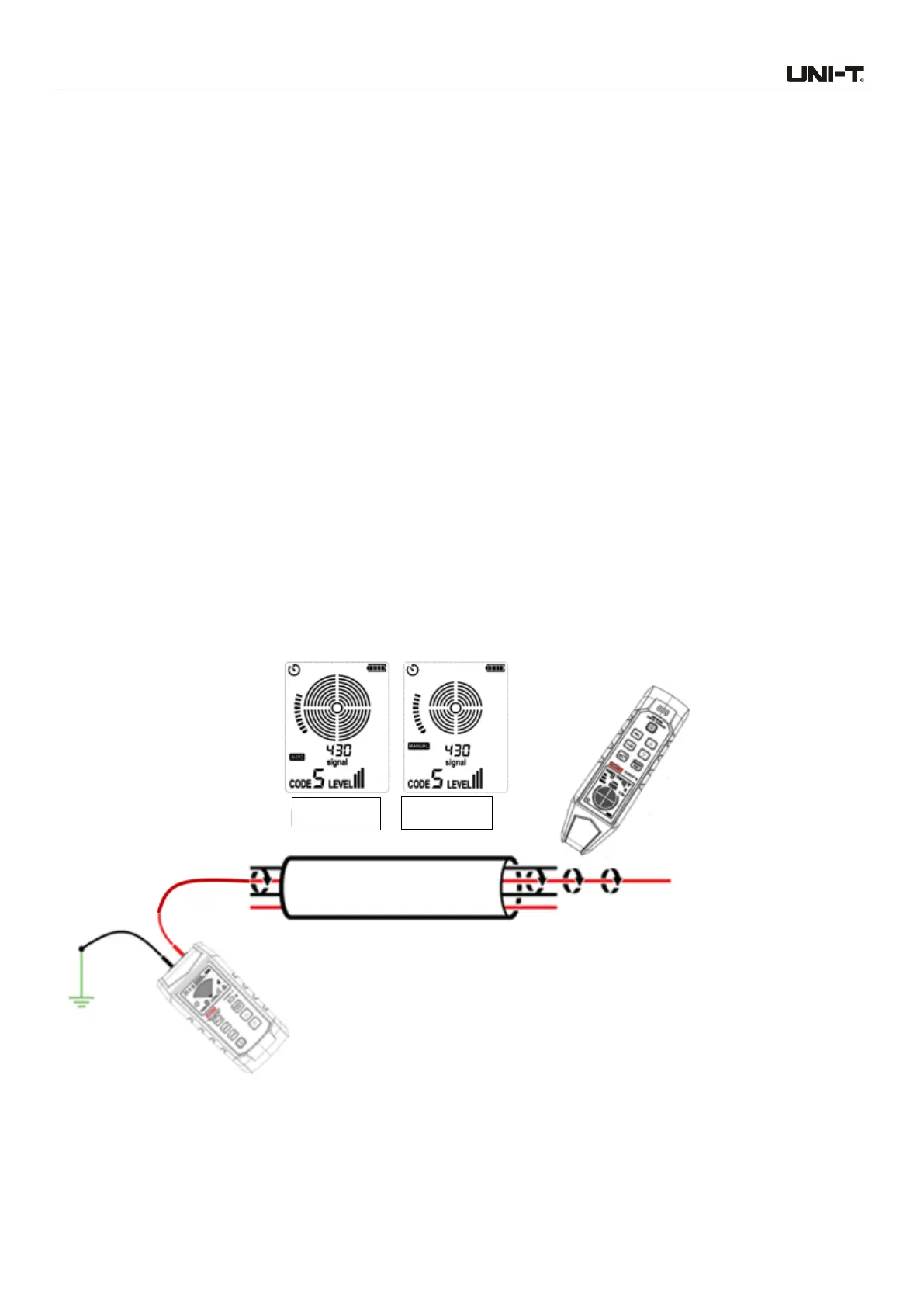
8.8 Identify the Specific Cable in Cable Harness
Identify the specific cable in cable harness.
1. Connect the transmitter. If connected to energized cable, please make sure that the transmitter
is connected to the load side.
2. Select cable tracking mode for the receiver.
3. One cable each time (or, use multiple UT25CLT transmitters with different codes, maximum 8
transmitters can work at the same time, and decrease the LEVEL to II or I to reduce crosstalk. Each
transmitter can be connected to one cable). Pull away each cable from other cables in the cable
harness, and then use the sensor to make contact with these cables. The strongest signal
represents the correct cable.
4. Use the UP and DOWN buttons to adjust the receiver sensitivity if needed.
5. See Figure 8.8.1a for specific application.
Figure 8.8.1a Identify the specific cable in cable harness



 To Next Page