48
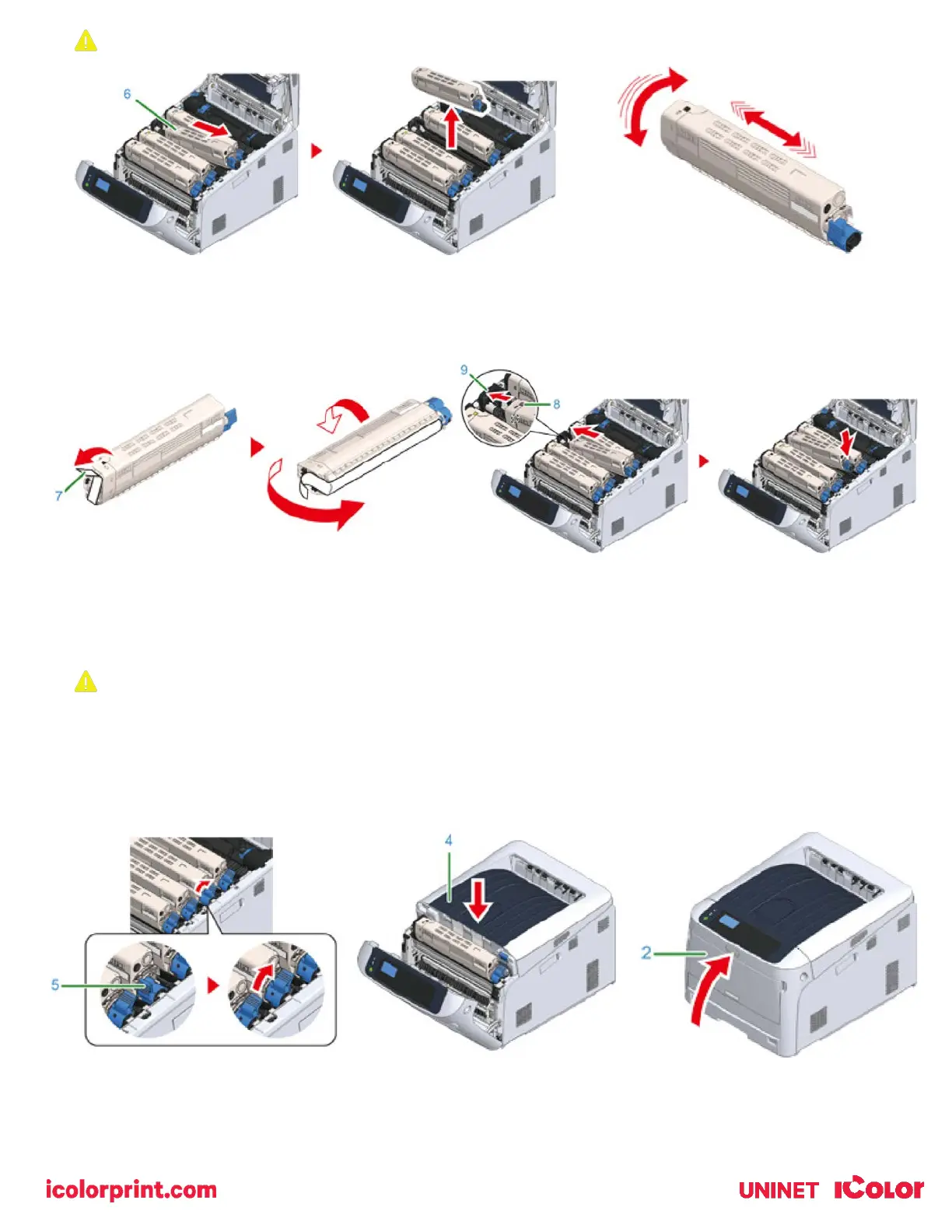
Be sure to replace the toner with the same color that was removed.
8) Remove the tape (7) from the toner cartridge.
9) Insert the left indentation (8) of the toner cartridge to the protrusion (9) of the image drum so that the labels of
color attached to a new toner cartridge (6) and image drum come to the same side and set the right side firmly.
10) While pressing the toner cartridge, turn the toner cartridge lock lever (blue) (5) backward until it aligns on the
mark, and lock the toner cartridge to the image drum.
• You will hear a click when it is locked in place.
Closing the cover without turning the toner cartridge lock lever (blue) may cause a malfunction. Make sure to turn
the cartridge lock lever until it lines up with the arrow in the far end.
11) Close the output tray (4) by pushing the center of the output tray (4) firmly. Close the front cover (2).
• The front cover cannot be closed if the output tray is not closed securely.
12) Recycle your cartridge – request a return label from Uninet.



 To Next Page