47
Replacing the toner cartridge in 2
nd
, 3
rd
and 4
th
Station
1) Display will read C (cyan), M (Magenta) or Y (yellow) low or empty.
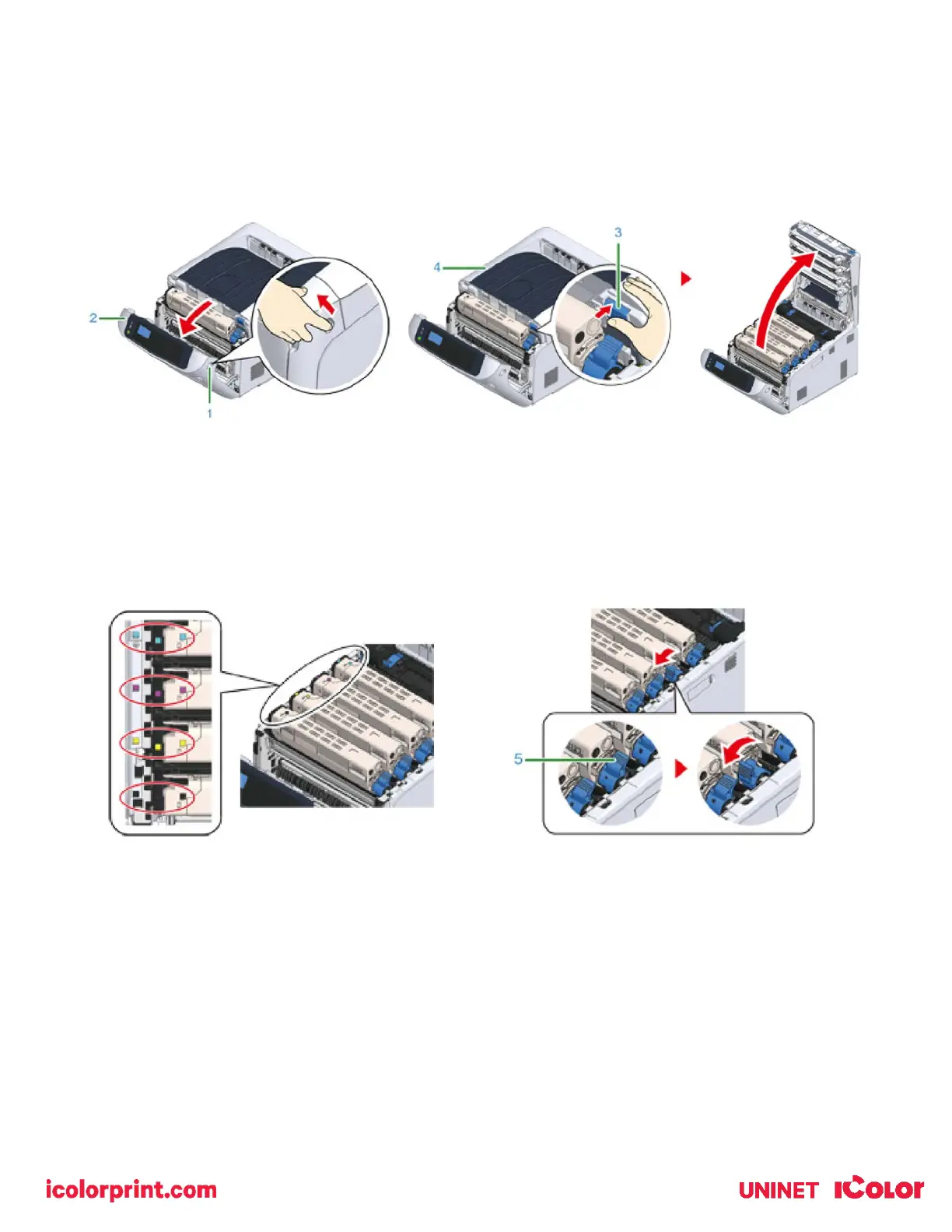
2) Insert your finger into the recess on the right side of the printer and pull the front cover open lever (1) to open the
front cover (2) forward.
3) Press the open button (3) and open the output tray (4).
4) Take note of the toner cartridge color installed in the 4
th
slot.
• Possible options are Cyan, White or Clear.
• Y (yellow) and M (magenta) will never change and these cartridges never swap.
5) Turn the toner cartridge lock lever (blue) (5) of the toner cartridge toward you until its top aligns on the mark to
detach the toner cartridge from the image drum.
6) Lift the toner cartridge (6) from the right side, and remove it from the printer.
7) Unpack a new toner cartridge, and shake the cartridge several times vertically and horizontally.



 To Next Page