67
3) In the same manner, slightly lifting the MP tray, press the left arm inward, then unlock the tab.
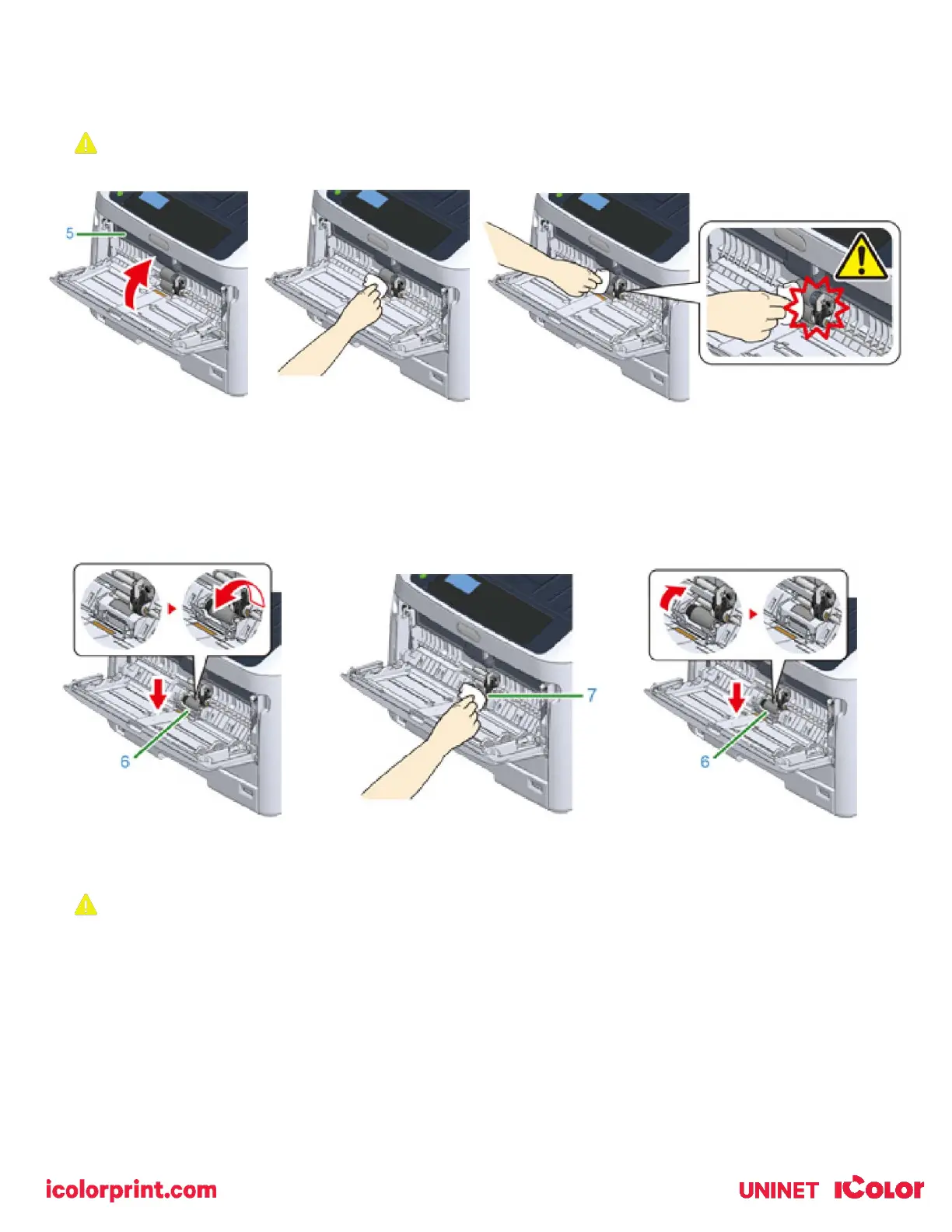
4) Open the paper set cover (5) until it touches to the printer body.
5) Wipe paper feed rollers with a wet cloth that has been wrung out well.
Do not damage the paper end sensor lever when cleaning the rollers.
6) Open the separation roller cover (6) forward while pressing the center part of the MP tray.
7) Wipe the separation rollers (7) with a wet cloth that has been wrung out well.
8) Close the separation roller cover (6).
9) Lower the paper set cover (5).
10) While pressing the right arm (3) on the MP tray (2) inward, slightly lift the MP tray (2) and hook the tab (4).
Closing the MP tray without putting the tab back in place may crack the paper set cover. Be sure to put it back in
place.
11) In the same manner, while pressing the left arm on the MP tray inward, slightly lift the MP tray and hook the tab.



 To Next Page