EasyManua.ls Logo

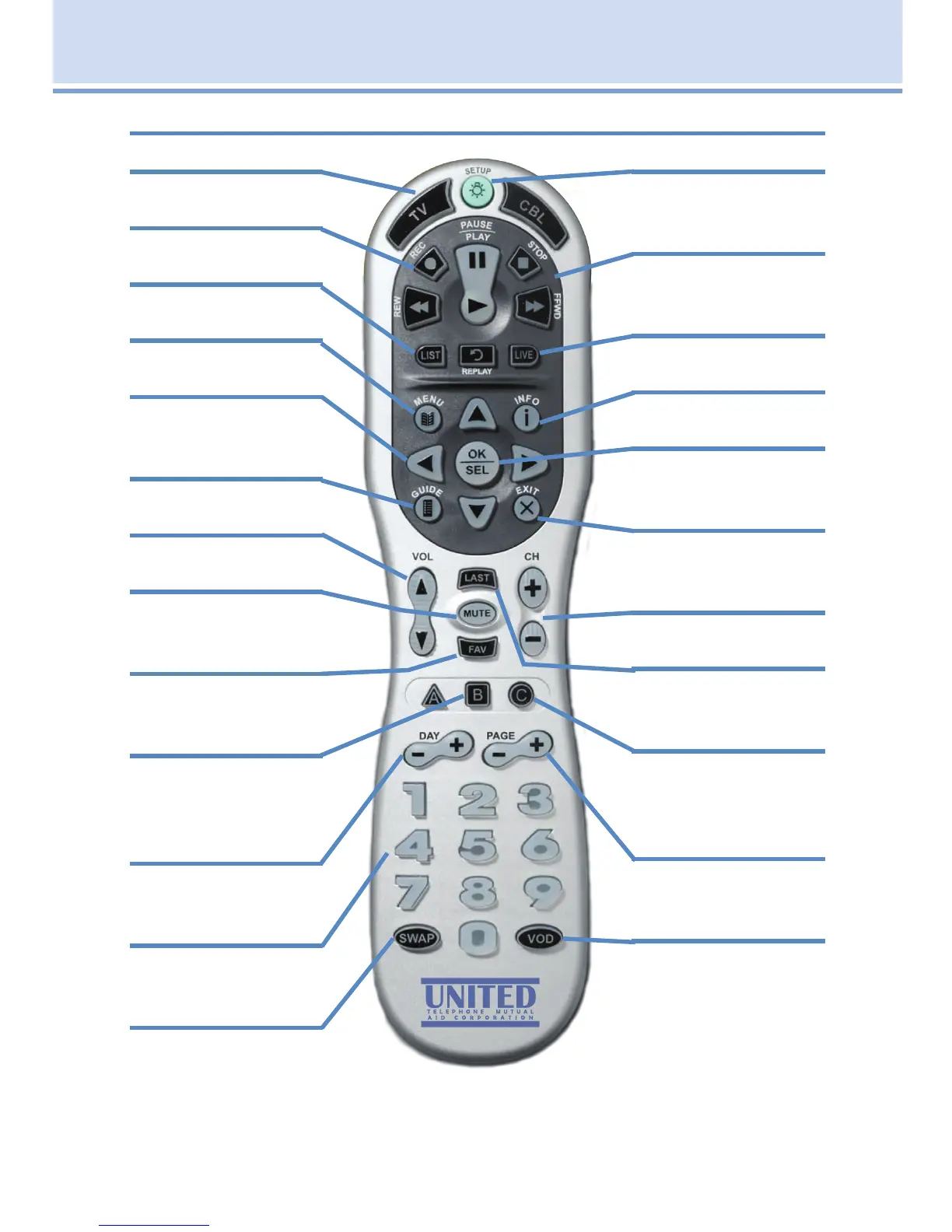
United Communications ADB 3721 - ADB Polaris Remote Control Layout

Default Icon
108 pages
Print Icon
To Next Page IconTo Next Page
To Previous Page IconTo Previous Page
Loading...
3
1 Remote Control Basics
Power (TV)
Turn TV on or off
REC
Begins recording
LIST
For future use
MENU
Displays Menu Bar
Arrow Buttons
Move highlight in
system screens
GUIDE
Displays Guide
VOL + / -
Adjust volume
MUTE
Toggle audio on or
off
FAV
Toggles closed
captions on or off
“B”
Use when blue
button is requested
on screen
DAY - / DAY +
Jumps Guide 1 day
ahead or back
Number Pad
Enter a channel
number or PIN
SWAP
For future use
Power (CBL)
Turn set top box on
or off
Playback Controls
Control playback of
VOD and recordings
LIVE
For Future Use
INFO
Display the Infobar
OK|SEL
Enter a choice you
have made
EXIT
Close any screen
and return to TV
CH +/-
Change the channel
LAST
Return to previous
channel
“C”
Use when red
button is requested
on screen
PG + / -
Jump Guide 1 page
up or down
VOD
Displays VoD menu
ADB Polaris Remote Control Layout

Table of Contents