EasyManua.ls Logo

United Communications ADB 3721 - Remote Control Basics; Remote Control Layouts

Default Icon
108 pages
Print Icon
To Next Page IconTo Next Page
To Previous Page IconTo Previous Page
Loading...
1
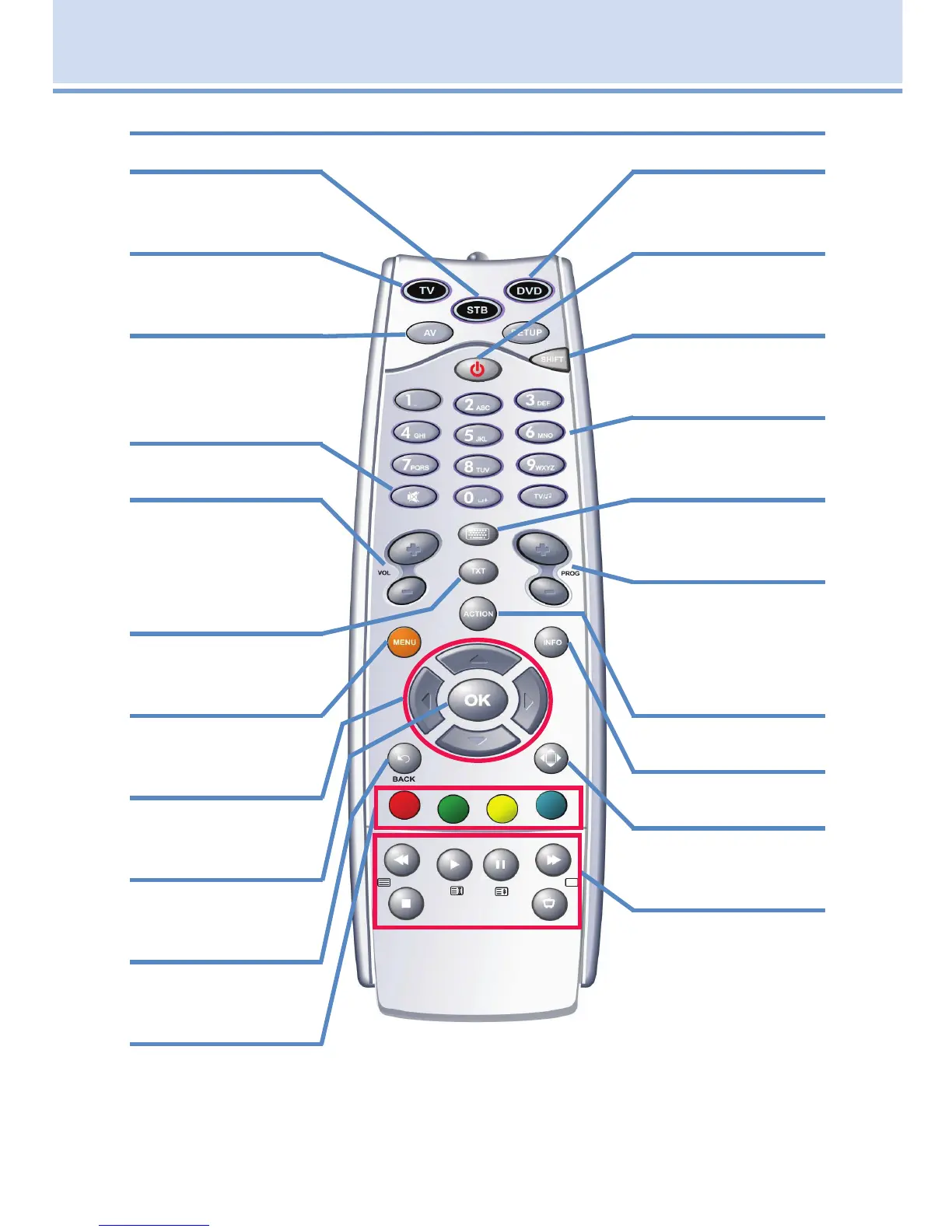
1 Remote Control Basics
STB
Send commands to
the set top box
TV
Send commands to
the TV
AV
Choose between
your TV’s different
connections
Mute
Toggles audio on/off
Vol +/-
Adjust the volume; in
Guide jumps listings
12 hours ahead/
back
Closed Caption
Toggles closed
captions on or off
Menu
Display the Menu
Bar
Direction Buttons
Move the highlight in
system screens
OK
Enter a choice you
have made
Back
Tune to the previous
channel
Function Buttons
For future use
DVD
Send commands to
the DVD player
Power
Turn a selected
device on or off
Shift
Used to program
your remote control
Number Pad
Enter a channel
number or PIN
Keyboard
Displays an on-
screen keyboard
Prog +/-
Change the chan-
nel; in Guide jumps
listing one screen
ahead/back
Action
Displays Guide
Info
Display the Info Bar
Exit
Close any screen
and return to TV
Playback Controls
Control playback of
Video On Demand
and DVR-recorded
programs.
ADB Focus Remote Control Layout

Table of Contents