ENGLISH
- 34 -
6 - CONTROL PANEL
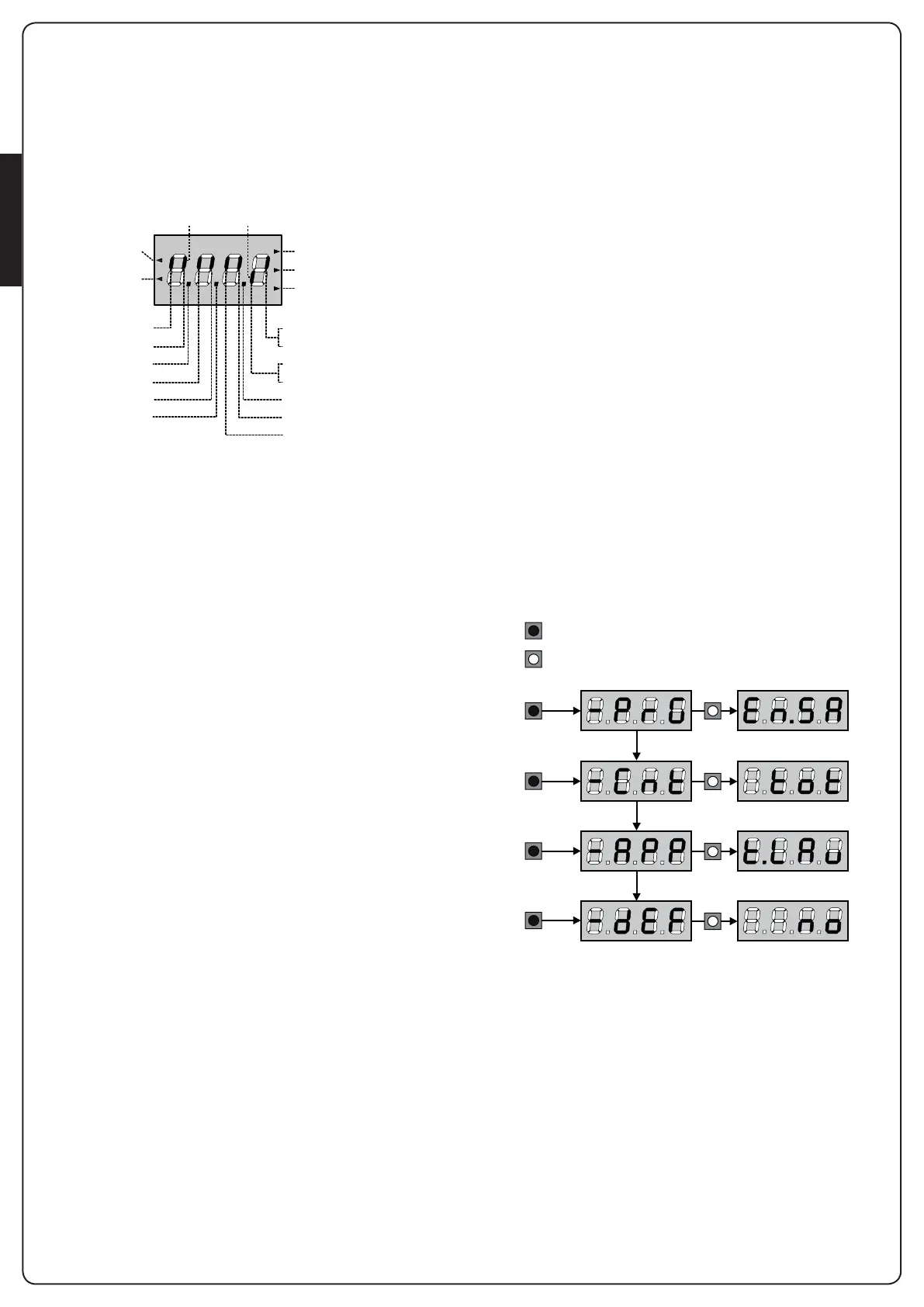
Whenpowerison,thecontrolunitchecksthatdisplaycorrectly
operatesbyswitchingonallsegmentsfor1.5sec.8.8.8.8.
Firmwareversion,e.g.Pr 2.4,willbeviewedinthefollowing
1.5 sec.
Panelwillbevieweduponcompletionofthistest.
Thecontrolpanelrepresentsthephysicalstatusoftheterminal
boardcontactsandoftheprogrammodekeys:iftheupper
verticalsegmentison,thecontactisclosed;ifthelowervertical
segmentison,thecontactisopen(theabovepictureshows
aninstancewheretheinputsLIMITSWITCH,PHOTOCELL1,
PHOTOCELL2,SAFETYRIBBONS1,SAFETYRIBBONS2andSTOP
haveallbeencorrectlyconnected).
The segments indicated as REMOTE SAFETY show the status
oftheremotesafetydevicesforthedeviceconnectedtotheADI
connector.
• IftheADIinterfaceisnotenabled(nodeviceconnected),both
segmentsremainturnedoff.
• Ifthedeviceindicatesaphotocellalarm,theuppersegment
comes on.
• Ifthedeviceindicatesanedgealarm,thelowersegmentcomes
on.
• Ifthedeviceindicatesastopalarm,bothsegmentsstart
ashing.
Points being among display digits showthestatusof
programmingpush-buttons:assoonasapush-buttonispressed,
its relevant point turns on.
The arrows on the left of the display showthestateofthe
startinputs.Thearrowslightwhentherelatedinputisclosed.
The arrows on the display right side showthegatestatus:
• Thehighestarrowturnsonwhenthegateisintoitsopening
phase.Ifitblinks,itmeansthattheopeninghasbeencaused
byasafetydevice(borderorobstacledetector).
• Thecentralarrowshowsthatthegateisonpause.
Ifitblinks,itmeansthatthetimecountdownfortheautomatic
closinghasbeenactivated.
• Thelowestarrowblinkswhenthegateisintoitsclosingphase.
Ifitblinks,itmeansthattheclosinghasbeencausedbya
safetydevice(borderorobstacledetector).
6.1 - USE OF THE DOWN, MENU AND
UP KEYS FOR PROGRAMMING
Programmingofthefunctionsandtimesofthecontrolleris
performedusingaspecialcongurationmenuthatisaccessed
andexploredusing3keys,DOWN,MENU,andUP,whichare
locatedbelowthedisplay.
m CAUTION: Except in the conguration menu, pressing
the UP key activates a START command and pressing the
DOWN key activates a START PEDESTRIAN command.
Toactivatetheprogrammingmodes(thedisplaymustshowthe
controlpanel),pressandholddowntheMENUkeyuntil-PrG
appearsonthedisplay.
HolddowntheMENUkeytoscrollthroughthe4mainmenus:
-PrG CONTROLLER PROGRAMMING
-Cnt COUNTERS
-APP SELF-LEARNING OF WORKING TIMES
-dEF LOAD DEFAULT PARAMETERS
Toenteroneofthefourmainmenus,justreleasetheMENUkey
whenthemenuyouwantappearsonthedisplay.
Tomovethroughthefourmainmenus,presstheUPandDOWN
keystoscrollthroughthevariousitems.PresstheMENUkeyto
displaythecurrentvalueoftheselecteditemandchangeitif
needed.
OPENING IN PROGRESS
OPEN CONTACTCLOSED CONTACT
START
PEDESTRIAN
START
PAUSE (GATE OPENED)
CLOSING IN PROGRESS
STOP
PHOTOCELL 1
DOWN
PHOTOCELL 2
SAFETY RIBBON 1
MENU
LIMIT SWITCH (MOTOR 2)
ENCODER (MOTOR 1)
LIMIT SWITCH (MOTOR 1)
ENCODER (MOTOR 2)
UP
REMOTE SAFETY
SAFETY RIBBON 2
MENU
3”
3”
3”
3”
MENU
6”
MENU
9”
MENU
12”
KEY PRESSED
KEY RELEASED


 To Next Page