ENGLISH
- 35 -
7 - QUICK CONFIGURATION
Thisparagraphconcernsaquickproceduretosetthecontrolunit
andsetitatworkimmediately.
Werecommendfollowingtheseinstructions,inorderto
checkquicklythecorrectoperationofcontrolunit,motorand
accessories,andthenchangingthecongurationincaseofany
non-satisfactoryparameter.
1. Callupthedefaultconguration(chapter8)
m CAUTION: If there is only one motor, set the open
time, t.AP2, to zero in order to inform the controller that
the parameters for motor 2 do not need to be considered.
2. Set items StoP - Fot1 - Fot2 - CoS1 - CoS2
accordingtothesafetydevicesinstalledonthegate.
3. Starttheself-learningcycle(chapter11)
4. checkthattheautomationworkproperlyandifnecessary
modifythecongurationofthedesiredparameters.
8 - LOADING OF DEFAULT
PARAMETERS
Ifnecessary,itispossibletorestorealltheparameterstotheir
standardordefaultvalue(seetableattheend)
m WARNING: This procedure causes the loss of all the
customized parameters, therefore it has been put outside
the conguration menu, to reduce the possibility of
executing it by mistake.
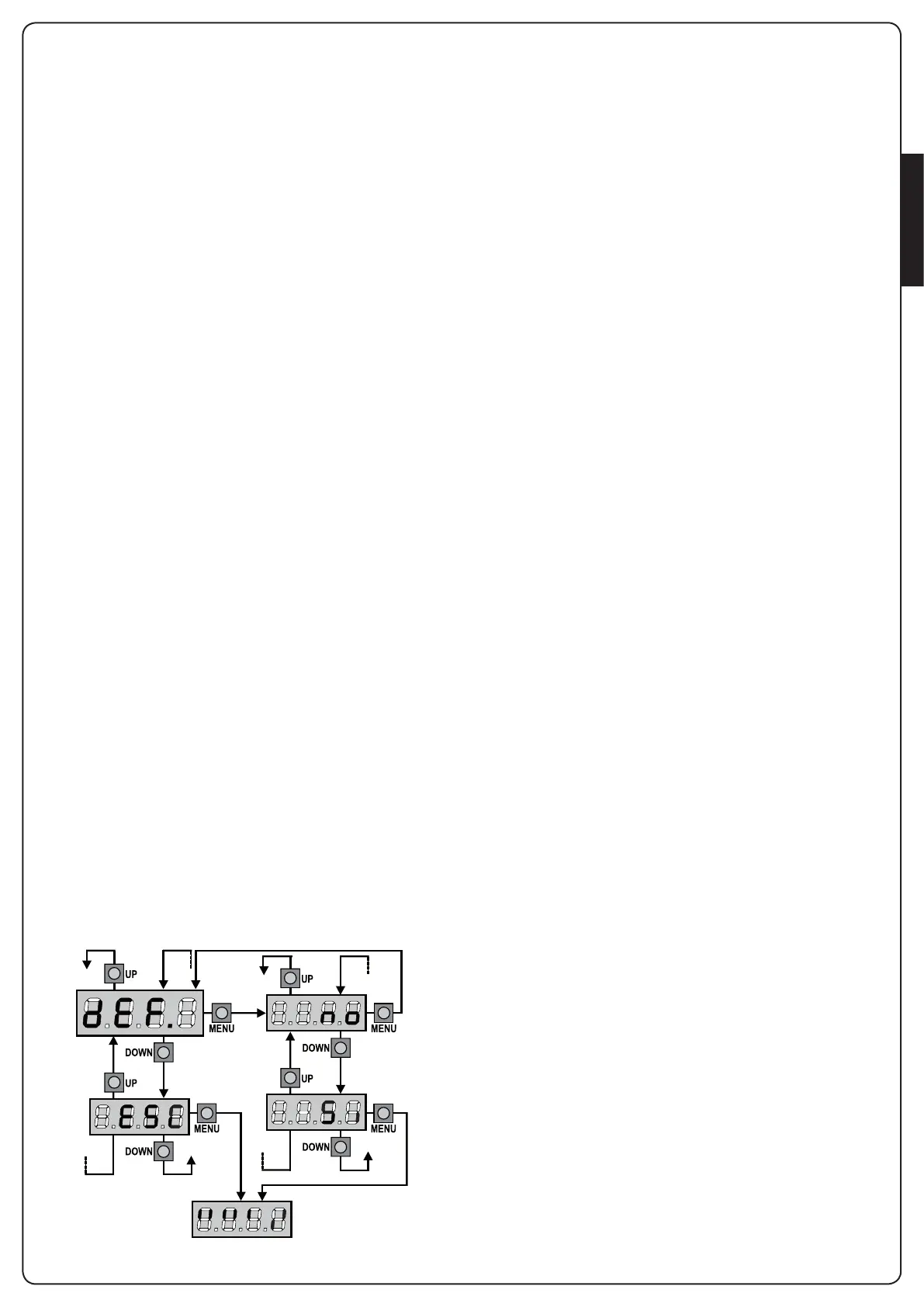
1. PressandholddowntheMENUkeyuntilthe-dEF appears
onthedisplay
2. ReleasetheMENUkey:thedisplaywillshowESC (press the
MENUkeyonlyifyouwanttoleavethismenu)
3. PresstheDOWNkey:dEF willappearonthedisplay.
4. PresstheMENUkey:nowillappearonthedisplay.
5. PresstheDOWNkey:Siwillappearonthedisplay.
6. PresstheMENUkey:Alloftheparametersarereturnedto
theirdefaultvalues(seethetableonpages37)andthedisplay
shows the control panel


 To Next Page