EasyManua.ls Logo

Valmet TS - Operating Diagram

Valmet TS
63 pages
Print Icon
To Next Page IconTo Next Page
To Previous Page IconTo Previous Page
Loading...
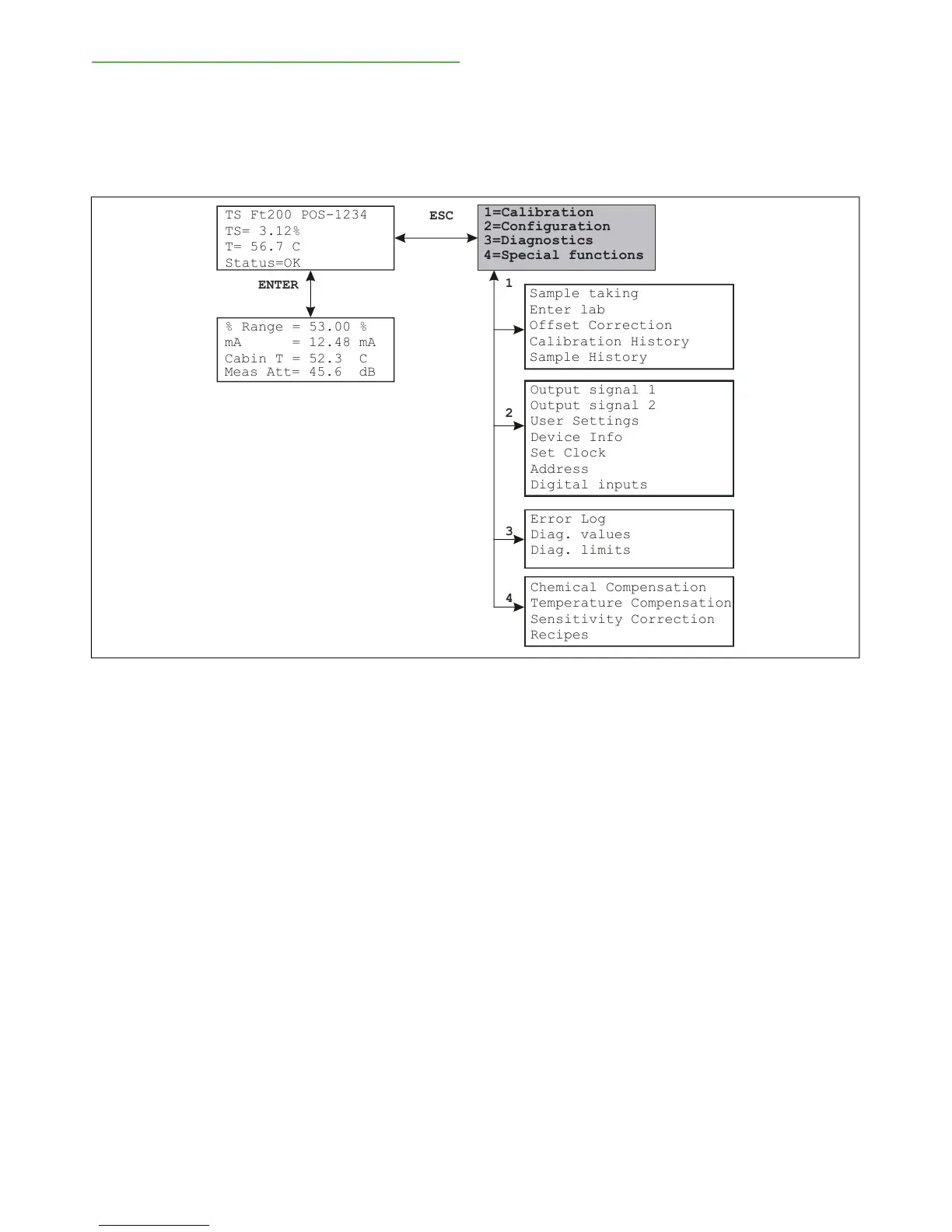
5.2. Operating diagram
The operating diagram is divided into four functions
and their submenus. The main sections are Calibration,
Configuration, Diagnostics, and Special functions.
To access a menu from the main display, press ESC
and then select the number of the desired function.
Press ESC to return to the previous level. If a display
contains more lines than the TCU can show at a time
(i.e. more than four lines), arrows in the top or bottom
right corner of the screen indicate that the lines can be
scrolled up or down with the down arrow or up arrow
keys.
TS Ft200 POS-1234
1=C
2=Tu
4
=D
ENTER
3=Lab Values
TS= 3.12%
T= 56.7 C
Status=OK
1=Calibration
2=Configuration
4
=Special functions
3=Diagnostics
% Range = 53.00 %
mA = 12.48 mA
Cabin T = 52.3 C
ESC
1
2
3
4
Meas Att= 45.6 dB
Sample taking
Enter lab
Offset Correction
Calibration History
Sample History
Output signal 1
Output signal 2
User Settings
Device Info
Set Clock
Address
Digital inputs
Error Log
Diag. values
Diag. limits
Chemical Compensation
Temperature Compensation
Sensitivity Correction
Recipes
Fig. 1. Operating chart.
Installation & Owner's manual, OUL00489 V2.3 EN
20
Valmet Total Solids Transmitter


Table of Contents