SECTION 4: OPERATION
090189-OP_r0 (JUNE-2022) 4 - 3
VANAIR MANUFACTURING, INC.
(844) VAN-SERV • www.vanair.com
Cap•Start Hydraulic-Driven
12V/24V • Battery Starter • Charger
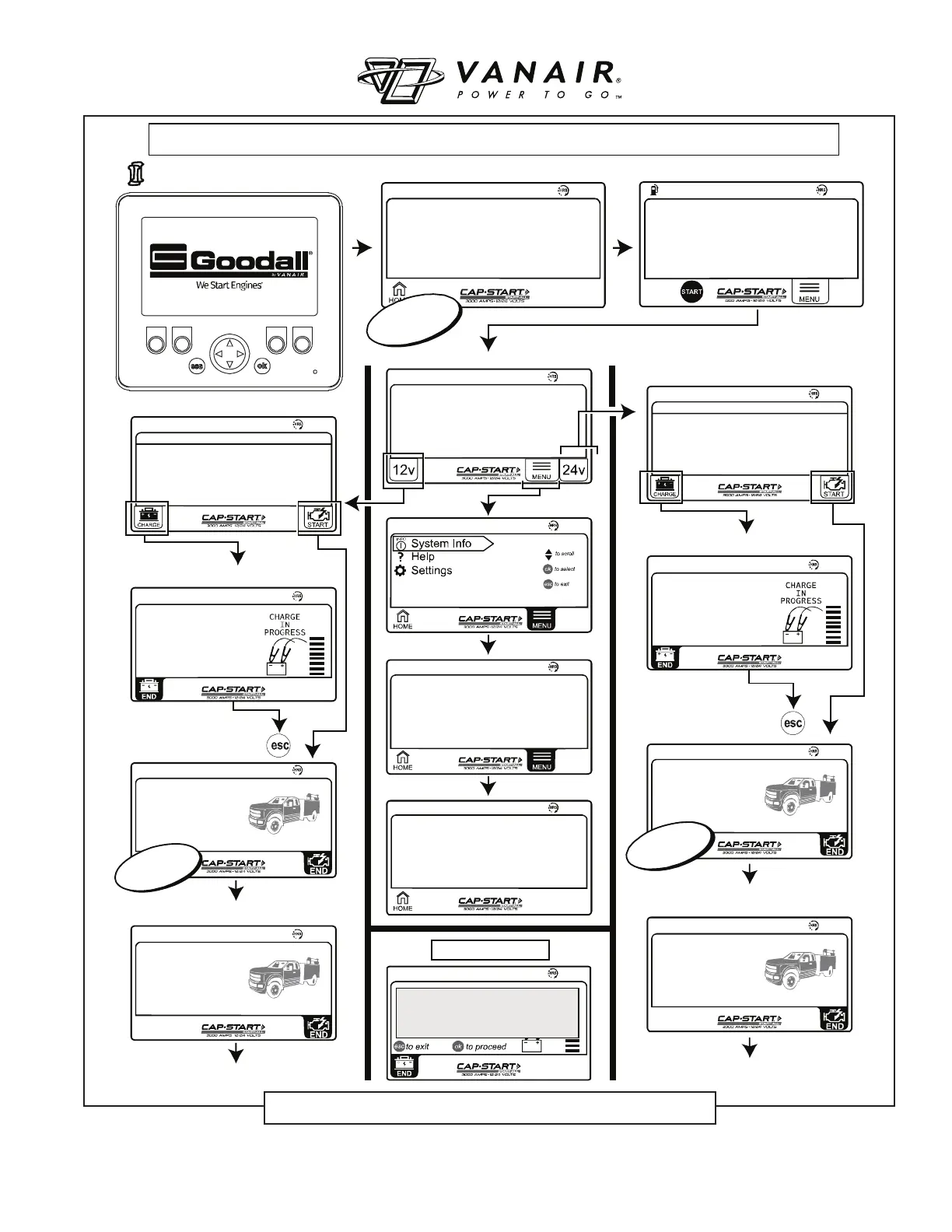
CAP•START SCREEN NAVIGATION MAP FOR HYDRAULIC SYSTEMS
XXX.X
Select System Voltage
XXX.X
XX%
XXX.X
XXX.X
Vanair Manufacturing
(800)-526-8817
Controller: vX.XX
Display: vX.XX
24V SYSTEM SELECTED
Select Charge or Start Function to Begin
Clamp Measurement x.x V
X.X
12V SYSTEM SELECTED
Select Charge or Start Function to Begin
Clamp Measurement x.x V
X.X
X.X
VOLTAGE: X.XV
AMPERAGE: X.X A
TIME REMAINING: XX.XX
X.X
VOLTAGE: X.XV
AMPERAGE: X.X A
TIME REMAINING: XX.XX
X.X
CHARGING CA PACITORS
X.X
CHARGING CA PACITORS
X.X
READY
VOLTAGE: X.XV
AMPERAGE: X.X A
TIME REMAINING: XX.XX
X.X
READY
VOLTAGE: X.XV
AMPERAGE: X.X A
TIME REMAINING: XX.XX
XXX.X
SETTINGS
Display Version: x.xx
Controller Version: x.xxx
XXX.X
Call Vanair
®
Service
1-844-VAN-SERV
VANAIR.COM
X.X
VOLTAGE: X.XV
AMPERAGE: X.X A
TIME REMAINING: XX.XX
ERROR E6
ENSURE CORRECT CONNECTIONS BEFORE
PROCEEDING. NO AMPERAGE DR AW
DETECTED. TURN ON AUXILIA RY
CIRCUITS SUCH AS HEADLIGHTS OR
BLOWER MO T OR. IF THIS ERROR
PERSISTS REFER TO OWNER’S MANUA L
I
I
nitial Screen Start-up
Home after motor engaged
Home
Temporary
Pop-up
12v Select Mode
12v Start
Start Vehicle
12v Charge
Temporary
Pop-up
Start Vehicle
24v Start
24v Charge
24v Select Mode
Temporary
Pop-up
Error Example:
Temporary
Pop-up
Press Start to Activate
Hydraulic Flow to Cap•start
Figure 4-2: Controller Screen Identifi cation and Navigation


 To Next Page