WARRANTY
CLAIMS PROCEDURE
WARRANTY CLAIMS PROCEDURE
090189-OP_r0 (JUNE-2022) WARRANTY - I
VANAIR MANUFACTURING, INC.
(844) VAN-SERV • www.vanair.com
Cap•Start Hydraulic-Driven
12V/24V • Battery Starter • Charger
CLAIMS PROCESS FOR WARRANTED
VANAIR PARTS
This process must be used by owners of Vanair
®
equipment in situations where a warranted item
needs repair or replacement under the terms of
the purchase warranty. Do not return items to
Vanair without prior authorization from the Vanair
Warranty Administrator.
PROCEDURE:
When a customer needs assistance in trouble-
shooting a system and/or returning parts, follow
the steps below.
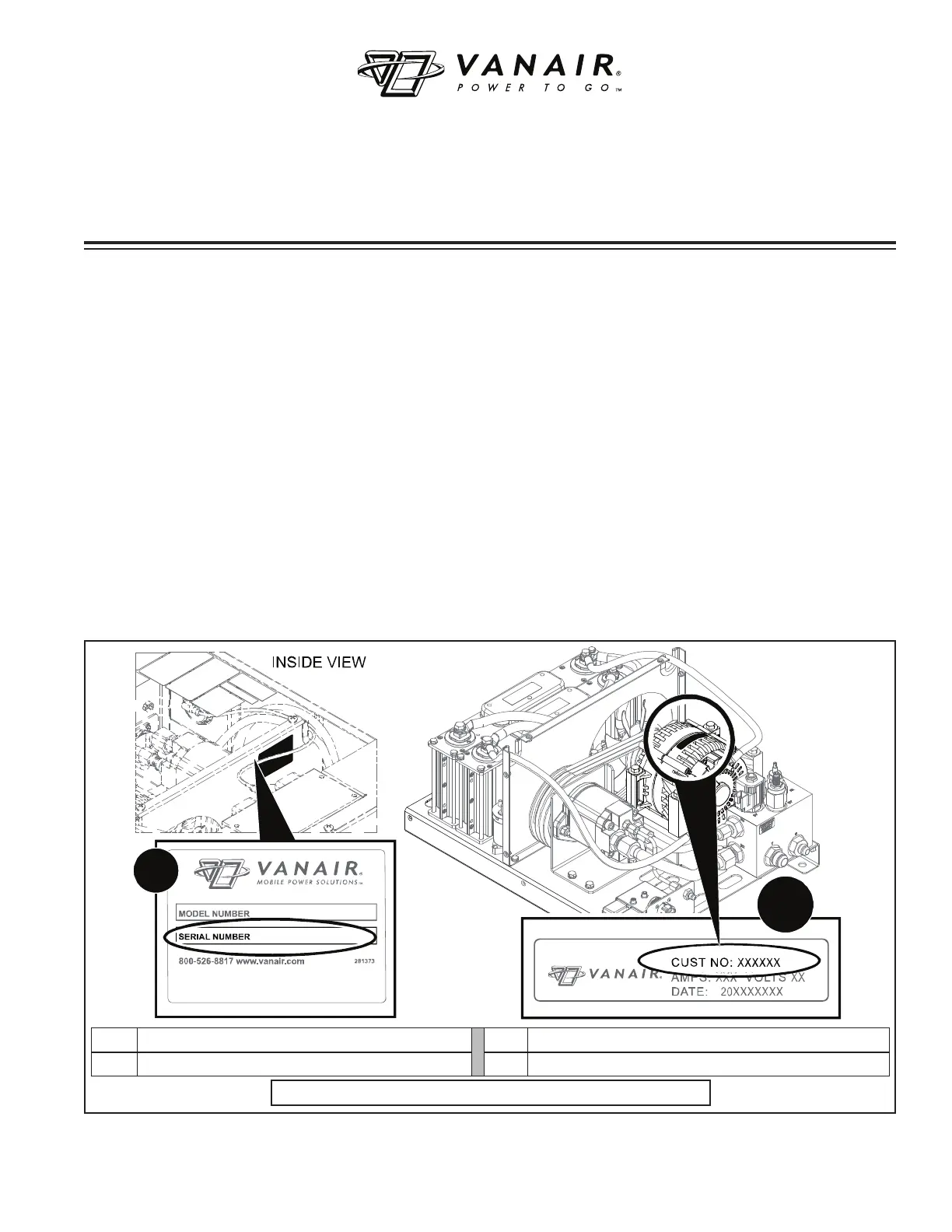
1. Locate the machine’s serial number:
The machine package serial number plate is
located inside the machine compartment on
the wall of the enclosure near the
hydraulic
motor unit (see Figure W-1).
The machine and the alternator also have
individual serial numbers respectively (see
Figure W-1).
Have a list of the symptoms/
condition/malfunctions along with any ap-
plicable temperature and pressure read-
ings, and also the number of operational
hours available:
Note that the above information will also
need to be included on the Return Material
Authorization Form (per Step #6); this form
is necessary for warranty processing if the
warranty claim is deemed valid by the service
case review.
2. Contact the Vanair Service Department by
phone (1-219-879-5100) to speak with a
Service Technician.
3. Vanair Service will troubleshoot the prob-
A
B
KEY DESCRIPTION KEY DESCRIPTION
A MACHINE SERIAL PLATE / SERIAL NUMBER B
ALTERNATOR SERIAL PLATE / SERIAL NUMBER
Figure W-1: Machine Serial Plate / Serial Number Location


 To Next Page