108
User Manual
TECHNICAL SPECIFICATIONS
♦ Power consumption : 0.25 A max, @ 12 V
♦ Interface : NMEA0183
♦ Autopilot Interface : NMEA-0180, NMEA-0180/CDX, NMEA-
0183
♦ Video Output : VGA compatible
♦ Display Resolution : 640x480 or 800x600 or 1024x768
pixels user selectable
♦ Cartography : C-MAP BY JEPPESEN C-CARD
♦ Operating temperature range : 32/131 °F (0/+55 °C)
♦ Memory : Non volatile with battery backup
♦ Keyboard : Silicon rubber, backlight
♦ Weight : 950 gr.
When the package containing the controller is opened for the first time after
purchase, please make sure that the following contents are present (if any item is
missing, please contact your local dealer):
♦ External bracket
♦ Power supply and I/O (CBC0FS0804) I/O, cable CBC0FS0603
♦ AUX IN I/O cable 1,5 mt/5.9 feet
♦ Video Output cable
♦ Fuse 1A (2 pcs) + cable fuse holder (2 pcs)
♦ User Manual
INSERTING/REMOVING PROCEDURE
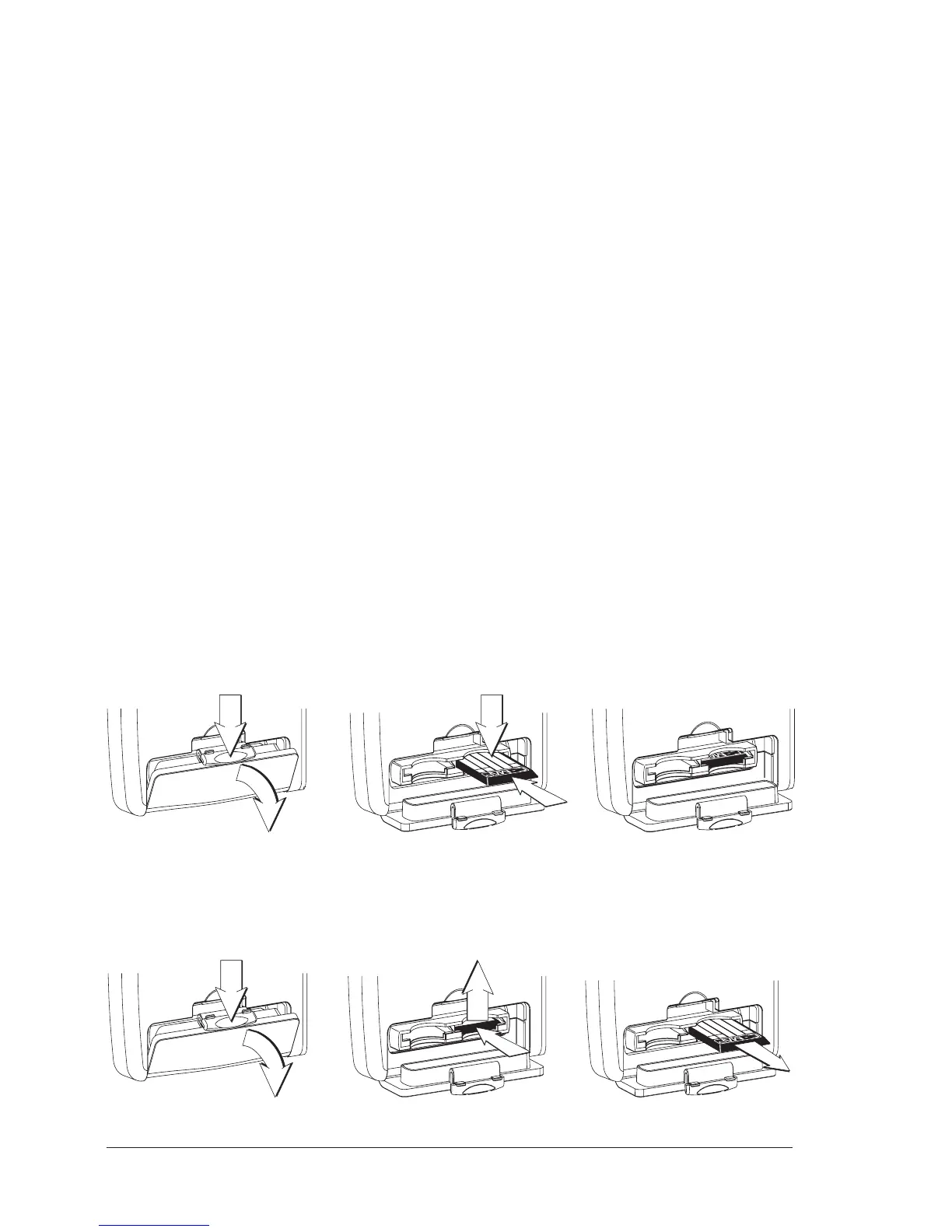
Inserting the C-CARD
Hold the C-CARD by the short inclined side so that you can see the C-MAP BY
JEPPESEN label. Open the C-CARD slot's door pressing (1) to the bottom (2). Gently
push the C-CARD into one of the two slots; push the C-CARD in as far as it will go
(3), then move it to the bottom (4) to hold fixed into the slot.
date
code
ser.n.
class
Removing the C-CARD
Open the C-CARD slot's door pressing (1) to the bottom (2). Press lightly (3) the
C-CARD you wish to remove and move it to the top (4) until you hear a click: the
C-CARD will eject out of the slot (5).


 To Next Page