21
User Manual
2.7 CONTROLLING THE DISPLAY
This paragraph describes how to change the Display Mode and how to move
around the chart by changing the chart scale.
Changing Display Mode
[MODE] more times
The selected page appears on the screen. The available pages are listed in the
following pictures.
NOTE If the Fish Finder or Radar is connected, other displaying pages are available
too. See the Fish Finder or Radar User Manual for more information (O
NLY FOR
MAP 7CWI PLUS see the Capther 7 for Fish Finder information).
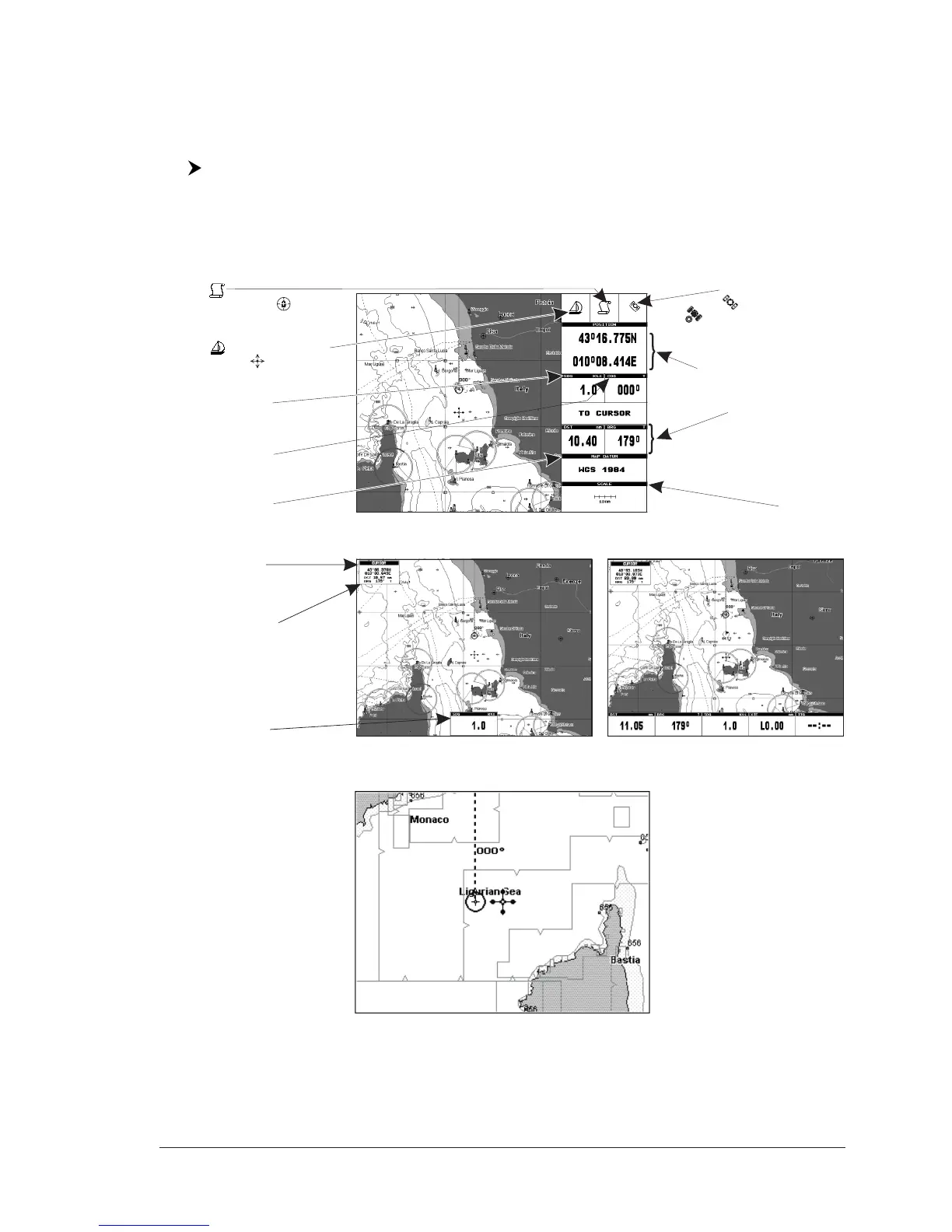
Cursor or Ship Coordinates
Distance and Bearing
from Ship to Cursor
(from Ship to Target
if Target is set,
from Ship to MOB if MOB is set)
Chart Scale
Speed Over Ground
Course Over Ground
Map Datum selected
Charting
or Navigation (Home)
Ship icon (if in Charting the
displayed icon is )
Fix received Indication
- if fix is not received
- if a Differential GPS signal
is received
Fig. 2.7 - Example of charts and Text Area on right side
Cursor Coordinates
Speed Over Ground
Distance and Bearing
from Ship To Cursor
(from Ship to Target if Target
is set, from Ship to MOB if
MOB is set)
Fig. 2.7a - Example of charts and bottom Text Area pages
Fig. 2.7b - Example of Full Charts


 To Next Page