15
User Manual
1. Overview
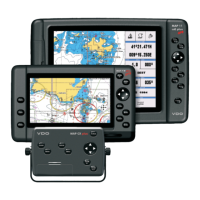
1.1 CHART PLOTTER
KEY DESCRIPTION ctc 7w/wi 11csE
Cursor Key in the display screen moves the cursor quickly and accurately x x x
in the menu page(s) scrolls the desired option x x x
in Home mode, allows to exit from Home mode x x x
in Video mode, UP/DOWN adjust the Brightness x x
in Video mode, LEFT/RIGHT adjust the Color x x
POWER turns On/Off the chart plotter x x x
activates the backlight and contrast menu x x
in Video mode, activates the Adjustment Mode x x
LIGHT adjusts the backlight of the display x
in Video mode, activates the Adjustment Mode x
CONTRAST adjusts the contrast of the display x
in Video mode, activates the Adjustment Mode x
MODE selects the screen configuration you wish x x x
in Video mode, changes the Contrast x x
CLEAR if you are into a menu, exits from menu or leaves a menu x x x
without making changes
if you are not into a menu, sets the Home mode: the cursor x x x
is centered on ship's position
for 1 second activates the Video Input 2 x
ENTER if you are in chart page, opens a menu to place Marks, x x x
Waypoints, Goto, EBL & VRM
if you are in chart page, opens a menu to place MOB x x x
if you are into a menu, confirms selection x x x
for 1 second activates the Video Input 1 x x
MENU opens the Map menu x x x
if pressed twice selects the Functions menu x x x
ZOOM IN increases the chart scale and zooms in on your display x x x
in Video mode, adjusts the Hue Phase x x
ZOOM OUT decreases the scale and shows a wider view x x x
in Video mode, adjusts the Hue Phase x x
1.2 C-MAP BY JEPPESEN MAX CARTOGRAPHY
INFORMATION
MAX is a major evolution of the product technology. Key points are:
Data Features
♦ ISO Certification (electronic chart production process with quality
certification)
♦ Extra Large Coverage (all the C-MAP By Jeppesen electronic chart
detail and a huge coverage without having to change cartridge)


 To Next Page