90
User Manual
TECHNICAL SPECIFICATIONS
♦ Operating Voltage : 10 - 35 Volt dc
♦ Power consumption : 11 W max
♦ Interface : NMEA-0183
♦ Autopilot Interface : NMEA-0180, NMEA-0180/CDX, NMEA-0183
♦ Display : Color Sunlight Viewable LCD (active area 7")
♦ Display Resolution : 800 x 480 pixels
♦ Cartography : C-MAP BY JEPPESEN C-CARD
♦ Operating temperature range: 0/+55°C (32/+131°F)
♦ Memory : Non volatile
♦ Keyboard : Silicon rubber, backlight
♦ Weight : 1,1 kg
When the package containing the chart plotter is first opened, please check it for
the following contents (if any parts are missing contact the dealer the chart plot-
ter was purchased from):
♦ "Quick disconnect" bracket and its protective cover
♦ Chart plotter's protective cover
♦ Fuse 2 Amp. + fuseholder
♦ MAP 7w Plus GPS Flush mounting kit
♦ MAP 7w Plus GPS Smart DGPS WAAS Receiver with cable 15 mt/45 feet
♦ User Manual
INSERTING/REMOVING PROCEDURE
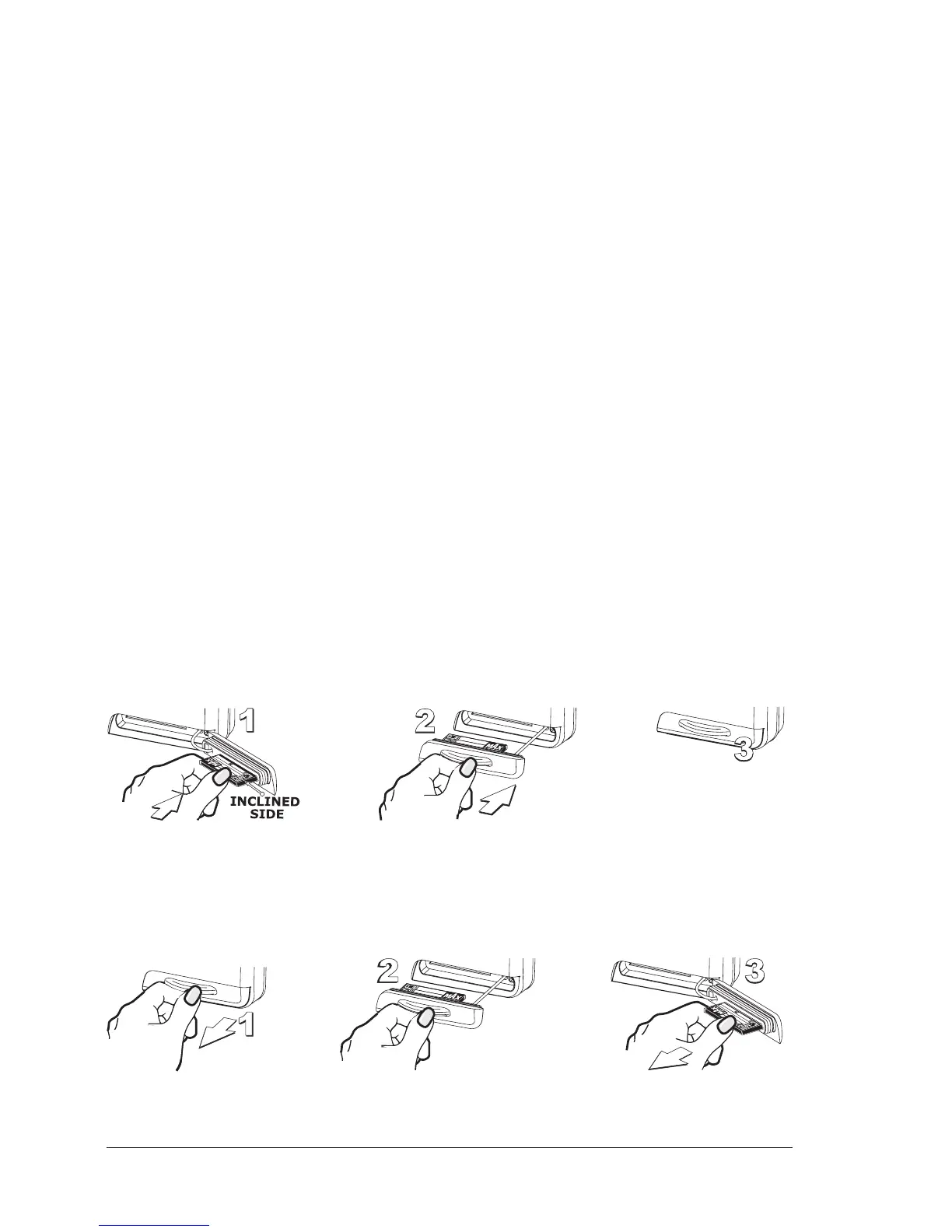
Inserting the C-CARD
Open the door, hold the C-CARD by the long side so that you can see the label and
gently push the C-CARD into the door slot (1). Close the door pushing the C-CARD
in as far as it will go to hold fixed into the chart plotter slot (2). When finished the
door must be right closed (3).
Removing the C-CARD
To remove the C-CARD inserted in the chart plotter open the door (1). The C-CARD
will eject out of the chart plotter slot remaining fixed into the door (2). Then
remove the C-CARD from the slot (3).


 To Next Page