50
6 Set up with the display and adjustment module
VEGAPULS 64 • Two-wire 4 … 20 mA/HART
51141-EN-210219
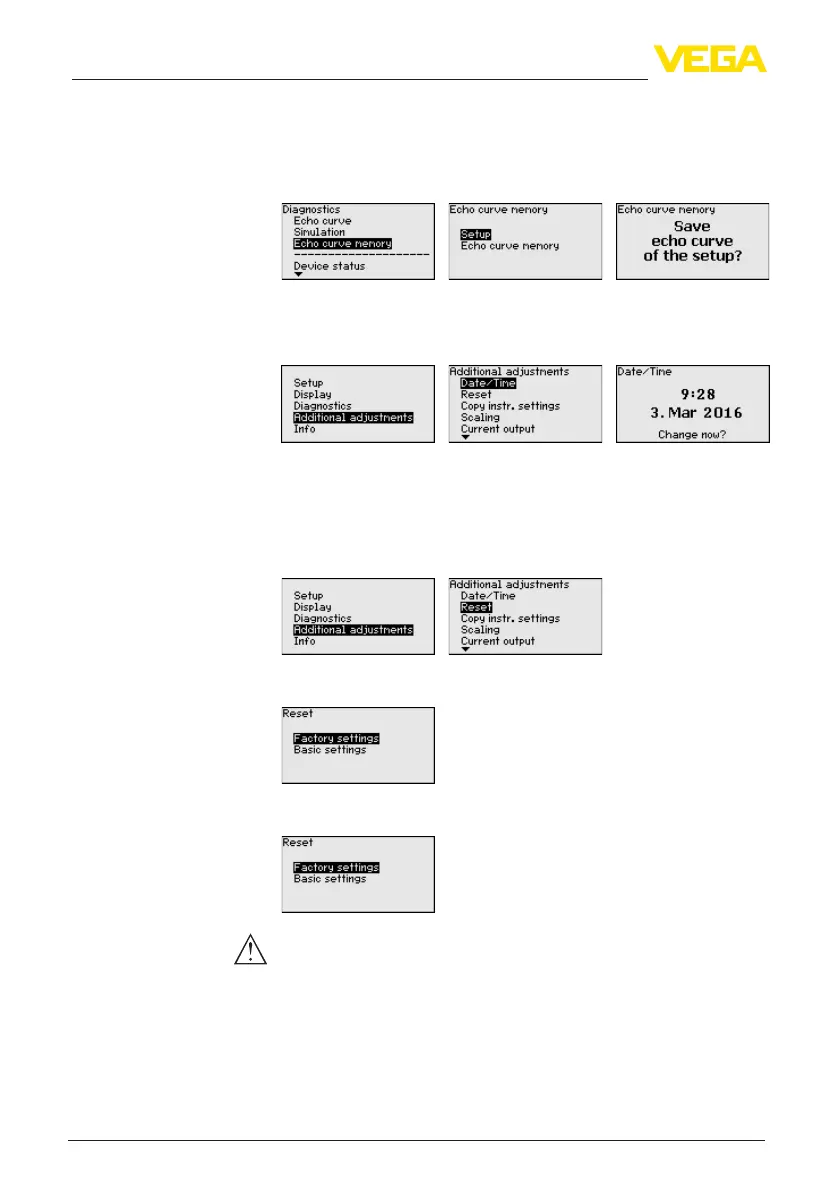
With the adjustment software PACTware and the PC, the stored echo
curvescanbedisplayedwithhighresolutionandusedtorecognize
signal changes over time. In addition, the echo curve saved during
setup can also be displayed in the echo curve window and compared
with the current echo curve.
In this menu item, the internal clock of the sensor is set to the request-
ed time and time format. At the time of shipment from factory, the
instrument is set to CET (Central European Time).
During a reset, the parameter settings carried out by the user are
reset to the default values (see below table).
Proceed as follows:
1. Select with [->] under " Additional adjustments" the menu item "
Reset"andconrmwith[OK].
2. Conrmwith[OK] and select the requested reset function with
[->]
3. Conrmwith[OK], for approx. 5 s the message " Resetting" is
displayed, then the selection window appears.
Caution:
For the duration of the reset, the set trouble signal is output via the
current output. Within the context of the asset management function,
the message " Maintenance" is output.
The following reset functions are available:
Delivery status: Restores the parameter settings at the time of ship-
mentfromthefactory,incl.theorder-specicsettings.Anycreated
falsesignalsuppression,user-programmablelinearizationcurveas
Additional settings - Date/
Time
Additional settings -
Reset



 To Next Page