49
6 Set up with the display and adjustment module
VEGAPULS 64 • Two-wire 4 … 20 mA/HART
51141-EN-210219
Theselectedcurveiscontinuouslyupdated.Asubmenuwithzoom
functions is opened with the [OK] key:
•
"X-Zoom":Zoomfunctionforthemeas.distance
•
"Y-Zoom":1,2,5and10xsignalmagnicationin"dB"
•
"Unzoom":Resetthepresentationtothenominalmeasuringrange
withoutmagnication
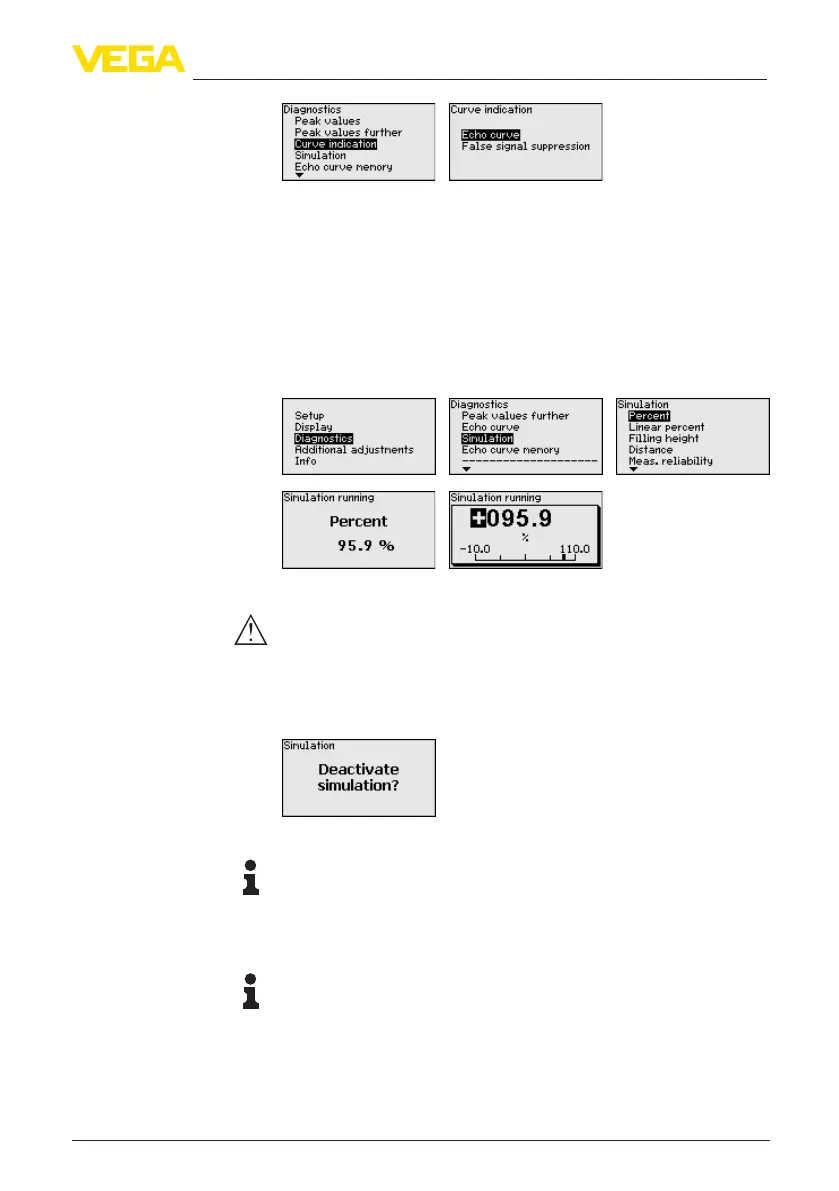
In this menu item you can simulate measured values via the current
output. This allows the signal path to be tested, e.g. through down-
stream indicating instruments or the input card of the control system.
Select the requested simulation variable and set the requested value.
Caution:
During simulation, the simulated value is output as 4 … 20 mA cur-
rent value and as digital HART signal. The status message within the
context of the asset management function is " Maintenance".
To deactivate the simulation, you have to push the [ESC] key and
conrmthemessage
with the [OK] key.
Information:
The sensor terminates the simulation automatically after 60 minutes.
The function " Setup" allows the echo curve to be saved at the time of
setup.
Information:
This is generally recommended, however, for use of the Asset
Management functions it is absolutely necessary. Saving should be
carried out with a very low level.
The function " Echo curve memory" allows up to ten individual echo
curves to be stored, for example to detect the measurement behav-
iourofthesensorindierentoperatingconditions.
Diagnosis - Simulation
Diagnostics - Echo curve
memory



 To Next Page