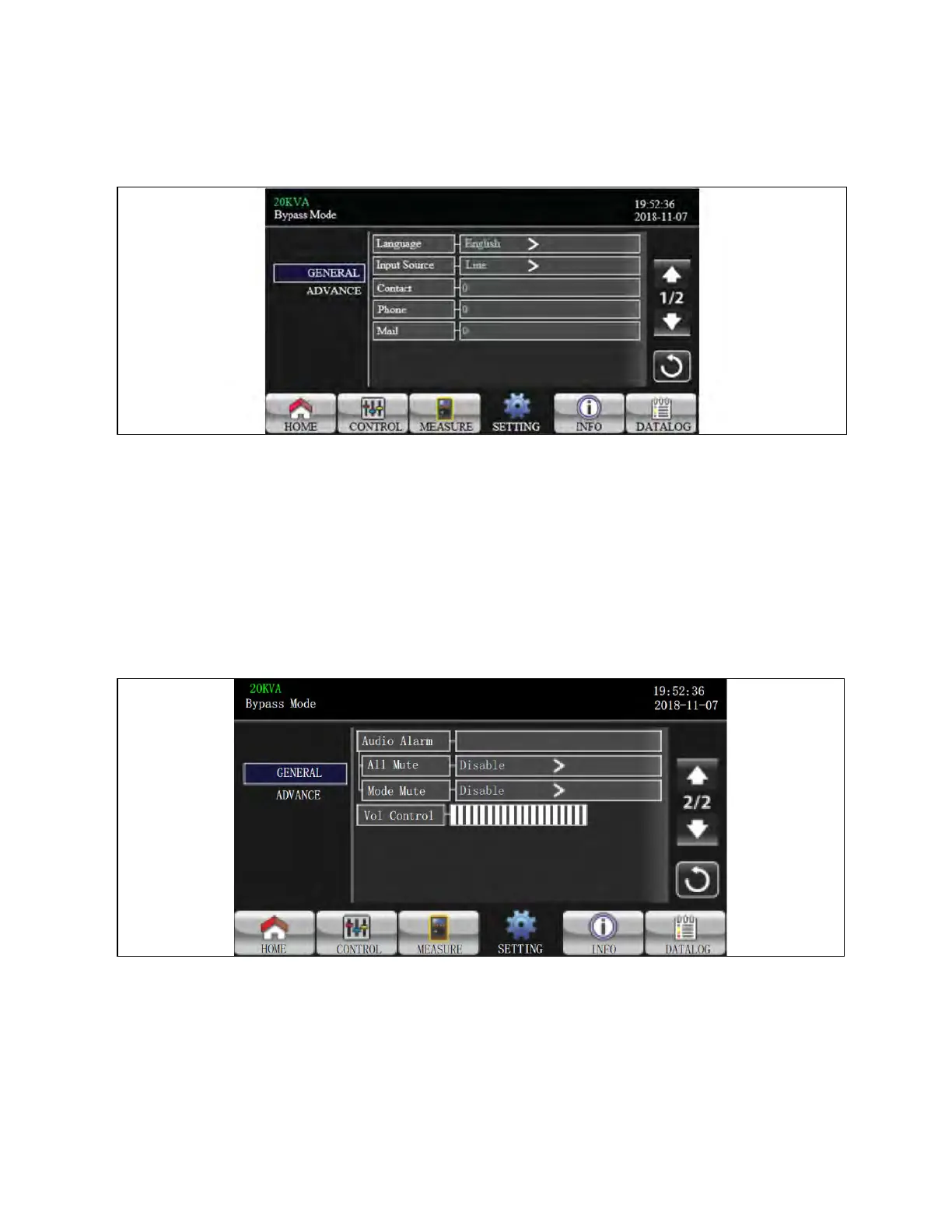
General Setting
Figure 3.26 Setting Screen Page 1
1. Language: Set the LCD language. There are three options: English, Simplified Chinese, and Traditional Chinese.
English is default setting.
2. Input Source: Select the input source. There are two options: Line (utility) and generator. Line is default setting.
This setting value will show on the main page. When “generator” is selected, the acceptable input frequency will
be fixed at the range of 40~75Hz. This setting value will show on the status bar.
3. Contact: Set the name of contact person and the maximum length is 18 characters.
4. Phone: Set the service phone number. Only 0~9, + and – are accepted. The maximum length is 14 characters.
5. Mail: Set the service email and the maximum length is 18 characters.
Figure 3.27 General Screen Page 2
1. Audio Alarm: There are two events available to mute. You may choose “Enable” or “Disable” alarm when related
events occur.
a. Enable: When selected, alarm will be mute when related events occur.
b. Disable: When selected, UPS will alarm when related events occur.
44 Proprietary and Confidential ©2024 Vertiv Group Corp. 3 Operations
Vertiv™ Liebert® MTP Online UPS User Manual 20-40-80kVA






 To Next Page