USER MANUAL-S600E
47
S600E
4.4
Prompt Window
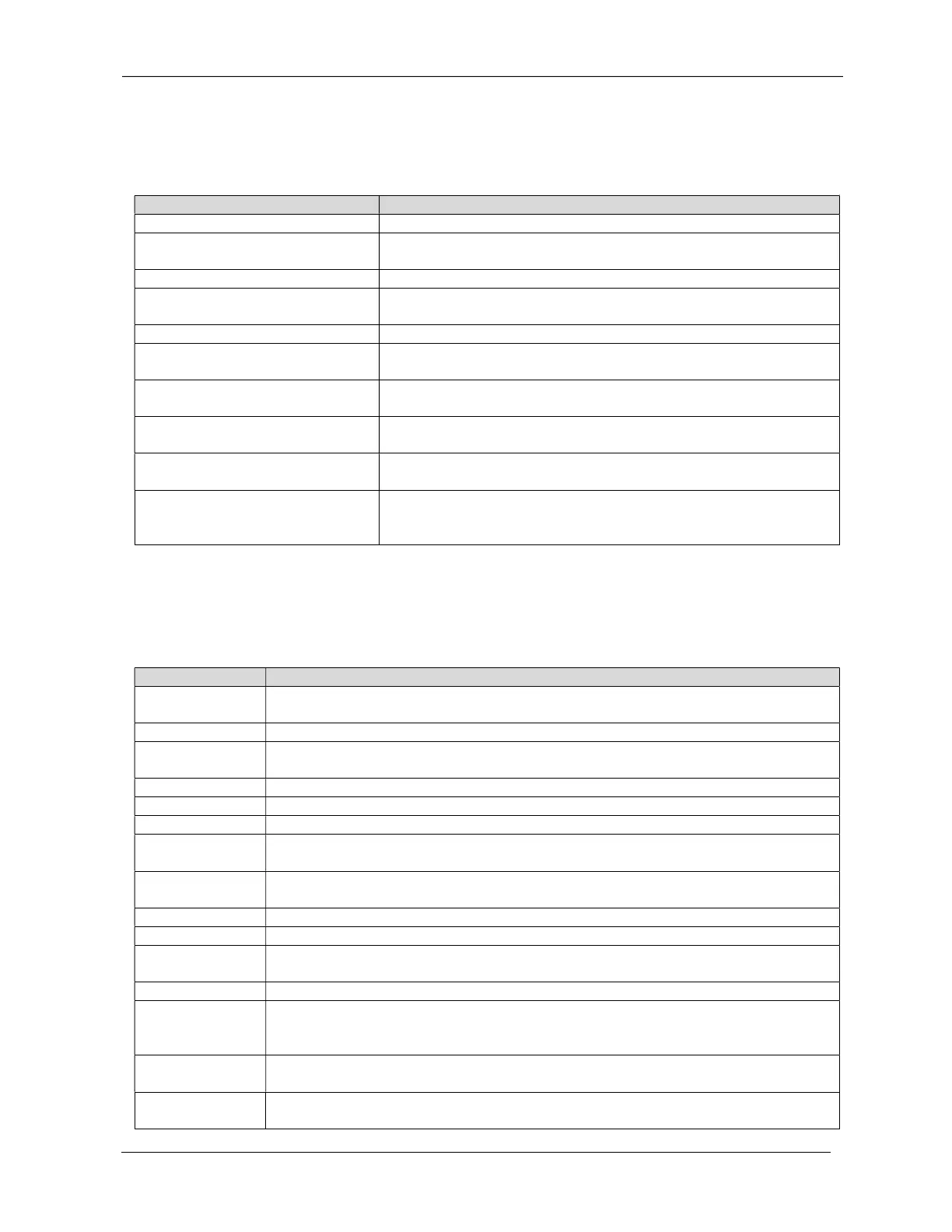
A prompt window is displayed while the system is in operation to alert you to certain conditions and/or request you
to confirm a command or other operation. Table 4-4 lists the prompts and the associated meanings.
Table 4-4 Prompts and meanings
System setting is different, please check
When the parallel parameters are
different, this prompt will appear
output
If the user attempts to change certain important settings while the output is active
(output voltage, output frequency, output phase No.), this prompt will appear
Incorrect password, please input again
This prompt will appear when t
he user enters an incorrect Settings password
Operation failed, condition is not met
This prompt will appear when the user attempts to execute a certain operation, but the
necessary condition is not met
Fail to change password, please try again
This prompt will appear when the user attempts to change the
has failed to the same new password twice
The time cannot be earlier than system time
to a time earlier than the current system time
Turn on failed, condition is not met
on/Turn off/to Bypass' command on the 'Control' page).
Cannot set this on line, please unplug REPO
This prompt will appear if the user
attempts to change output phase No. while the
output is active
Please disconnect power, check output: 1 phase,
3 phase, then power UPS on
This prompt will appear when the output phase is changed. To ensure safety, the
system requests the user to
switch the UPS off and check the cable connections, and then
switch the UPS on again
4.5
UPS Alarm Message List
Table 4-5 lists all the UPS alarm messages based on the 'Current' and 'History' menus.
Table 4-5 UPS alarm message list
Communication fail
or not
The rectifier is faulty and is not running
DC/DC fault
The discharger is faulty,
because the bus voltage exceeds the setting range when discharger starts or soft
starts
The inverter is off when DC bus
voltage is faulty. The load will transfer to bypass, if the bypass is available
charger output voltage is abnormal, and the charger is off
The auxiliary power output voltage exceeds the normal range
Input backfeed
Battery mode. The mains relay is shorted and the difference between the mains and battery voltage is le
than the setting range
Inverter fault
The inverter is off when the inverter output voltage and current exceed the setting range. If the bypass is
available, the UPS will transfer to bypass mode, otherwise the system will switch off
Check for short circuits between the output cables
Battery mode. The bypass relay is shorted or the SCR is damaged
not zero
The Output is switched off, but the system detects the presence of a voltage at the output terminals
The inverter relay is short circuited
Parallel No. abnormal
number on the 'Settings' page is the same as the actual on-line number, and that the parallel cables are
normal
Parallel comm fault
line frequency configuration is different
or there is a conflict with the parallel
address. Please check that the parallel system parameter setting is the same as the local parameter setting
connection abnormal
The system has detected that the parallel cables are not secure











 To Next Page