USER MANUAL-S600E
36
S600E
Chapter 4 Operator Control and Display Panel
This chapter introduces the functions and use of the components on the UPS operator and display panel, and
provides LCD display information, including the LCD screen types, detailed menu messages, prompt windows
message and UPS alarm list.
4.1
Introduction
The operator and display panel is located on the front panel of the UPS. The operator and display panel allows the user
operate and monitor the UPS, and view the UPS parameters, Ups and battery status information and any alarm
messages.
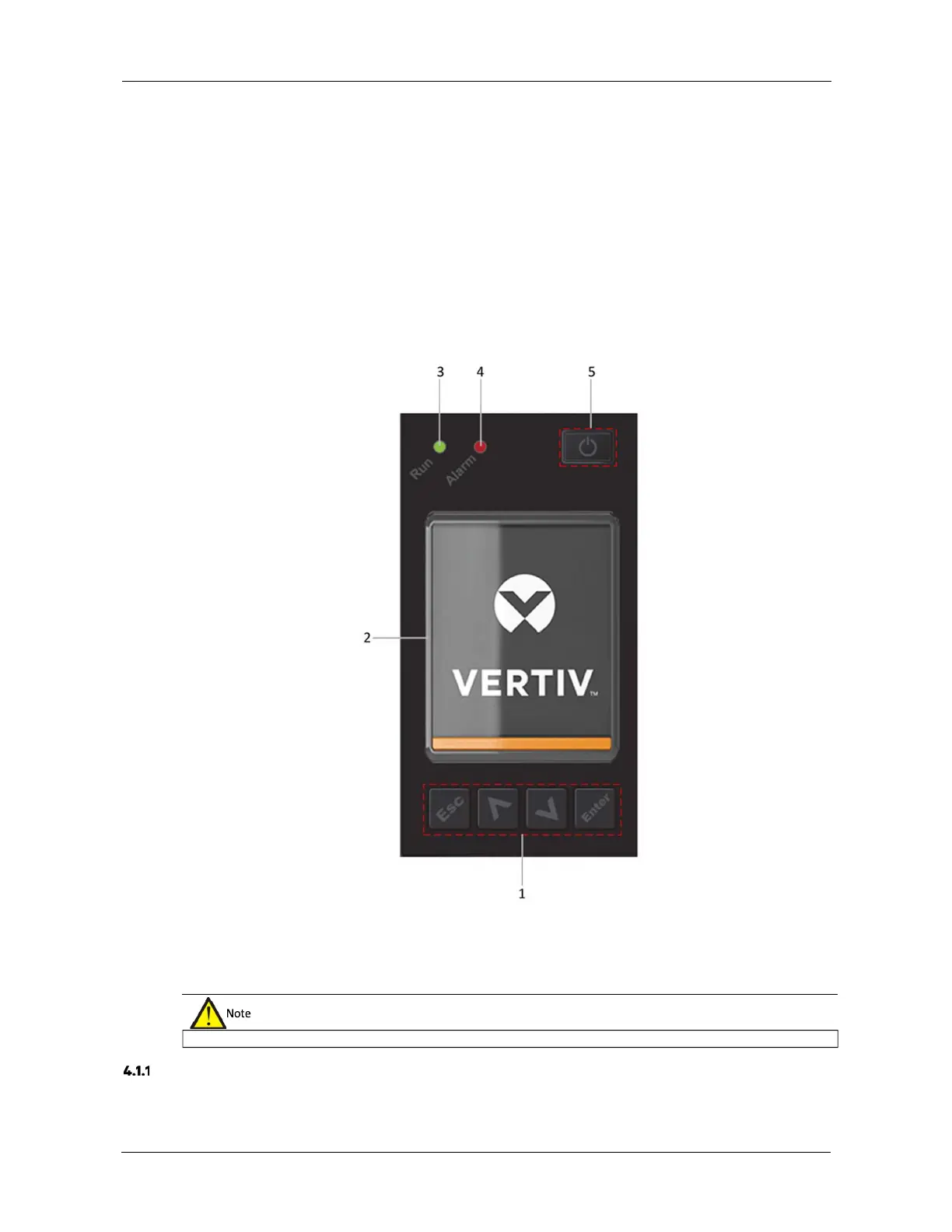
As shown in Figure 4-1, the operator and display panel includes an LCD screen, menu keys, and LED indicators (run
indicator and alarm indicator).
1.
Menu keys 2. LCD 3. Run indicator
4. Alarm indicator 5. Power button Figure 4-1 Operation
and display panel
LED Indicators
T
he LED indicators consist of the run indicator and alarm indicator. Table 4-1 provides a description of these
indicators.
The device includes a gravity sensor function, so that the LCD display direction will adapt to the device layout mode.











 To Next Page