Configuration Safe—Saves or loads configuration settings for the display that have been modified from
the factory defaults to an internal file that can be downloaded/uploaded using the Liebert iCOM Service
Tool. Selecting Save will write the settings to the internal storage file and selecting Load will write the
settings from the internal storage file to the application software. The internal file is updated
automatically every 12 hours.
Network Safe—Saves or loads network settings for the display that have been modified from the factory
defaults to an internal file that can be downloaded/uploaded using the Liebert iCOM Service Tool.
Selecting Save will write the settings to the internal storage file and selecting Load will write the settings
from the internal storage file to the application software.
SW Version—Contains the application software version loaded onto the Liebert iCOM display.
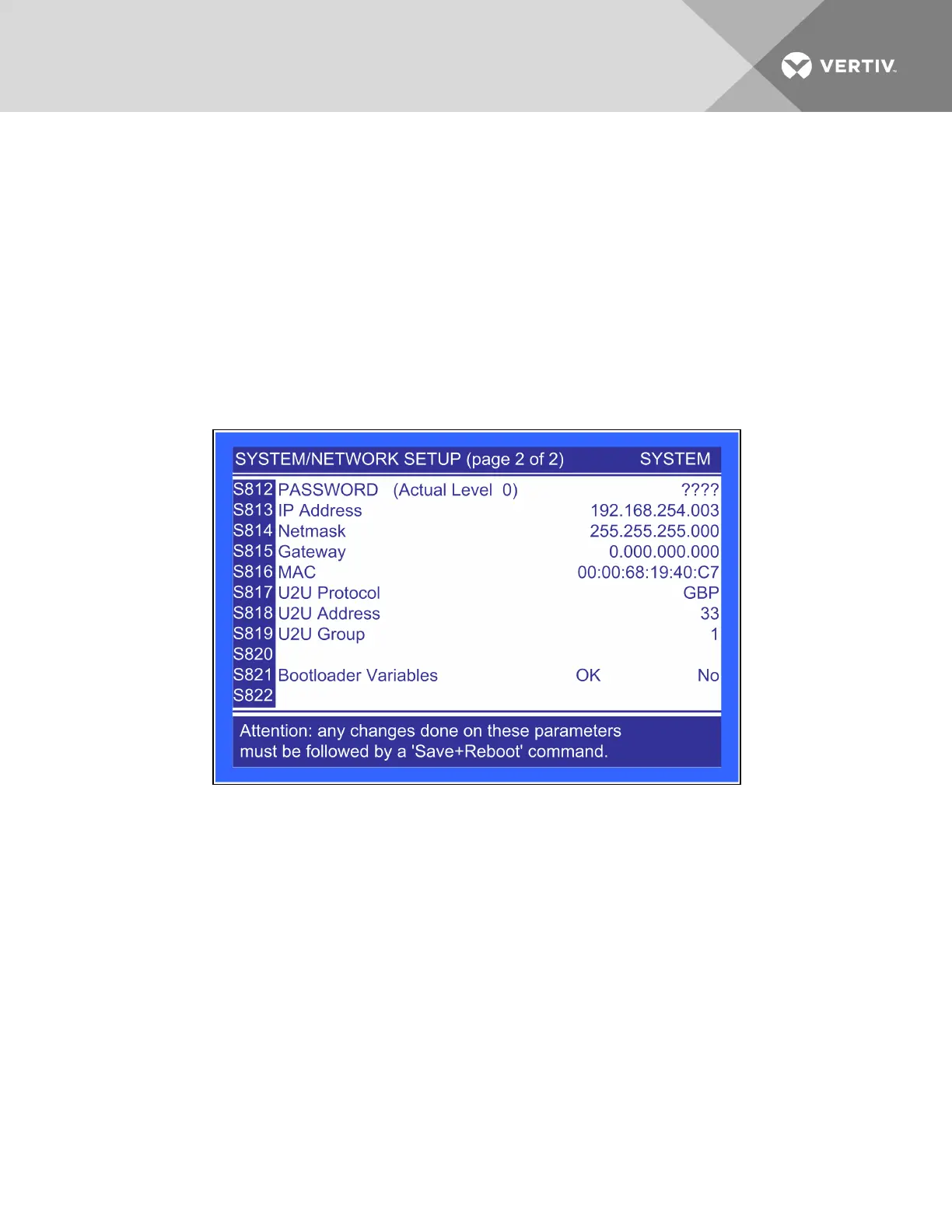
Figure 6.43 Network setup display—System/Network setup, page 2 of 2
IP Address—Contains the network address of the display. This address must be unique on the network.
The factory default is 192.168.254.003.
Netmask—Defines which part of the IP address is used for the network. The factory default is
255.255.255.000.
Gateway—A network point that acts as an entrance to another network. The factory default is
0.000.000.000.
MAC—A unique hardware identifier for the Ethernet device.
The following parameters (U2U Protocol, U2U Address and U2U Group) are for displaying other networked
Liebert XDCs. The Liebert XDC does not perform Team Work Operations.
U2U Protocol—This is always set to GBP.
Vertiv | Liebert® XDC™ User Manual | 104




 To Next Page