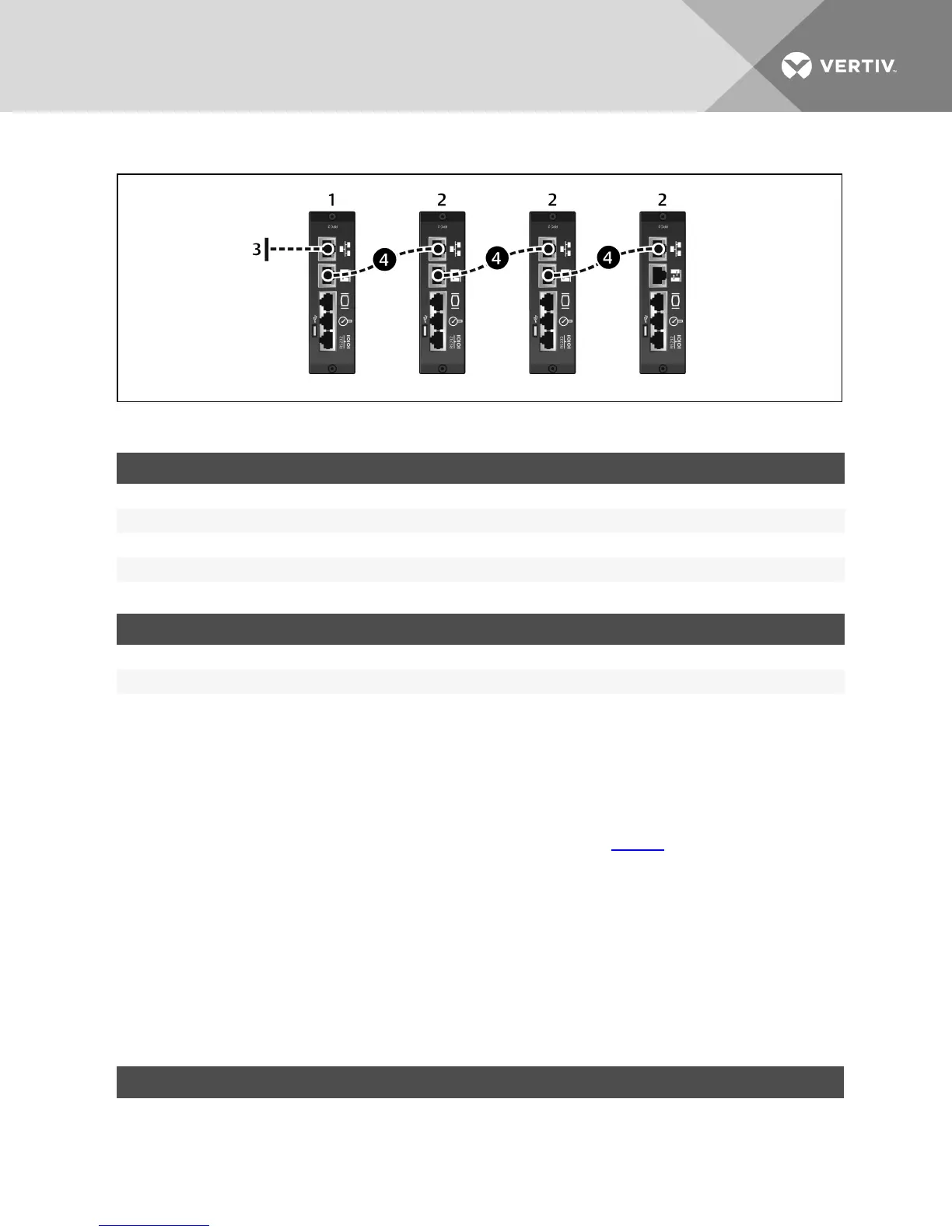
Figure 2.4 Rack PDU Array Example
ITEM DESCRIPTION
1 RPC2 communications module in master rack PDU.
2 RPC2 communications modules in sibling rack PDUs.
3 Network connection.
4 Ethernet cable between Link port and Network port, connecting rack PDUs.
Table 2.4 Rack PDU Array Example Descriptions
IPADDRESS RACK PDU1 RACK PDU2 RACK PDU3 RACK PDU4
Link Port 192.168.1.10 192.168.1.6 192.168.1.2 192.168.1.14
Network Port User Determined 192.168.1.9 192.168.1.5 192.168.1.1
Subnet Mask 255.255.255.252 255.255.255.252 255.255.255.252 255.255.255.252
Table 2.5 IP Addresses In A Rack PDU Array
2.5 Configuring an RPC2 Communications Module for Static IP
The RPC2 communications module is factory set for DHCP, making it ready for service immediately. The module can be
configured for operation on a network using a static IP address.
To configure a module for a network that uses static IP:
1. Connect an Ethernet cable (not included) to the module’s link port (see Figure 1.1).
NOTE: The card’s Link port should be used only for local configuration through interconnection to a laptop. Do not
connect the cable from the Link port to your company LAN.
2. Connect the other end of the Ethernet cable to a laptop.
3. Configure the laptop’s IP settings to communicate on a 192.168.1.X network with the following settings:
• IP address: 192.168.1.9
• Subnet mask: 255.255.255.252
• Default gateway: 192.168.1.1
4. Open a web browser and enter the proper IP address. See the following table for a list of static IPaddresses.
DEVICE RACK PDU1 RACK PDU2 RACK PDU3 RACK PDU4
Laptop Computer 192.168.1.9 192.168.1.5 192.168.1.1 192.168.1.13
Table 2.6 Static IP Settings for the RPC2 Communications Module Through the Link Port
Vertiv | RPC2™ Communications Module Installer/User Guide | 6



 To Next Page